In contrast, the UFS model is rigid. Each disk (or disk partition) contains a single file system. The directory hierarchy layer of UFS is bound tightly to the physical storage layer. When a file system becomes full, this tight binding makes it impossible to move selected files onto another disk without changing the full pathnames of those files. The task of dividing a logical directory into directory subtrees and mapping the subtrees onto separate disks requires careful consideration. Even with extensive planning, adjustments to the directory structure are limited with the UFS model.
From a user's perspective, AdvFS looks like any other UNIX file system.
End users can use the
mkdir
command to create new directories,
the
cd
command to change directories, and the
ls
command to list directory contents.
AdvFS logical structures,
quota controls, and backup capabilities are based on traditional file system
design.
AdvFS replaces or eliminates several standard commands, such as
newfs,
dump,
restore
and
fsck.
AdvFS commands and utilities, and a comparison of AdvFS and
UFS commands are detailed in
Appendix B.
Without taking an AdvFS system off line, system administrators can backup,
reconfigure, and tune file systems.
End users can retrieve their own unintentionally
deleted files from predefined trashcan directories or from AdvFS fileset clones
without assistance from system administrators.
1.2 License Registration
AdvFS is the file system default on the operating system.
AdvFS Utilities
is a separately licensed product that provides additional processing capabilities.
Before you can use the file system utilities, you must register a license
The AdvFS file system consists of two distinct layers: the directory
hierarchy layer and the physical storage layer.
The directory hierarchy layer
implements the file-naming scheme and POSIX-compliant functions such as creating
and opening files, or reading and writing files.
The physical storage layer
implements write-ahead logging, caching, file allocation, and physical disk
I/O functions.
This decoupled file system structure enables you to manage the physical
storage layer apart from the directory hierarchy layer.
You can move files
between a defined group of disk volumes without changing pathnames for your
files.
Because the pathnames remain the same, the action on the physical level
is completely transparent to end users.
AdvFS is the file system for the cluster configuration.
Cluster operation
is likewise transparent.
AdvFS running on a cluster, with very few exceptions,
looks no different from AdvFS running on a single node.
AdvFS implements two unique file system concepts:
For the types of storage that AdvFS can use, see
Section 1.5.
A fileset follows the logical structure of a traditional UNIX file system.
It is a hierarchy of directory names and file names, and it is what you mount
on your system.
AdvFS goes beyond the traditional file system by allowing
you to create multiple filesets that share a common pool of storage called
a domain.
See
Section 1.4.1
for information about configuring
an AdvFS file system and
Section 2.4
for information about fileset
operation.
A domain represents the physical storage layer.
It is managed separately
from the directory structure.
You can add or remove volumes without affecting
the directory structure.
See
Section 2.3
for information about
domain management.
A
The AdvFS file system is a log-based file system that employs
When you create a domain, AdvFS creates a transaction log file for it.
During crash recovery, AdvFS reads the transaction log file to confirm file
system transactions.
All completed transactions are committed to disk and
uncompleted transactions are undone.
The number of uncommitted records in
the log, not the amount of data in the file system, dictates the speed of
recovery.
Recovery usually takes only a few seconds.
Traditional UNIX file
systems rely on the
By default, only file system structures are logged, but you can choose
to log file data and change the way your system writes to storage.
(See
Section 5.5.) A file that has data logging turned on remains internally
consistent in the event of a system crash.
However, enabling data logging
can slow system performance.
Files are not static; their space requirements change over time.
To
maintain contiguous file placement without overallocating space on the disk,
AdvFS uses a unique file storage allocation scheme.
Key features of file storage allocation are as follows:
Extents
An
File I/O is most efficient when there are few extents.
If a file consists
of many small extents, it takes more I/O processing to read or write than
a similar-sized file with a few large extents.
Given the dynamic nature of a file system, the file storage allocation
cannot always guarantee contiguous placement of pages to create large extents.
The following factors affect placement:
Disk fragmentation
When a disk is highly fragmented, there are many small free spaces.
AdvFS writes data to isolated physical pages because contiguous pages are
not available.
This results in files with many extents.
Multiple users
When there are many users on a system, requests for space increase,
decreasing the likelihood of contiguous file allocation.
If you have a domain with files containing many extents, you can decrease
the number by running the
Preallocation
Each time a file is appended, AdvFS adds pages to the file by preallocating
one-fourth of the file size, up to 16 pages.
Excess preallocated space is
truncated when the file is closed.
For multivolume domains, new files are allocated sequentially across
volumes.
Volumes that are more than 86% full (allocated) are not used for
new file allocation unless all volumes are more than 86% full.
When data is
appended to existing files, storage is allocated on the volume on which the
file was initially allocated until the volume is full.
Fragments
AdvFS writes files to disk in pages.
In files where holding the last
bytes of a page would represent a waste of more than 5% of the allocated space,
a
Sparse files
A
You can create a sparse file by setting a file's end-of-file using the
Core files are sparse files.
They have large areas with no information
and do not use disk blocks for locations where no data exists.
Quota files
are sparse because they are indexed by user ID.
If there are gaps in the user
IDs, there might be sections of the file with no data.
In contrast, database applications generally reserve storage for the
entire file even when data is not available.
The applications generally write
zeroes in the pages that have no useful data.
By writing the data sequentially,
the database application creates a database file with large sets of contiguous
pages and a small number of extents.
To examine the length of a sparse file, including the pages that do
not have disk storage, use the
When planning your configuration, consider setting up the root ( You can set up AdvFS to resemble a traditional UFS configuration with
one partition (volume) per domain and one fileset in each domain.
If you have
the optional AdvFS Utilities, when you need space, you can add volumes (except
to the local root file system, which is restricted to one volume) to increase
the size of the domain without changing anything in the existing configuration.
You can create one domain that contains numerous filesets or you can
create a domain for each fileset; you can also structure your system anywhere
between these two extremes.
If you have AdvFS Utilities, you can distribute
your domains on more than one volume.
If you have enough drives, use an entire disk for a domain.
Add one
partition (typically, partition
Do not place partitions in different domains, for example, partition
Assuming the disks are the same type and speed, it is generally more
efficient to spread your domain over several disks.
For example, a domain
with three volumes on separate disks is more efficient than one with three
partitions on a single disk because the latter has only one I/O path.
Establishing multiple domains allows greater control over your physical
resources.
You can create domains for use by specific projects, groups of
users, departments, or any division that makes sense for your organization.
For example, you can create domains for each of your organization's departments,
such as engineering, finance, and personnel.
A data management applications programming interface (DMAPI)-enabled
domain (Appendix D) can have only one fileset.
Table 1-1
illustrates the advantages and disadvantages
of choosing different configurations.
You can examine your file system in the following ways:
Use the
Use the
Chapter 5
details ways to optimize a file system.
The
System Configuration and Tuning
guide provides detailed guidelines for planning
and configuring your file system.
See
Appendix E
if you want to
configure your domains using a graphical user interface.
A volume is the entity that is a block special device (such as a single
disk partition, an entire disk, an aggregate volume provided by LSM, hardware
RAID, or a SAN).
Each volume can be assigned to only one domain.
It is associated
with its domain by a
Each volume in an AdvFS domain contains a
The following table describes the tradeoffs for how you configure domains
on AdvFS volumes.
When you create a domain, AdvFS recognizes storage through the block
special device name that is associated with the domain.
Storage can include
directly connected disks, software RAID volumes, hardware RAID, and storage
area networks.
By using LSM, hardware RAID and SAN volumes, you can take advantage
of their features that allow for advanced backup strategies and dynamic volume
expansion.
For more information on LSM see the
Logical Storage Manager
manual.
For
information on hardware RAID and SAN products see
http://www.tru64unix.compaq.com/storage/index.html.
1.3 File System Design
Figure 1-1: AdvFS File System Design
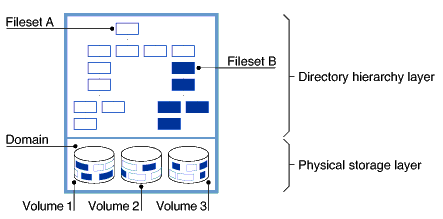
1.3.1 Filesets, Domains, and Volumes
1.3.2 Transaction Log File
fsck
utility to recover from a system
failure.
The
fsck
utility can take hours to check and repair
a large file system.
1.3.3 File Storage Allocation
vfast
utility to optimize file
placement.
(See
Section 5.8.)
ftruncate(2)lseek(2)write(1)ls
command with the
-l
option.
The
ls
command with the
-s
option displays the amount of storage actually used by the file.
Section 6.4.1
details a number of ways to look at disk usage.
1.4 Setting Up an AdvFS File System
/),
/usr
and
/var
file systems
on AdvFS.
By using AdvFS for root and
/usr, you increase
configuration flexibility and significantly reduce system down time in the
event of a system failure.
1.4.1 Configuring Domains and Filesets
c) to a domain rather than
several partitions on one disk (such as
a,
b,
g,
h).
a
in one domain and partition
b
in another domain.
Table 1-1: Domain and Fileset Configuration Tradeoffs
Configuration
Advantage
Disadvantage
Entire disk used for a domain, not small partitions on
several physical devices
Efficiency; device's I/O stream is not shared
Waste of space if small domains are on large volumes
Domain configured on multiple volumes (requires Advanced
Utilities) rather than on a single volume
Distributes I/O load; increases throughput
Failure of a single volume makes the domain inaccessible
Many smaller domains instead of one large domain (assuming
the number of volumes stays the same)
Faster recovery; improved throughput; might decrease some
administrative tasks
Might increase administrative overhead
Many filesets in a domain instead of one large one
Can set quota limits on each fileset for finer-grained
control of resources
Administrative overhead; all filesets must be mounted to
run some utilities
Transaction log on fast or uncongested volume
Prevents log from becoming I/O bottleneck
Cost of hardware
Root fileset configured as AdvFS
Fast recovery after system crash
None
showfsets
command to display the
number of filesets in a domain and the size of the filesets.
showfile
command to determine which
volume a file resides on.
Make sure that busy files are not located on the
same volume.
1.4.2 Organizing Volumes
Table 1-2: AdvFS Volume Configuration Tradeoffs
Configuration
Advantage
Disadvantage
Volume is a disk partition
Uses small portion of disk
Limited size; I/O contention with other partitions
Volume is a single disk
More efficient than using single partitions
Limited size
Volume is a RAID volume (LSM or hardware) or SAN
Improve performance and reliability; increased capacity
Cost: requires LSM license or additional hardware
1.5 Choosing Storage for AdvFS