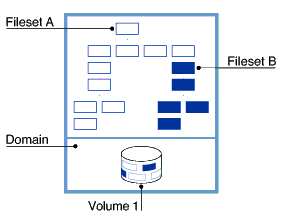
Once you have determined the configuration of your file system, you can create and structure it. This chapter discusses the following topics:
Setting up your AdvFS file system (Section 2.1)
Volumes (Section 2.2)
Domains (Section 2.3)
Filesets (Section 2.4)
Configuring an AdvFS root file system (Section 2.5)
Setting up your system to make deleted files retrievable (Section 2.6)
An active AdvFS file system requires one domain and one mounted fileset.
To create an active domain, do the following:
Create a domain and assign a volume to it (Section 2.3.3).
Create a fileset (Section 2.4.3).
Create a mount-point directory (Section 2.4.5).
Mount a fileset (Section 2.4.5).
You can create one fileset per domain or you can create many. See Section 1.4.1 for guidelines.
AdvFS is fully supported in the
/etc/fstab
file to
automatically mount a fileset at system boot.
(See
Section 2.4.1.)
Alternately, you can use a graphical interface (Appendix E) or the SysMan Menu
(Appendix A) to perform this activity.
See
Appendix B
for a complete list of AdvFS commands.
For more detailed information on AdvFS configuration, see the
System Configuration and Tuning
manual.
2.2 Volumes
An AdvFS volume can be a raw disk partition, an entire disk, an aggregate volume provided by Logical Storage Manager (LSM), a storage area network (SAN), or a hardware or software redundant array of independent disks (RAID) storage.
If you have the optional AdvFS Utilities, you can add volumes to create a multivolume domain. Multivolume domains increase the storage available for the filesets and allow for preventative disk maintenance. You can add volumes immediately after creating the domain, even before creating and mounting filesets. To perform preventative disk maintenance, you can add a new volume to the domain, migrate your files to the new volume, and then remove the old volume.
See
Section 2.3
for information on how to associate volumes
with domains.
2.2.1 Volume Attributes
You can configure AdvFS volumes with attributes that determine how data is read, cached, written, and consolidated. When an AdvFS volume is incorporated into a domain, either by creating the initial domain or by adding a volume, the default volume attributes are set. Modifying these default attributes might improve performance in some system configurations.
To display or modify the current volume attributes, use the SysMan Menu
utility called Manage an AdvFS Domain (see
Appendix A), or enter
the
chvol
command from the command line:
chvol
device_name domain_name
The
chvol
command supports shorthand names for LSM
volume names.
The following commands are equivalent:
# chvol dom1 testdg.vol1
# chvol dom1 /dev/vol/testdg/vol1
You can change the attributes of a volume in an active domain at any
time; the system does not have to be quiescent.
See
Chapter 5
and the
System Configuration and Tuning
manual for more complete information on
modifying attributes to improve system performance.
2.3 Domains
A domain is the physical storage layer of the AdvFS file system. It is a defined pool of physical storage that can contain one or more volumes. Because this storage is managed separately from the directory structure (Section 2.3.1), you can expand and contract the size of the domain by adding or removing volumes. You can move files between volumes in the domain without changing file pathnames. Changing the name of the domain does not affect the domain ID.
Domain names must be unique.
You cannot use slash (/), number (#), colon
(:), asterisk (*), question mark (?), tab, newline, form feed, return, vertical
tab, and space characters in a domain name.
2.3.1 The /etc/fdmns Directory
The
/etc/fdmns
directory defines domains by providing
a subdirectory for each domain you create.
The domain name is defined by a
directory entry.
When you create a domain, the directory entry is created.
The subdirectories contain a symbolic link to every volume in the domain.
AdvFS automatically creates and maintains this directory when you use
standard AdvFS commands.
You must have a current
/etc/fdmns
directory to mount the filesets in a domain.
When you create a domain, a soft link is created from the domain entry
in the
/etc/fdmns
directory to the block device.
You cannot
create a domain by creating a link in the directory.
Back up the
/etc/fdmns
directory regularly.
If the
contents of the directory become corrupt or if the directory is deleted, restore
the directory from your most recent backup.
A damaged directory prevents access
to the domain because the information matching the domain to the physical
volume containing the filesets is incorrect; the filesets are not affected.
For AdvFS to function properly, the number of volumes in a domain with
the same domain ID must remain consistent with the number of volumes stored
in the metadata information.
In addition, each domain is defined by an entry
in the
/etc/fdmns
directory.
(See
Section 2.3.1.)
This directory must be up to date; that is, the domain entries must correctly
reference the volumes associated with the domains.
The number of links to
the volumes in the
/etc/fdmns
directory must equal the
number of volumes.
If you attempt to mount a fileset from a domain with a damaged directory,
a message similar to the following for the domain
accounts
is displayed:
Volume count mismatch for domain accounts.
accounts expects 2 volumes, /etc/fdmns/accounts has 1 links.
If the
/etc/fdmns
directory is damaged or if the
volumes of a domain are moved to a different system, use the
/sbin/advfs/advscan
utility to locate the volumes and reconstruct the directory.
(See
Section 6.3.3.)
2.3.2 Displaying Domain Information
If a domain is active (at least one fileset is mounted), you can display
detailed information about the domain and the volumes included in it by using
the
showfdmn
command:
showfdmn
domain_name
For example, to display domain information for the
domain_1
domain:
# showfdmn domain_1
      Id           Date Created      LogPgs Version Domain Name
2bb0c594.00008570 Fri Mar 22 12:33 2002 512       4 domain_1

Vol 512-Blks  Free % Used Cmode Rblks Wblks  Vol Name
 1L     8325 79210    90%    on   128   128  /dev/disk/dsk1c
 2    832527  1684    98%    on   128   128  /dev/disk/dsk2c
     --------------------
     1665054 80894    94%
To examine disk usage and quota values, see
Section 3.4.
2.3.3 Creating Domains
The first step in setting up an AdvFS file system is creating a domain and assigning an initial volume to it. However, a domain is not a complete file system that you can mount. To mount an AdvFS file system, the domain must contain one or more filesets. You can access files as soon as you mount one or more filesets. (See Section 2.4.) For the advantages and disadvantages of different domain and fileset configurations, see Section 1.4.1.
To convert a UFS file system to AdvFS or to configure the root domain as AdvFS, see Appendix C.
Creating a single-volume domain with a single fileset is equivalent
to creating a traditional UFS file system.
To set up an active, single-volume
file system, as illustrated in
Figure 2-1, use the SysMan Menu
utility called Create a New AdvFS Domain (see
Appendix A), a
graphical user interface (see
Appendix E), or enter the
mkfdmn
command from the command line:
mkfdmn
volume_name domain_name
Figure 2-1: Single-Volume Domain
If you create a domain on a partition and it overlaps with a partition
that has an entry in the
/etc/fdmns
directory (that is,
the partition is associated with a domain), you get an error message.
You
can override the message.
Alternatively you can execute the
mkfdmn
command with the
-F
option to bypass this test.
If you try to create a domain on a volume that is marked in the disk
label as in use, the
mkfdmn
command fails if the volume
is mounted or if it is a current swap partition.
If the volume is unmounted,
you get a warning message.
You can override the message and create the domain.
For example, if
/dev/disk/dsk3g
is in use and you try to
create the domain
usr_domain, the following message is
displayed:
# mkfdmn /dev/disk/dsk3g usr_domain
Warning: /dev/rdisk/dsk3g is marked in use for 4.2BSD.
If you continue with the operation you can
possibly destroy existing data.
CONTINUE? [y/n] <y>
The
mkfdmn
command supports shorthand names for LSM
volume names.
The following commands are equivalent:
# mkfdmn dom1 testdg.vol1
# mkfdmn dom1 /dev/vol/testdg/vol1
2.3.3.1 Domain Version Numbers
A
All domains that were created in operating systems prior to Version 5.0 are
recognized by later versions but are not automatically upgraded to the new
structure.
You can mount a DVN3 fileset on a system running Version 5.0 or later.
You
cannot locally mount a fileset in a DVN4 domain created under Version 5.0 or later
on a system running a Version 4 operating system.
If you need to access a
DVN4 fileset while running an earlier version of the operating system, NFS
mount it from a server running Version 5.0 or later software.
Therefore, if your
application requires backward compatibility, do not upgrade your domain.
DVN4 domains have an improved disk structure that provides support for
quota values larger than two terabytes and increases performance for directories
containing thousands of files.
DVN4 domains automatically have an index created
when the directory grows beyond a page, that is, about 200 files.
Directories
with more than 5000 files show the most benefit.
Execute the
All domains created on Version 5.0 and higher operating systems have a DVN
of 4.
Therefore, if you do a full installation, all the domains created in
the process have the new structure.
If you perform an update installation from a system running Version
4 of the operating system, all existing domains retain the DVN of 3.
Thus
To create an active single-volume DVN4 domain, do the following:
Create a single-volume domain associated with a volume by
using the
Create one or more filesets by using the
Create the mount-point directory by using the
Mount each fileset by using the
Do not use the
The following example creates a single-volume DVN4 domain,
You can set up a domain with various kinds of storage.
See
Section 1.5
for more information.
If you have AdvFS Utilities, you can change the size
of your domain by adding more volumes.
You can transform a single-volume domain
(except a non-cluster root domain) into a multivolume domain.
Use the SysMan Menu
utility called Manage an AdvFS Domain (see
Appendix A), the AdvFS
GUI (see
Appendix E), or see
Section 2.3.4.
You can create a DVN3 domain on a Version 5 system.
Execute the
For more information about creating a DVN3 domain, see
To upgrade a domain, create a new domain on a system running Version 5.0
or later software and copy all the information from the old domain to it.
If you are unfamiliar with creating domains, read
Section 2.3.3
first.
To upgrade a domain, do the following:
Back up the filesets in the domain to tape by using the
Unmount the old domain and remove it by using the
Create a new domain by using the
Create the new filesets by using the
Restore the filesets in the new domain by using the
For example, to upgrade the domain
You can expand a domain by doing any of the following:
Adding another volume to the domain (requires AdvFS Utilities).
Replacing a volume in the domain with a larger storage device.
Increasing the size of the underlying storage and notifying
the domain.
Neither increasing nor decreasing size affects the directory hierarchy
layer; all pathnames for the files remain the same.
The file system can remain
active during the process.
Except in a cluster configuration, the root domain is restricted to
one volume.
If you need to increase the size of your root domain, depending
on your volume, you can increase the underlying storage and notify the domain,
or you can follow the procedure in
Section 6.4.9
to change
the device on which root is located.
Unless quotas are set, every fileset in the domain can access the available
storage.
(See
Chapter 3
for a discussion of quotas.)
A newly created domain consists of one volume, which can be a disk,
disk partition, or logical volume.
If you have AdvFS Utilities, you can increase
the size of the domain by adding one or more volumes.
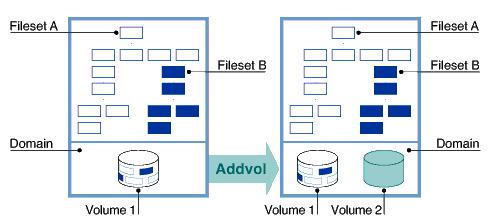
Figure 2-2
shows a graphic illustration of adding volumes to a domain.
The volume you
add initially contains no data.
Once the volume is added, information will
be stored on it as a result of adding files to the domain, as the vfast utility
operates (see
Section 5.8), if you migrate files to it
(see
Section 5.12), and if you balance the domain
(see
Section 5.11).
To add volumes, use the SysMan Menu utility called Manage an AdvFS
Domain (see
Appendix A), a graphical user interface (see
Appendix E), or enter the
For example, to add volume
The
You can add volumes immediately after creating a domain, or you can
wait until the domain requires additional space.
You can add a volume to an
active domain while its filesets are mounted and in use.
Performance might improve if, instead of increasing the size of a DVN3
domain, you upgrade to the new file structure (Section 2.3.3.4)
before increasing its size.
You cannot add a volume to the root domain unless you are running a
cluster.
(See the
Cluster Administration
manual.) If you are running a cluster configuration,
you add another root volume the same way that you add any volume.
If you are
not running a cluster and need to increase the size of the root domain, see
Section 6.4.9.
Do not use the
To add volumes to a domain, do the following:
Use the
Add the new volume to the domain.
If you add a partition and it overlaps with a partition that has an
entry in the
Use the
-F
option with extreme caution.
Disabling the
overlap check can result in extensive data loss.
(See
If you are not running the
The following example adds one disk, the volume
If you do not have AdvFS Utilities and want to increase the size of
your domain:
Make a new domain on the new larger device.
Do not use the
same name for the domain.
Create filesets with the same name as the old filesets.
Create a temporary mount-point directory for each fileset.
Mount each new fileset on its temporary mount point.
Use a utility (for example
Unmount the old and new filesets.
Rename the new domain to the old name if you want.
If you
do not change the domain and fileset names, you do not need to edit the
Mount each new fileset using the mount point of the old fileset.
The directory tree is then unchanged.
Delete all temporary mount-point directories.
You can increase the amount of storage available in your domain by enlarging
the size of an existing volume.
For example, LSM and hardware RAID controllers
support dynamically increasing the size of a volume.
Because expanding the
size of an LSM or hardware RAID volume is done independently of AdvFS, you
must notify the domain when the size of a volume changes by using the
If the fileset is not already mounted, enter:
If the fileset is already mounted, enter:
When the
-o extend
option is used, all additional storage
is available to all filesets in the domain.
Increasing the size of a domain by extending a volume is unidirectional.
AdvFS does not support shrinking volumes.
When there is sufficient free space on the remaining volumes, you can
remove volumes from a domain without interrupting users or affecting the logical
structure of the filesets in the domain.
The file system automatically migrates
the contents of the selected volume to other volumes in the domain.
Before
you can remove a volume from a domain, all filesets in the domain must be
mounted.
You get an error if you try to remove a volume from a domain with
unmounted filesets.
If there is not enough free space on other volumes in the domain to
accept the files that are off-loaded from the departing volume, as many files
as possible are moved to available free space on other volumes.
Then, a message
is sent indicating that there is insufficient space.
The domain is not damaged.
You can only use AdvFS commands to reduce the size of a domain.
No analog
to the
If your domain is located on an LSM volume, do not use the LSM
To remove a volume, use the SysMan Menu utility called Manage an
AdvFS Domain (see
Appendix A), a graphical user interface (see
Appendix E), or enter the
For example, to remove
The
You can interrupt the
Under some circumstances interrupting an
To reduce the size of a domain:
Use the
Remove the volume.
If you are not running the
You cannot remove a volume from a domain that you are balancing or defragmenting
or that the
The following example illustrates how to remove one disk of the
If you remove an AdvFS volume that contains a stripe segment, the
You can remove a domain after all filesets in the domain are unmounted.
When you remove a domain, the entry in the
You can use the
To remove a domain, use a graphical user interface (Appendix E),
or unmount all filesets and fileset clones from the command line.
Then, enter
the
For example, to remove the domain
If you use this command when there are mounted filesets, the system
displays an error message.
AdvFS does not remove an active domain.
You can assign a new name to an existing domain without altering its
domain ID.
When you rename a domain, entries for all filesets in the domain
must be updated in the
Unmount all the filesets and any related clones.
In the
Edit the
Mount the filesets in the renamed domain.
For example, to rename the domain
Locate the following in the
Edit this line as follows:
Mount the fileset:
A fileset represents a mountable portion of the directory hierarchy
of a file system.
Filesets and traditional UNIX file systems are equivalent
in many ways.
You mount AdvFS filesets.
Filesets contain files, are units
on which you enable quotas, and are units for backing up data.
The filesets in a domain share the available space on the volumes in
the domain and use the same domain transaction log file.
Each fileset has
its own directory structure, root tag directory, quota files, and frag file.
The optimal number of AdvFS filesets in a domain depends primarily on the
requirements of the applications that use the filesets.
For the advantages
and disadvantages of different domain and fileset configuration, see
Section 1.4.1.
Because filesets are managed independently of their physical storage,
each fileset can be backed up independently (Chapter 4)
and can be assigned its own quota limits (Chapter 3).
Multiple small filesets can be backed up and restored more quickly than a
single large fileset.
You can run the
In contrast with traditional file systems, the directory hierarchy of
AdvFS is independent of the storage.
Therefore, you can change file placement
without affecting the logical structure of the filesets.
Fileset names must be unique within a domain.
You cannot use slash (/),
number (#), colon (:), asterisk (*), question mark (?), tab, newline, form
feed, return, vertical tab, and space characters.
Filesets that are not in
the same domain can have the same name.
Filesets can be associated with their domain names, as in
Each fileset has a unique
AdvFS also supports
Add AdvFS filesets to the
The fileset entry includes the domain name, fileset name, mount point,
file system type, and the mount-point options.
If you want to enable user
and group quotas (see
Section 3.2), include the
For example, to mount the
If you want only to add group quotas, for example, do not include the
user quota designation.
In this case the fileset entry would be:
The
You can relocate the
For example, to relocate the
In this example, the group quota file is not moved.
Any system user can display detailed information about mounted filesets
and clones.
Root user privilege is required only if the domain is inactive
(filesets unmounted).
To examine fileset information enter the following command:
The following example displays the domain
The following example displays
You can use a graphical user interface to obtain similar information.
(See
Appendix E.)
A domain must contain at least one mounted fileset to be active.
(See
Section 2.3.3.) Within a domain you can create multiple filesets
that share the storage pool established for the domain.
Any fileset can consume
all of the storage available in the domain.
Each fileset can be mounted and unmounted independently of the other
filesets in the domain.
You can limit fileset growth within a domain by assigning
fileset quotas.
(See
Chapter 3.) You can control the
creation of frags for files that waste more than 5% of their allocated storage.
(See
Section 5.2.) You can set the characteristics of the fileset
at creation by using the
To create a fileset in a domain, use the SysMan Menu utility called
Create a New AdvFS Fileset (see
Appendix A), a graphical user
interface (see
Appendix E), or enter the
For example, to create the fileset
To mount a fileset, you must create a mount-point directory for it.
(See
Section 2.4.5.)
See also
Section 2.3.3, which explains domains.
Filesets that are part of domains created for operating system software Version 5.0
and later (DVN4) support large quota values and have better performance for
very large directories.
Filesets in domains created earlier (DVN3) do not
have these improvements.
To upgrade a fileset to the new version, you must
upgrade its domain (that is, create a new one) and restore the fileset to
it.
Then the restored fileset has the new quota limits and performance improvements.
(See
Section 2.3.3.)
You cannot mount DVN4 filesets on operating system versions earlier
than Version 5.0 unless you NFS mount them from a server running Version 5.0 or later
of the operating system software.
See
Section 6.4.6
for
information on avoiding other incompatibilities.
As with traditional UNIX file systems, AdvFS filesets must be mounted
to access them.
You must create a mount-point directory if one does not exist.
Filesets to be mounted must be compatible with the operating system on which
they were created.
(See
Section 6.4.6.)
To mount a fileset, use the SysMan Menu utility called General File
System Utilities — Mount File Systems (see
Appendix A),
a graphical user interface (see
Appendix E), or enter the
For example, to create a mount-point directory and mount the fileset
To automatically mount your fileset at reboot, it must be entered in
the
Before a fileset is mounted, AdvFS verifies that all data in all volumes
in a domain can be accessed.
If there are problems, the mount might fail or
the fileset might be mounted as read-only.
(See
Section 6.3.2.)
If you attempt to mount a fileset with an incorrect number of volumes,
the mount operation fails.
See
Section 6.3.3.2
and
An error message is displayed if you attempt to mount a fileset created
under operating system software Version 5.0 or later on a system running Version
4 or earlier operating system software.
(See
Section 6.4.6.)
You can specify temporary
If you unmount a fileset, the fileset remains in the domain but it is
not accessible.
Mount the fileset to make it available again.
To unmount an AdvFS fileset, use the SysMan Menu utility called
General File System Utilities — Dismount a File System (see
Appendix A),
a graphical user interface (see
Appendix E), or enter the
For example, to unmount the fileset
If you remove a fileset, it cannot be remounted.
It is no longer part
of the domain.
You must unmount a fileset before you can remove it.
You must also remove
its fileset clone.
If you have set up a trashcan directory (Section 2.6)
for the fileset, it is removed when you remove the fileset.
To remove a fileset, use the SysMan Menu utility called Manage an
AdvFS Domain (see
Appendix A), a graphical user interface (see
Appendix E) or, from the command line, enter the
For example, to remove the
The most secure way to remove all filesets in a domain is by using the
An unmounted fileset can be renamed.
The fileset name is kept within
the domain and is an attribute that you assign.
When you rename a fileset,
only this assignment is changed.
The fileset ID is not altered.
To rename a fileset, unmount it and unmount its clone, if it has one.
You can use the SysMan Menu utility called Manage an AdvFS Domain (see
Appendix A), a graphical user interface (see
Appendix E)
or, from the command line, enter the following command:
After renaming the fileset, you must update the corresponding entries
in the
For example, to rename the
Locate the following line in the
Edit this line as follows:
Mount the fileset:
You cannot rename an AdvFS fileset clone.
You must delete the old clone
and create a new one.
You can change fileset characteristics with the
If you have the optional AdvFS Utilities license, and you are root user,
you can back up your files using an AdvFS fileset clone.
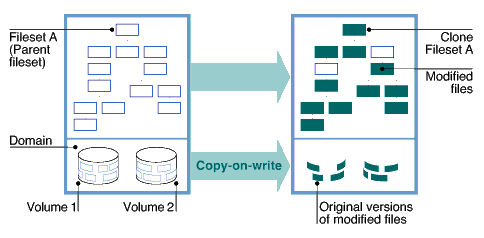
A fileset clone is
a read-only snapshot of fileset structure information (metadata).
When you
clone a fileset (create a fileset clone), the utility copies only the structure
of the original fileset, not the actual data.
When a file is modified, the
file system copies the original, unchanged data to the AdvFS fileset clone.
Therefore a copy of the system as it was at the time of creating the clone
remains for the life of the clone.
(This process is called
The only data in the fileset clone is a copy of data that has been modified,
so the fileset clone is usually smaller than the original fileset.
Figure 2-3
illustrates the relationship between a parent fileset and its clone.
Fileset clones increase the availability of data because they do the
following:
Preserve the system at a particular time
A clone is not a replacement for the backup process (using the
Protect against accidental file deletion or corruption
Create a clone of each fileset that you plan to access or modify.
By
leaving the fileset clone on line, you can replace unintentionally deleted
or corrupt files without loading backup tapes.
A clone cannot be cloned.
Data caching is not applicable to clones.
Changing text files with an editor can cause the entire original file
to be copied to the clone.
Many editors rewrite the entire file regardless
of what has changed.
When this happens, your fileset clone might grow very
large.
AdvFS cannot alter this process.
When you delete a file that existed when the clone was created, it remains
available (but not visible in the original fileset) for the life of the clone.
The file is not copied to the clone, but the actual delete operation is delayed
until the clone is deleted.
The version of the file that is retained is the
one that existed when the clone was created.
Later updates are lost.
The size of an AdvFS fileset clone depends upon the number of updates
that occur during the life of the clone.
The
When a domain runs out of disk space, the file system loses its ability
to maintain the consistency of files within AdvFS fileset clones.
The original
fileset is usable, but the fileset clone is not accurate and is no longer
used.
A warning message is displayed on both the user's terminal and the system
console.
You cannot clone a DMAPI-enabled fileset.
To clone a system disk and boot it on another system, see the Best Practices
documentation.
This not the same as creating an AdvFS fileset clone.
AdvFS fileset cloning is transparent to the user and has little impact
on system performance.
You must be root user to create a clone.
To create
a fileset clone, use the SysMan Menu utility called Manage an AdvFS Domain
(see
Appendix A), a graphical user interface (see
Appendix E),
or enter the
For example, to create a clone called
See
Section 4.3.11
for command-line instructions
on using cloning as a source for backup.
See
Section E.4.3
for
an explanation of cloning with the AdvFS GUI.
Clones are mounted and unmounted in the same manner as any other fileset.
(See
Section 2.4.5
and
Section 2.4.6.)
Clones are removed in the same manner as any other fileset.
(See
Section 2.4.7.)
A fileset clone cannot be renamed.
To assign a new name, remove the
old clone and create a new clone for the fileset.
This new clone is a snapshot
of the fileset at a later point in time than the deleted clone.
Configuring AdvFS for the root file system has several advantages:
You can start quickly after a crash.
You do not have to run
the
One set of tools manages all local file systems.
All features
of AdvFS except the
You can use AdvFS with mirroring to protect the root file
system.
Your root file system remains viable even if there is a media failure.
The following are restrictions on the AdvFS root file system:
Unless you are running a cluster (see the
Cluster Administration
manual), the root domain can contain only one volume.
You cannot add volumes
to the root domain.
The volume must start from the beginning of the physical device
( The root fileset must be the first fileset created in the
root domain.
You can assign any name to the root domain and fileset but
the name that you assign must be entered in the
Structure the root domain to contain only the root fileset.
It is not
advisable to include the
You can put the root file system on an AdvFS volume during the initial
base operating system installation, or you can convert your existing root
file system after installation.
When you install AdvFS as the root file system
during the initial installation, root defaults to the
See
Section C.2
for instructions on converting an
existing UFS root file system to AdvFS.
See the
Installation Guide
for instructions
on installing AdvFS as the root file system during the initial operating system
installation.
The root file system is automatically mounted as read-only when the
system is booted in single-user mode.
You can change the root fileset mount
from read-only to read-write by using the
Use this procedure when you need to make modifications to the root configuration.
For example, use it if you need to modify your
You can change the name of the root domain as you would any other domain.
(See
Section 2.3.7.) The name of a root domain is stored as the
directory name in the
You can change the name of the root fileset as you would any other fileset.
(See
Section 2.4.8.) There are, however, two complications:
The
You must edit the
Therefore, you must use an alternate bootable partition.
Manipulate
the root fileset you are changing as you would an ordinary fileset, make the
changes, then reboot the changed fileset as root.
To rename the root fileset, do the following:
Boot a partition other than the one you want to change.
(It
can be UFS.)
Make a new entry in the
Change to the new directory and make a symbolic link to the
device holding the original fileset.
Use the
Mount the newly named root fileset at a temporary location
to update its
Change the
Shut down the alternate system.
Reboot the original AdvFS system.
The following procedure changes the name of the root fileset from
Boot a device other than the one you want to change.
Make an entry for
Change to the new directory and make a symbolic link for
Rename the fileset from
Mount the changed root fileset to update the associated
Edit the
Locate the following line in the
Edit this line as follows:
Shut down the alternate system.
Reboot the AdvFS system.
If you change the root domain and fileset names and do not change the
If you have the optional AdvFS Utilities, end users can configure their
systems to retain a copy of files they have deleted.
They can attach
Trashcan directories are a trade off, however.
The convenience of recovering
files without accessing backup comes at the cost of the additional writes
to disk that are required at the time files are deleted.
Root user privilege is not required to use this command.
However, the
following restrictions apply:
You can restore only the most recently deleted version of
a file.
You can attach more than one directory to the same trashcan
directory; however, if you delete files with identical file names from the
attached directories, only the most recently deleted file remains in the trashcan
directory.
Only files you delete directly are removed to the trashcan.
If you delete a complete fileset using the
Deleted files in an attached trashcan count against your quota.
When you delete files in the trashcan directory, they are
unrecoverable.
Table 2-1
lists and defines the commands for setting
up and managing a trashcan.
For example, to attach the trashcan directory
To remove a file, and look for it in the trashcan directory:
To remove the connection between the trashcan and the directory:
showfile
command to determine if a directory is indexed.
Use the
-i
option to display information about the index.
See
showfile(8)2.3.3.2 Creating Domains with DVN4
/root,
/usr, and
/var
also
have a DVN of 3.
No conversion utility exists.
To move your data to a DVN4
domain, see
Section 2.3.3.4.
mkfdmn
command.
mkfset
command.
mkdir
command.
It is a convention to name the directory the same as the
fileset.
For example, if the fileset is
tmp, name the mount-point
directory
/tmp.
mount
command.
Caution
mkfdmn
command on a volume containing
data that you want to keep.
Executing the command destroys the data on that
volume.
If you have accidentally used the
mkfdmn
command,
you might recover some of your data by using the
/sbin/advfs/salvage
utility if the volume is an AdvFS volume.
(See
Section 6.2.6.)
domain_2, and two filesets,
fileset_a
and
fileset_b, in the domain.
Because the domain has only one volume,
the files in both filesets physically reside on that volume.
The number sign
(#) between the domain and fileset names is part of the naming syntax and
does not represent a comment.
# mkfdmn /dev/disk/dsk2c domain_2
# mkfset domain_2 fileset_a
# mkfset domain_2 fileset_b
# mkdir /fileset_a
# mkdir /fileset_b
# mount domain_2#fileset_a /fileset_a
# mount domain_2#fileset_b /fileset_b
2.3.3.3 Creating Domains with DVN3
mkfdmn
command with the
-V3
option.
This is useful
if you need backward compatibility.
mkfdmn(8)2.3.3.4 Upgrading Domains to DVN4
vdump
command.
It is a good idea to use the
-x
option for additional protection from saveset errors.
You lose all the data
in your domain if you cannot restore it after creating a new domain.
rmfdmn
command.
mkfdmn
command.
The new domain has a DVN of 4.
You do not need to use the
-x
and
-p
options for the
mkfdmn
command.
DVN4 domains do not require additional BMT allocations.
mkfset
command and mount them.
vrestore
command.
domain_p
on
/dev/disk/dsk1c
containing filesets
fileset_p
and
fileset_m
and put them back on the same volume with
the same names, enter the following commands:
# vdump -0 -N -x 8 /fileset_p
# vdump -0 -N -x 8 /fileset_m
# umount /fileset_p
# umount /fileset_m
# rmfdmn domain_p
# mkfdmn /dev/disk/dsk1c domain_p
# mkfset domain_p fileset_p
# mkfset domain_p fileset_m
# mount domain_p#fileset_p /fileset_p
# mount domain_p#fileset_m /fileset_m
# vrestore -x -D /fileset_p
# mt fsf 1
# vrestore -x -D /fileset_m
2.3.4 Increasing the Size of Domains
2.3.4.1 Increasing Storage in Domains by Adding Volumes
Figure 2-2: Enlarging a Domain
addvol
command from the command
line:
addvol device_name domain_name
dsk3c
to the domain
resources:
#
addvol /dev/disk/dsk3c
resources
addvol
command supports shorthand names for LSM
volume names.
The following commands are equivalent:
# addvol dom1 testdg.vol1
# addvol dom1 /dev/vol/testdg/vol1
Caution
addvol
command to add a volume containing
data that you want to keep.
Executing the command destroys the data on that
volume.
If you have accidentally used the
addvol
command,
you might recover some of your data by using the
/sbin/advfs/salvage
utility.
(See
Section 6.2.6.)
showfdmn
command to display the
contents of the domain and the current disk capacity of each volume.
This
step is optional.
/etc/fdmns
directory (that is, the partition
is associated with a domain), you get an error message.
You can override the
message.
Alternatively you can use the
addvol
command with
the
-F
option to bypass this test.
See
addvol(8)
Caution
addvol(8)vfast
utility
(see
Section 5.8), it is a good idea to run the
balance
utility to even the file distribution between the volumes.
/dev/disk/dsk3c
to
domain_1:
# showfdmn domain_1
    Id              Date Created     LogPgs Version Domain Name
2bb0c594.00008570 Fri Mar 22 12:33 2002 512       4 domain_1

Vol 512-Blks  Free % Used Cmode Rblks Wblks  Vol Name
 1L   832527 79210    90%    on   128   128  /dev/disk/dsk1c
 2    832527  1684    98%    on   128   128  /dev/disk/dsk2c
     --------------------
     1665054 80894    94%
# addvol /dev/disk/dsk3c domain_1
2.3.4.2 Increasing Storage in Domains by Exchanging Volumes
vdump/vrestore, cpio,
cp -R
or
tar) to copy each fileset from the old
device to the newly mounted fileset.
/etc/fstab
file.
If you do change the names, change them in the
/etc/fstab
file.
2.3.4.3 Increasing Storage in Domains by Extending an Existing Volume
mount
command with the
-o extend
option.
You only
need to mount one fileset with this option to increase the size of the domain.
mount
-o extenddomain#fileset /mount_point
mount
-u
-o extenddomain#fileset /mount_point
Note
2.3.5 Reducing the Size of Domains
mount
command with the
-o extend
option exists to indicate to a domain that the storage has been reduced.
Caution
shrink
option to reduce its size.
rmvol
command from the command
line:
rmvol
device_name domain_name
dsk3c
from the domain
inventory:
#
rmvol /dev/disk/dsk3c
inventory
rmvol
command supports shorthand names for LSM
volume names.
The following commands are equivalent:
# rmvol dom1 testdg.vol1
# rmvol dom1 /dev/vol/testdg/vol1
rmvol
process with Ctrl/c or
by using the
kill -term
command without damaging your domain.
(See
rmvol(8)kill -KILL
command.
rmvol
command
by using the
kill
command can leave the volume in an inaccessible
state; that is, it cannot be written to.
Volumes in this condition are marked
as "data unavailable" in the output of the
showfdmn
command.
If a volume does not allow writes after an aborted
rmvol
operation, execute the
chvol
command with the
-A
option to reactivate the volume.
showfdmn
command to display the
contents of the domain and the current disk capacity of each volume.
This
step is optional.
vfast
utility,
it is a good idea to run the
balance
utility to even the
file distribution between the remaining volumes.
This step is not required.
vfast
utility is balancing or defragmenting.
domain_2
domain,
/dev/disk/dsk2c:
# showfdmn domain_2
  Id              Date Created     LogPgs Version Domain Name
2bb0c594.00008570 Fri Apr 26 10:23 2002 512      4 domain_2

Vol 512-Blks    Free % Used Cmode Rblks Wblks  Vol Name
 1L   832527  386984    54%    on   128   128  /dev/disk/dsk1c
 2    832527  647681    22%    on   128   128  /dev/disk/dsk2c
 3    832527  568894    32%    on   128   128  /dev/disk/dsk3c
     ----------------------
      249758 1603559    36%
# rmvol /dev/disk/dsk2c domain_2
rmvol
utility moves the segment to another volume that does not
already contain a stripe segment of the same file.
When a file is striped
across all volumes in the domain, a confirmation is required before removing
the volume.
If you allow the removal process to continue, more than one stripe
segment is placed on the remaining volumes.
See
Section 5.13
for information on file striping.
2.3.6 Removing Domains
/etc/fdmns
directory
that defined the domain is removed and you cannot mount the filesets.
Volumes
that were assigned to the removed domains are relabeled as unused and can
be reused.
rmfdmn
command to remove a domain
and inactivate filesets.
This might present a security hole because the command
changes no data on the volumes.
You might be able to access your data by using
the
/sbin/advfs/salvage
command.
(See
Section 6.2.6.)
Instead, use the
rmfset
command to remove each fileset.
(See
Section 2.4.7.)
rmfdmn
command:
rmfdmn
domain_name
promotions:
# rmfdmn promotions
rmfdmn: remove domain promotions? [y/n]y
rmfdmn: domain promotions removed
2.3.7 Renaming Domains
/etc/fstab
file.
(See
Section 2.4.1.)
To rename a domain, use a graphical user interface (Appendix E)
or, from the command line do the following:
/etc/fdmns
directory, change the
old domain name to the new one:
# mv /etc/fdmns/old_domain_name /etc/fdmns/new_domain_name
/etc/fstab
file to enter the new
domain name and remove the old.
marketing
to
advertising, assuming one fileset,
fset, is mounted
at
/fset
using the command line and the vi editor:
# umount /fset
# mv /etc/fdmns/marketing /etc/fdmns/advertising
# vi /etc/fstab
/etc/fstab
file:
marketing#fset /fset advfs rw,userquota,groupquota 0 2
advertising#fset /fset advfs rw,userquota,groupquota 0 2
# mount /fset
vdump
or
vrestore
commands on several filesets simultaneously.
domain#fileset.
Here the number sign (#) is part
of the naming syntax and does not represent a comment.
2.4.1 Designating Filesets in the /etc/fstab File
/etc/fstab
file by listing
them with an
advfs
file system designation.
(See
fstab(4)/etc/fstab
file are mounted each time you
reboot the system.
userquota
and
groupquota
options and the pass
field numbers.
No spaces can be left in the list of options delimited by commas;
that is, from
rw
through
groupquota.
domain#fileset /mount_point advfs rw,userquota,groupquota 0 2
crdt
fileset at reboot
(assuming the fileset's mount point exists), add the following line to the
/etc/fstab
file:
acct_124#crdt /crdt advfs rw,userquota,groupquota 0 2
acct_124#crdt /crdt advfs rw,,groupquota 0 2
userquota
and
groupquota
options
identify the mounted file systems that can be processed by quota-related commands.
Many quota commands have the
-a
(all) option that directs
the command to operate only on file systems specified in this way.
quota.user
and
quota.group
files to subdirectories of the fileset.
However, you cannot relocate
them to other filesets nor delete them.
If you relocate your files, you must
update the
/etc/fstab
file entry to include the path and
name of the relocated files in the
userquota
and
groupquota
parameters.
quota.user
file to the
d4
subdirectory in the
crdt
fileset and rename
it
nq, change the
/etc/fstab
entry to:
acct_124#crdt /crdt advfs rw,userquota=/d4/nq,groupquota 0 2
2.4.2 Displaying Fileset Information
showfsets
domain_name
zso_domain,
which has four filesets:
# showfsets zso_domain
staff1_fs
    Id           :  2cb9d009.000419f4.1.8001
    Files        :     18554,  SLim= 0, HLim= 0
    Blocks(512)  :    712230,  SLim= 0, HLim= 0
    Quota Status :  user=on group=on
    Object Safety:  off
    Fragging     :  on
    DMAPI        :  off
 guest_fs
    Id           :  2cb9d009.000419f4.2.8001
    Files        :      4765,  SLim= 0, HLim= 0
    Blocks(512)  :    388698,  SLim= 0, HLim= 0
    Quota Status :  user=on group=on
    Object Safety:  off
    Fragging     :  on
    DMAPI        :  off
 staff2_fs
    Id           :  2cb9d009.000419f4.3.8001
    Files        :     12987,  SLim= 0, HLim= 0
    Blocks(512)  :    842862,  SLim= 0, HLim= 0
    Quota Status :  user=on group=on
    Object Safety:  off
    Fragging:       on
    DMAPI        :  off
 staff3_fs
    Id           :  2cb9d009.000419f4.4.8001
    Files        :     48202,  SLim= 0, HLim= 0
    Blocks(512)  :   1341436,  SLim= 0, HLim= 0
    Quota Status :  user=on group=on
    Object Safety:  off
    Fragging     :  on
    DMAPI        :  off
domain_2, which contains
one fileset and one fileset clone:
# showfsets domain_2
test_fs
    Id           :  3003f44f.0008ac95.4.8001
    Clone is     :  clone_test
    Files        :      7456,  SLim= 0, HLim= 0
    Blocks (512) :    388698,  SLim= 0, HLim= 0
    Quota Status :  user=on group=on
    Object Safety:  off
    Fragging     :  on
    DMAPI        :  off
 Clone_test
    Id           :  3003f44f.0008ac95.5.8001
    Clone of     :  test_fs
    Revision     :  2
2.4.3 Creating Filesets
mkfset
command or change them
later by using the
chfsets
command.
(See
Section 2.4.9.)
mkfset
command from the command line:
mkfset
domain_name fileset_name
coupons
in the
domain
advertising:
# mkfset advertising coupons
2.4.4 Upgrading Filesets
2.4.5 Mounting Filesets
mount
command from the command line:
mount
domain_name#fileset_name
mount_point
coupons
in the domain
advertising:
# mkdir /coupons
# mount advertising#coupons /coupons
/etc/fstab
file, as described in
Section 2.4.1.
advscan(8)2.4.6 Unmounting Filesets
umount
command from the command line:
umount
mount_point
coupons
in the
domain
advertising
that was mounted in
Section 2.4.5:
#
umount /coupons
2.4.7 Removing a Fileset
rmfset
command:
rmfset
domain_name fileset_name
tmp_1
fileset in
domain_1:
# rmfset domain_1 tmp_1
rmfset: remove fileset tmp_1? [Y/N]y
rmfset
command.
The utility destroys pointers to the metadata for
all the files in the fileset so you cannot recover them by using the
/sbin/advfs/salvage
utility.
(See
Section 6.2.6.)
It is faster to delete filesets by using the
rmfdmn
command
to remove the domain.
However, if you do this, you might be able to access
some of the data, because the
rmfdmn
command removes the
definition of the domain in the
/etc/fdmns
directory and
relabels the volumes, but it does not alter any data on the volume.
2.4.8 Renaming Filesets
renamefset
domain_name old_fileset_name
new_fileset_name
/etc/fstab
file.
(See
Section 2.4.1.)
If you do not do this, AdvFS does not mount the fileset when the system is
booted.
sad
fileset in
dmn_1
that is mounted at
/mount_point
to
happy
using the command line and vi editor:
# umount /mount_point
# renamefset dmn_1 sad happy
# vi /etc/fstab
/etc/fstab
file:
dmn_1#sad /mount_point advfs rw,userquota,groupquota 0 2
dmn_1#happy /mount_point advfs rw,userquota,groupquota 0 2
# mount /mount_point
Note
2.4.9 Changing the Characteristics of Filesets
chfsets
command.
Change the fileset quota limits by using the
-F,
-f,
-B, and
-b
options.
(See
Section 3.3.2.) Use the
-o
option to turn
fragment files on and off (Section 5.2), to enable or disable
object safety (Section 6.4.11), and to enable or disable the
data management API (DMAPI) (Appendix D).
2.4.10 AdvFS Fileset Clones
vdump
command, for example).
However, it can provide internal consistency
if you are trying to back up a system where files are changing rapidly and
you want to retain the information at a particular time.
Use the clone to
make a snapshot of your data, then use it as a backup source for the
vdump
command.
(See
Chapter 4
for more information.)
Note
df
command,
which displays statistics on free disk space, does not accurately reflect
the size of the fileset clone because it constantly changes as files are updated.
Caution
2.4.10.1 Creating an AdvFS Fileset Clone
clonefset
command from the command line:
clonefset
domain_name fileset_name
clone_name
clone_day300
for the fileset
day300
in the domain
transactions:
#
clonefset transactions
day300 clone_day300
2.4.10.2 Mounting and Unmounting an AdvFS Fileset Clone
2.4.10.3 Removing an AdvFS Fileset Clone
2.4.10.4 Renaming an AdvFS Fileset Clone
2.5 Configuring an AdvFS root File System
fsck
utility.
addvol
and
rmvol
commands are available to manage the root file system, except in a cluster
configuration where multivolume root domains are allowed.
a
or
c
partitions).
/etc/fstab
file.
/usr
and
/var
filesets in the root domain.
If you have only one storage device on your system,
put other domains on different partitions.
a
partition.
2.5.1 Mounting the root File System in Single-User Mode
mount
command
with the
-u
option:
#
mount -u /
/etc/fstab
file.
See
mount(8)2.5.2 Changing the Name of the root Domain
/etc/fdmns
directory and in the entry
for root in the
/etc/fstab
file.
Both need to be updated
if you change the name.
2.5.3 Changing the Name of the root Fileset
renamefset
command requires that the
fileset be unmounted, and you cannot unmount the root fileset.
/etc/fstab
file to change
the name of the root fileset.
To do this, you must make the root fileset writable.
But you cannot mount the root fileset as writable unless the
/etc/fstab
entry is correct.
/etc/fdmns
directory
of the booted partition for the fileset whose name you want to change.
renamefset
command to rename the
root fileset.
/etc/fstab
file.
fstab
entry to correspond to
the new root fileset name.
root_fs
to
new_root.
Assume that the root fileset
is in the
root_domain
domain on
/dev/disk/dsk2a.
tmp_root_domain
in the
/etc/fdmns
directory:
#mkdir /etc/fdmns/tmp_root_domain
tmp_root_domain:
# cd /etc/fdmns/tmp_root_domain
# ln -s /dev/disk/dsk2a
root_fs
to
new_root:
# renamefset tmp_root_domain root_fs new_root
/etc/fstab
file:
#mount tmp_root_domain#new_root /mnt
/mnt/etc/fstab
entry for
tmp_root_domain
using the vi editor:
# cd /mnt/etc
# vi fstab
/etc/fstab
file:
root_domain#root_fs / advfs rw,userquota,groupquota 0 2
root_domain#new_root / advfs rw,userquota,groupquota 0 2
# shutdown -h now
Note
/etc/fstab
entries, you cannot boot past single-user mode.
Edit
the
/etc/fstab
file in single-user mode using an editor
to proceed.
2.6 Setting Up Trashcans for File Recovery
mv
command.
rmfset
command,
the files in it are not saved and the trashcan is deleted.
Table 2-1: Trashcan Commands
Command
Description
mktrashcanCreates the trashcan
shtrashcan
Shows the contents of the trashcan
rmtrashcan
Removes the trashcan directory
keeper
to the directory
booklist:
# mkdir keeper
# mktrashcan keeper /booklist
   'keeper' attached to '/booklist'
# rm old_titles
# shtrashcan /booklist
   '//keeper' attached to '/booklist'
# cd keeper
# ls
   old_titles
# rmtrashcan /booklist
   '/booklist' detached