You may be able to improve Tru64 UNIX performance by optimizing your memory resources. Usually, the best way to improve performance is to eliminate or reduce paging and swapping. To do this, increase memory resources.
This chapter describes:
How the operating system allocates virtual memory to processes and to file-system caches, and how memory is reclaimed (Section 12.1)
How to configure swap space for high performance (Section 12.2)
How to display information about memory usage (Section 12.3)
The kernel subsystem attributes that you can modify to provide more memory resources to processes (Section 12.4)
How to modify the paging and swapping operations (Section 12.5)
How to reserve physical memory for shared memory (Section 12.6)
How to use big pages to improve the performance of memory-intensize applications (Section 12.7)
The operating system allocates physical memory in 8-KB units called pages. The virtual memory subsystem tracks and manages all the physical pages in the system and efficiently distributes the pages among three areas:
Static wired memory
Allocated at boot time and used for operating system data and text and for system tables, static wired memory is also used by the metadata buffer cache, which holds recently accessed UNIX file system (UFS) and CD-ROM file system (CDFS) metadata.
You can reduce the amount of static wired memory only by removing subsystems or by decreasing the size of the metadata buffer cache (see Section 12.1.2.1).
Dynamically wired memory
Dynamically wired memory is allocated at boot time and used for dynamically
allocated data structures, such as system hash tables.
User processes also
allocate dynamically wired memory for address space by using virtual memory
locking interfaces, including the
mlock
function.
The amount
of dynamically wired memory varies according to the demand.
The
vm
subsystem attribute
vm_syswiredpercent
specifies
the maximum amount of memory that a user process can wire (80 percent of physical
memory, by default).
Physical memory for processes and data caching
Physical memory that is not wired is referred to as pageable memory. It is used for processes' most-recently accessed anonymous memory (modifiable virtual address space) and file-backed memory (memory that is used for program text or shared libraries). Pageable memory is also used to cache the most-recently accessed UFS file system data for reads and writes and for page faults from mapped file regions, in addition to AdvFS metadata and file data.
The virtual memory subsystem allocates physical pages according to the
process and file-system demand.
Because processes and
file systems compete for a limited amount of physical memory, the virtual
memory subsystem periodically reclaims the oldest pages by writing their contents
to swap space or disk (paging).
Under heavy loads, entire processes may be
suspended to free large amounts of memory (swapping).
You can control virtual
memory operation by tuning various
vm
subsystem attributes,
as described in this chapter.
You must understand memory operation to determine which tuning guidelines will improve performance for your workload. The following sections describe how the virtual memory subsystem:
Tracks physical pages (Section 12.1.1)
Allocates memory to file system buffer caches (Section 12.1.2)
Allocates memory to processes (Section 12.1.3)
Reclaims pages (Section 12.1.4)
The virtual memory subsystem tracks all the physical memory pages in the system. Page lists are used to identify the location and age of each page. The oldest pages are the first to be reclaimed. At any one time, each physical page can be found on one of the following lists:
Free list — Pages that are clean and are not being used
Page reclamation begins when the size of the free list decreases to a tunable limit.
Active list — Pages that are currently being used by processes or the Unified Buffer Cache (UBC)
To determine which active pages to reclaim first, the page-stealer daemon identifies the oldest pages on the active list. The oldest pages that are being used by processes are designated as inactive pages. The oldest pages that are being used by the UBC are designated UBC LRU (Unified Buffer Cache least-recently used) pages.
Use the
vmstat
command to
determine the number of pages that are on the page lists.
Remember that pages
on the active list (the
act
field in the
vmstat
output) include both inactive and UBC LRU pages.
12.1.2 File-System Buffer Cache Memory Allocation
The operating system uses caches to store file system user data and metadata. If the cached data is later reused, a disk I/O operation is avoided, which improves performance. This is because data can be retrieved from memory faster than a disk I/O operation.
The following sections describe these file-system caches:
Metadata buffer cache (Section 12.1.2.1)
Unified Buffer Cache (Section 12.1.2.2)
12.1.2.1 Metadata Buffer Cache Memory Allocation
At boot time, the kernel allocates wired memory for the metadata buffer cache. The cache acts as a layer between the operating system and disk by storing recently accessed UFS and CDFS metadata, which includes file header information, superblocks, inodes, indirect blocks, directory blocks, and cylinder group summaries. Performance is improved if the data is later reused and a disk operation is avoided.
The metadata buffer cache uses
bcopy
routines to
move data in and out of memory.
Memory in the metadata buffer cache is not
subject to page reclamation.
The size of the metadata buffer cache is specified by the value of the
vfs
subsystem
bufcache
attribute.
See
Section 11.1.4
for information on tuning the
bufcache
attribute.
12.1.2.2 Unified Buffer Cache Memory Allocation
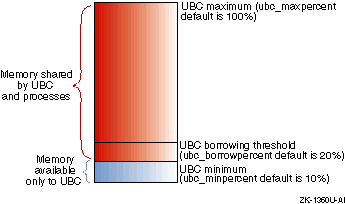
The physical memory that is not wired is available to processes and to the Unified Buffer Cache (UBC), which compete for this memory.
The UBC functions as a layer between the operating system and disk by storing recently accessed file-system data for reads and writes from conventional file activity and holding page faults from mapped file sections. UFS caches user and application data in the UBC. AdvFS caches user and application data and metadata in the UBC. File-system performance is improved if the data and metadata is reused and in the UBC.
Figure 12-1
shows how the memory subsystem allocates
physical memory to the UBC and for processes.
Figure 12-1: UBC Memory Allocation
At any one time, the amount of memory allocated to the UBC and to processes
depends on file-system and process demands.
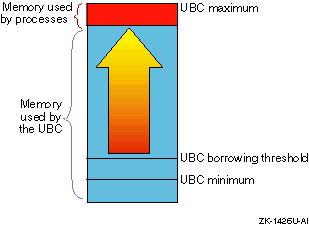
For example, if file system activity
is heavy and process demand is low, most of the pages will be allocated to
the UBC, as shown in
Figure 12-2.
Figure 12-2: Memory Allocation During High File-System Activity and No Paging Activity
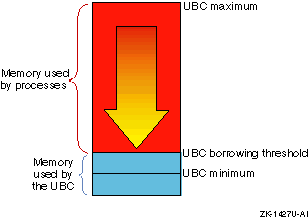
In contrast, heavy process activity, such as large increases in the
working sets for large executables, will cause the memory subsystem to reclaim
UBC borrowed pages, down to the value of the
ubc_borrowpercent
attribute, as shown in
Figure 12-3.
Figure 12-3: Memory Allocation During Low File-System Activity and High Paging Activity
The size of the UBC is specified by the value of the
vfs
subsystem UBC-related attributes.
See
Section 11.1.3
for information
on tuning the UBC-related attribute.
12.1.3 Process Memory Allocation
Physical memory that is not wired is available to processes and the UBC, which compete for this memory. The virtual memory subsystem allocates memory resources to processes and to the UBC according to the demand, and reclaims the oldest pages if the demand depletes the number of available free pages.
The following sections describe how the virtual memory subsystem allocates
memory to processes.
12.1.3.1 Process Virtual Address Space Allocation
The
fork
system call creates new processes.
When you invoke a process,
the
fork
system call:
Creates a UNIX process body, which includes a set of data
structures that the kernel uses to track the process and a set of resource
limitations.
See
fork(2)
Establishes a contiguous block of virtual address space for the process. Virtual address space is the array of virtual pages that the process can use to map into actual physical memory. Virtual address space is used for anonymous memory (memory that holds data elements and structures that are modified during process execution) and for file-backed memory (memory used for program text or shared libraries).
Because physical memory is limited, a process' entire virtual address space cannot be in physical memory at one time. However, a process can execute when only a portion of its virtual address space (its working set) is mapped to physical memory. Pages of anonymous memory and file-backed memory are paged in only when needed. If the memory demand increases and pages must be reclaimed, the pages of anonymous memory are paged out and their contents moved to swap space, while the pages of file-backed memory are simply released.
Creates one or more threads of execution. The default is one thread for each process. Multiprocessing systems support multiple process threads.
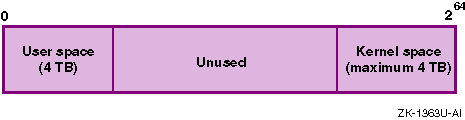
Although the virtual memory subsystem allocates a large amount of virtual address space for each process, it uses only part of this space. Only 4 TB is allocated for user space. User space is generally private and maps to a nonshared physical page. An additional 4 TB of virtual address space is used for kernel space. Kernel space usually maps to shared physical pages. The remaining space is not used for any purpose.
Figure 12-4
shows the use of process virtual address
space.
Figure 12-4: Process Virtual Address Space Usage
12.1.3.2 Virtual Address to Physical Address Translation
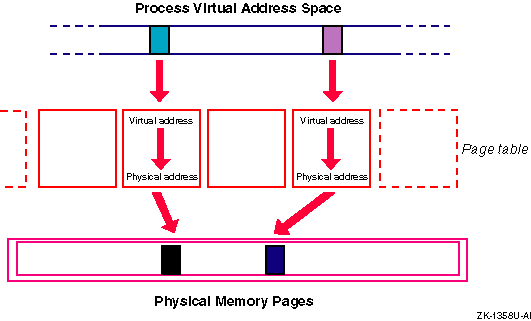
When a virtual page is touched (accessed), the virtual memory subsystem must locate the physical page and then translate the virtual address into a physical address. Each process has a page table, which is an array containing an entry for each current virtual-to-physical address translation. Page table entries have a direct relation to virtual pages (that is, virtual address 1 corresponds to page table entry 1) and contain a pointer to the physical page and protection information.
Figure 12-5
shows the translation of a virtual address
into a physical address.
Figure 12-5: Virtual-to-Physical Address Translation
A process resident set is the complete set of all the virtual addresses that have been mapped to physical addresses (that is, all the pages that have been accessed during process execution). Resident set pages may be shared among multiple processes.
A process
working set
is the set of virtual addresses
that are currently mapped to physical addresses.
The working set is a subset
of the resident set, and it represents a snapshot of the process resident
set at one point in time.
12.1.3.3 Page Faults
When an anonymous (nonfile-backed) virtual address is requested, the virtual memory subsystem must locate the physical page and make it available to the process. This occurs at different speeds, depending on whether the page is in memory or on disk (see Figure 1-10).
If a requested address is currently being used (that is, the address is in the active page list), it will have an entry in the page table. In this case, the PAL code loads the physical address into the translation lookaside buffer, which then passes the address to the CPU. Because this is a memory operation, it occurs quickly.
If a requested address is not active in the page table, the PAL lookup code issues a page fault, which instructs the virtual memory subsystem to locate the page and make the virtual-to-physical address translation in the page table.
There are four different types of page faults:
If a requested virtual address is being accessed for the first time, a zero-filled-on-demand page fault occurs. The virtual memory subsystem performs the following tasks:
Allocates an available page of physical memory.
Fills the page with zeros.
Enters the virtual-to-physical address translation in the page table.
If a requested virtual address has already been accessed and is located in the memory subsystem's internal data structures, a short page fault occurs. For example, if the physical address is located in the hash queue list or the page queue list, the virtual memory subsystem passes the address to the CPU and enters the virtual-to-physical address translation in the page table. This occurs quickly because it is a memory operation.
If a requested virtual address has already been accessed, but the physical page has been reclaimed, the page contents will be found either on the free page list or in swap space. If a page is located on the free page list, it is removed from the hash queue and the free list and then reclaimed. This operation occurs quickly and does not require disk I/O.
If a page is found in swap space, a page-in page fault occurs. The virtual memory subsystem copies the contents of the page from swap space into the physical address and enters the virtual-to-physical address translation in the page table. Because this requires a disk I/O operation, it requires more time than a memory operation.
If a process needs to modify a read-only virtual page, a copy-on-write page fault occurs. The virtual memory subsystem allocates an available page of physical memory, copies the read-only page into the new page, and enters the translation in the page table.
The virtual memory subsystem uses the following techniques to improve process execution time and decrease the number of page faults:
Mapping additional pages
The virtual memory subsystem attempts to anticipate which pages the task will need next. Using an algorithm that checks which pages were most recently used, the number of available pages, and other factors, the subsystem maps additional pages along with the page that contains the requested address.
The virtual memory subsystem attempts to map a process' entire resident set into the secondary cache and executes the entire task, text, and data within the cache.
The
vm
subsystem
attribute
private_cache_percent
specifies the percentage
of the secondary cache that is reserved for anonymous memory.
This attribute
is used only for benchmarking.
The default is to reserve 50 percent of the
cache for anonymous memory and 50 percent for file-backed memory (shared).
To cache more anonymous memory, increase the value of the
private_cache_percent
attribute.
Because memory resources are limited, the virtual memory subsystem must periodically reclaim pages. The free page list contains clean pages that are available to processes and the UBC. As the demand for memory increases, the list may become depleted. If the number of pages falls below a tunable limit, the virtual memory subsystem will replenish the free list by reclaiming the least-recently used pages from processes and the UBC.
To reclaim pages, the virtual memory subsystem:
Prewrites modified pages to swap space in an attempt to forestall a memory shortage. See Section 12.1.4.1 for more information.
Begins paging if the demand for memory is not satisfied, as follows:
Reclaims pages that the UBC has borrowed and puts them on the free list.
Reclaims the oldest inactive and UBC LRU pages from the active page list, moves the contents of the modified pages to swap space or disk, and puts the clean pages on the free list.
If needed, more aggressively reclaims pages from the active list.
See Section 12.1.4.2 for more information about reclaiming memory by paging.
Begins swapping if the demand for memory is not met. The virtual memory subsystem temporarily suspends processes and moves entire resident sets to swap space, which frees large numbers of pages. See Section 12.1.4.3 for information about swapping.
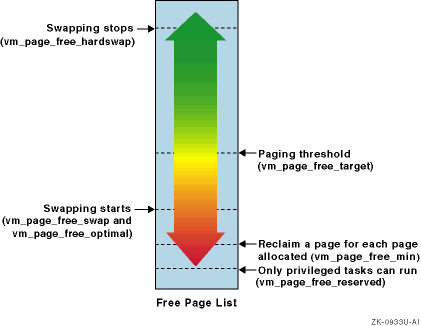
The point at which paging and swapping start and stop depends
on the values of some
vm
subsystem attributes.
Figure 12-6
shows some of the attributes that control paging and swapping.
Figure 12-6: Paging and Swapping Attributes
Detailed descriptions of the attributes are as follows:
vm_page_free_target
— Specifies a threshold value that stops paging.
When the
number of pages on the free page list reaches this value, paging stops.
The
default value of the
vm_page_free_target
attribute is based
on the amount of memory in the system.
Use
Table 12-1
to determine
the default value for your system.
Table 12-1: Default Values for vm_page_free_target Attribute
| Size of Memory | Value of vm_page_free_target |
| Up to 512 MB | 128 |
| 513 MB to 1024 MB | 256 |
| 1025 MB to 2048 MB | 512 |
| 2049 MB to 4096 MB | 768 |
| More than 4096 MB | 1024 |
vm_page_free_min
— Specifies a threshold value at which a page must be reclaimed
for each page allocated.
The default value is twice the value of the
vm_page_free_reserved
attribute.
vm_page_free_reserved
— Specifies a threshold value that determines
when memory is limited to privileged tasks.
When the number of pages on the
free page list falls below this value, only privileged tasks can get memory.
The default value is 10 pages.
vm_page_free_swap
— Specifies a threshold value that begins swapping idle tasks.
When the number of pages on the free page list falls below this value, idle
task swapping begins.
The default value is calculated using this formula:
vm_page_free_min + ((vm_page_free_target - vm_page_free_min) / 2)
vm_page_free_optimal
— Specifies a threshold value that begins hard swapping.
When the number of pages on the free list falls below this value for five
seconds, hard swapping begins.
The first processes to be swapped out include
those with the lowest scheduling priority and those with the largest resident
set size.
The default value is calculated using this formula:
vm_page_free_min + ((vm_page_free_target - vm_page_free_min) / 2)
vm_page_free_hardswap
— Specifies a threshold value that stops page swapping.
When
the number of pages on the free list reaches this value, paging stops.
The
default value is the value of the
vm_page_free_target
attribute
multiplied by 16.
See Section 12.5 for information about modifying paging and swapping attributes.
The following sections describe the page reclamation procedure in detail.
12.1.4.1 Modified Page Prewriting
The virtual memory subsystem attempts to prevent memory shortages by prewriting modified inactive and UBC LRU pages to disk. To reclaim a page that has been prewritten, the virtual memory subsystem only needs to validate the page, which can improve performance. See Section 12.1.1 for information about page lists.
When the virtual memory subsystem anticipates that the pages on the free list will soon be depleted, it prewrites to disk the oldest modified (dirty) pages that are currently being used by processes or the UBC.
The value of the
vm
subsystem attribute
vm_page_prewrite_target
determines the number of inactive pages
that the subsystem will prewrite and keep clean.
The default value is
vm_page_free_target * 2.
The
vm_ubcdirtypercent
attribute specifies the modified
UBC LRU page threshold.
When the number of modified UBC LRU pages is more
than this value, the virtual memory subsystem prewrites to disk the oldest
modified UBC LRU pages.
The default value of the
vm_ubcdirtypercent
attribute is 10 percent of the total UBC LRU pages.
In addition,
the
sync
function periodically flushes (writes to disk)
system metadata and data from all unwritten memory buffers.
For example, the
data that is flushed includes, for UFS, modified inodes and delayed block
I/O.
Commands, such as the
shutdown
command, also issue
their own
sync
functions.
To minimize the impact of I/O
spikes caused by the
sync
function, the value of the
vm
subsystem attribute
ubc_maxdirtywrites
specifies
the maximum number of disk writes that the kernel can perform each second.
The default value is five I/O operations per second.
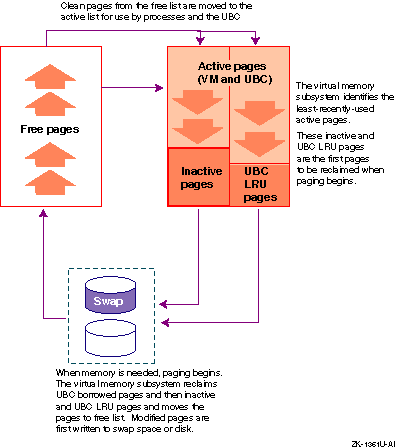
12.1.4.2 Reclaiming Memory by Paging
When the memory demand is high
and the number of pages on the free page list falls below the value of the
vm
subsystem attribute
vm_page_free_target, the
virtual memory subsystem uses paging to replenish the free page list.
The
page-out daemon and task swapper daemon are extensions of the page reclamation
code, which controls paging and swapping.
The paging process is as follows:
The page reclamation code activates the page-stealer
daemon, which first reclaims the clean pages that the UBC has borrowed from
the virtual memory subsystem, until the size of the UBC reaches the borrowing
threshold that is specified by the value of the
ubc_borrowpercent
attribute (the default is 20 percent).
Freeing borrowed UBC pages
is a fast way to reclaim pages, because UBC pages are usually not modified.
If the reclaimed pages are dirty (modified), their contents must be written
to disk before the pages can be moved to the free page list.
If freeing clean UBC borrowed memory does not sufficiently replenish the free list, a page out occurs. The page-stealer daemon reclaims the oldest inactive and UBC LRU pages from the active page list, moves the contents of the modified pages to disk, and puts the clean pages on the free list.
Paging becomes increasingly aggressive if the number of free
pages continues to decrease.
If the number of pages on the free page list
falls below the value of the
vm
subsystem attribute
vm_page_free_min
(the default is 20 pages), a page must be reclaimed
for each page taken from the list.
Figure 12-7
shows the movement of pages during paging
operations.
Figure 12-7: Paging Operation
Paging stops when the number of pages on the free list increases to
the limit specified by the
vm
subsystem attribute
vm_page_free_target.
However, if paging individual pages does not
sufficiently replenish the free list, swapping is used to free a large amount
of memory (see
Section 12.1.4.3).
12.1.4.3 Reclaiming Memory by Swapping
If there is a continuously high demand for memory, the virtual memory subsystem may be unable to replenish the free page list by reclaiming single pages. To dramatically increase the number of clean pages, the virtual memory subsystem uses swapping to suspend processes, which reduces the demand for physical memory.
The task swapper will swap out a process by suspending the process, writing its resident set to swap space, and moving the clean pages to the free page list. Swapping has a serious impact on system performance because a swapped out process cannot execute, and should be avoided on VLM systems and systems running large programs.
The point at which swapping begins and ends is controlled by a number
of
vm
subsystem attributes, as follows:
Idle task swapping begins when the number of pages
on the free list falls below the value of the
vm_page_free_swap
attribute for a period of time.
The task swapper suspends all tasks that have
been idle for 30 seconds or more.
Hard task swapping begins when the number of pages on the
free page list falls below the value of the
vm_page_free_optimal
attribute for more than five seconds.
The task swapper suspends,
one at a time, the tasks with the lowest priority and the largest resident
set size.
Swapping
stops when the number of pages on the free list increases to the value of
the
vm_page_free_hardswap
attribute.
A
swap in
occurs when the number of
pages on the free list increases to the value of the
vm_page_free_optimal
attribute for a period of time.
The value of the
vm_inswappedmin
attribute specifies the minimum amount of time, in seconds, that
a task must remain in the inswapped state before it can be moved out of swap
space.
The default value is 1 second.
The task's working set is then paged
in from swap space, and the task can now execute.
You can modify the value
of the
vm_inswappedmin
attribute without rebooting the
system.
You may be able to improve system performance by modifying the attributes that control when swapping begins and ends, as described in Section 12.5. Large-memory systems or systems running large programs should avoid paging and swapping, if possible.
Increasing the rate of swapping (swapping earlier during page reclamation) may increase throughput. As more processes are swapped out, fewer processes are actually executing and more work is done. Although increasing the rate of swapping moves long-sleeping threads out of memory and frees memory, it may degrade interactive response time because when an outswapped process is needed, it will have a long latency period.
Decreasing the rate of swapping (by swapping later during page reclamation) may improve interactive response time, but at the cost of throughput. See Section 12.5.2 for more information about changing the rate of swapping.
To facilitate the movement of data between memory and disk, the virtual memory subsystem uses synchronous and asynchronous swap buffers. The virtual memory subsystem uses these two types of buffers to immediately satisfy a page-in request without having to wait for the completion of a page-out request, which is a relatively slow process.
Synchronous swap buffers are used for page-in page faults
and for swap outs.
Asynchronous swap buffers are used for asynchronous page
outs and for prewriting modified pages.
See
Section 12.5.7
for swap buffer tuning information.
12.2 Configuring Swap Space for High Performance
Use the
swapon
command to display swap space,
and to configure additional swap space after system installation.
To make
this additional swap space permanent, use the
vm
subsystem
attribute
swapdevice
to specify swap devices in the
/etc/sysconfigtab
file.
For example:
vm:
     swapdevice=/dev/disk/dsk0b,/dev/disk/dsk0d
See Chapter 3 for information about modifying kernel subsystem attributes.
See Section 4.4.1.8 or Section 12.1.3 for information about swap space allocation modes and swap space requirements.
The following list describes how to configure swap space for high performance:
Ensure that all your swap devices are configured when you boot the system, instead of adding swap space while the system is running.
Use fast disks for swap space to decrease page-fault latency.
Use disks that are not busy for swap space.
Spread out swap space across multiple disks; do not put multiple swap partitions on the same disk. This makes paging and swapping more efficient and helps to prevent any single adapter, disk, or bus from becoming a bottleneck. The page reclamation code uses a form of disk striping (known as swap-space interleaving) that improves performance when data is written to multiple disks.
Spread out your swap disks across multiple I/O buses to prevent a single bus from becoming a bottleneck.
Configure multiple swap devices as individual devices (or LSM volumes) instead of striping the devices and configuring only one logical swap device.
If you are paging heavily and cannot increase the amount of memory in your system, consider using RAID5 for swap devices. See Chapter 9 for more information about RAID5.
See the
System Administration
manual for more information about adding swap
devices.
See
Chapter 9
for more information about configuring
and tuning disks for high performance and availability.
12.3 Monitoring Memory Statistics
Table 12-2
describes
the tools that you can use to display memory usage information.
Table 12-2: Tools to Display Virtual Memory and UBC
| Tools | Description | Reference |
Displays information about process threads, virtual memory usage (page lists, page faults, page ins, and page outs), interrupts, and CPU usage (percentages of user, system and idle times). |
||
|
Displays current statistics for running processes, including CPU usage, the processor and processor set, and the scheduling priority. The
|
|
|
Displays information about swap space utilization and the total amount of allocated swap space, swap space in use, and free swap space for each swap device. You can also use this command to allocate additional swap space. |
|
Reports UBC statistics and examines
the
|
||
|
Analyzes system configuration and displays statistics, providing warnings and tuning guidelines if necessary. |
|
Displays total system memory. |
See
|
|
Displays interprocess communication (IPC) statistics for currently active message queues, shared-memory segments, semaphores, remote queues, and local queue headers. The information
provided in the following fields reported by the
|
See
|
The following sections describe the
vmstat,
ps,
swapon,and
dbx
tools in
detail.
12.3.1 Displaying Memory by Using the vmstat Command
To display the virtual memory, process, and CPU statistics, enter:
# /usr/ucb/vmstat
Information similar to the following is displayed:
Virtual Memory Statistics: (pagesize = 8192)
procs        memory            pages                       intr        cpu
r  w  u  act  free wire  fault cow zero react pin pout   in  sy  cs  us sy  id
2 66 25  6417 3497 1570  155K  38K  50K    0  46K    0    4 290 165   0  2  98
4 65 24  6421 3493 1570   120    9   81    0    8    0  585 865 335  37 16  48
2 66 25  6421 3493 1570    69    0   69    0    0    0  570 968 368   8 22  69
4 65 24  6421 3493 1570    69    0   69    0    0    0  554 768 370   2 14  84
4 65 24  6421 3493 1570    69    0   69    0    0    0  865  1K 404   4 20  76
  [1]           [2]            [3]                        [4]         [5]
The first line of the
vmstat
output is for all time
since a reboot, and each subsequent report is for the last interval.
The
vmstat
command includes information that you can use to diagnose
CPU and virtual memory problems.
Examine the following fields:
Process information (procs):
r
— Number of threads that are running
or can run.
w
— Number of threads that are waiting
interruptibly (waiting for an event or a resource, but can be interrupted
or suspended).
For example, the thread can accept user signals or be swapped
out of memory.
u
— Number of threads that are waiting
uninterruptibly (waiting for an event or a resource, but cannot be interrupted
or suspended).
For example, the thread cannot accept user signals; it must
come out of the wait state to take a signal.
Processes that are waiting uninterruptibly
cannot be stopped by the
kill
command.
Virtual memory information (memory):
act
— Number of pages on the active
list, including inactive pages and UBC LRU pages.
free
— Number of pages on the free
list.
wire
— Number of pages on the wired
list.
Pages on the wired list cannot be reclaimed.
See Section 12.1.1 for more information on page lists. [Return to example]
Paging information (pages):
fault
— Number of address translation
faults.
cow
— Number of copy-on-write page
faults.
These page faults occur if the requested page is shared by a parent
process and a child process, and one of these processes needs to modify the
page.
If a copy-on-write page fault occurs, the virtual memory subsystem loads
a new address into the translation buffer, and then copies the contents of
the requested page into this address, so that the process can modify it.
zero
— Number of zero-filled-on-demand
page faults.
These page faults occur if a requested page is not located in
the internal data structures and has never been referenced.
If a zero-filled-on-demand
page fault occurs, the virtual memory subsystem allocates an available page
of physical memory, fills the page with zeros, and then enters the address
into the page table.
react
— Number of pages that have
been faulted (touched) while on the inactive page list.
pin
— Number of requests for pages
from the page-stealer daemon.
pout
— Number of pages that have
been paged out to disk.
in
— Number of nonclock device interrupts
per second.
sy
— Number of system calls called
per second.
cs
— Number of task and thread context
switches per second.
CPU usage information (cpu):
us
— Percentage of user time for
normal and priority processes.
User time includes the time the CPU spent executing
library routines.
sy
— Percentage of system time.
System
time includes the time the CPU spent executing system calls.
id
— Percentage of idle time.
See
Section 12.3.1
for information about using the
vmstat
command to monitor CPU usage.
[Return to example]
To use the
vmstat
command to diagnose a memory performance
problem:
Check the size of the free page list (free).
Compare the number of free pages to the values for the active pages (act) and the wired pages (wire).
The sum of the
free, active, and wired pages should be close to the amount of physical memory
in your system.
Although the value for
free
should be small,
if the value is consistently small (less than 128 pages) and accompanied by
excessive paging and swapping, you may not have enough physical memory for
your workload.
Examine the
pout
field.
If the
number of page outs is consistently high, you may have insufficient memory.
The following command output may indicate that the size of the UBC is too small for your configuration:
The output of the
vmstat
or
monitor
command shows excessive file system page-in activity, but little
or no page-out activity or shows a very low free page count.
The output of the
iostat
command shows
little or no swap disk I/O activity or shows excessive file system I/O activity.
See
Section 9.2
for more information.
Excessive paging also can increase the miss rate for the secondary cache, and may be indicated by the following output:
The output of the
ps
command shows high
task swapping activity.
See
Section 12.3.2
for more information.
The output of the
swapon
command shows
excessive use of swap space.
See
Section 12.3.3
for
more information.
To display statistics about physical memory use, enter:
# vmstat -P
Information similar to the following is displayed:
Total Physical Memory =   512.00 M
                      =    65536 pages
Physical Memory Clusters:

 start_pfn     end_pfn        type  size_pages / size_bytes
         0         256         pal         256 /    2.00M
       256       65527          os       65271 /  509.93M
     65527       65536         pal           9 /   72.00k

Physical Memory Use:

 start_pfn     end_pfn        type  size_pages / size_bytes
       256         280   unixtable          24 /  192.00k
       280         287    scavenge           7 /   56.00k
       287         918        text         631 /    4.93M
       918        1046        data         128 /    1.00M
      1046        1209         bss         163 /    1.27M
      1210        1384      kdebug         174 /    1.36M
      1384        1390     cfgmgmt           6 /   48.00k
      1390        1392       locks           2 /   16.00k
      1392        1949   unixtable         557 /    4.35M
      1949        1962        pmap          13 /  104.00k
      1962        2972    vmtables        1010 /    7.89M
      2972       65527     managed       62555 /  488.71M
                             ============================
         Total Physical Memory Use:      65270 /  509.92M

Managed Pages Break Down:

       free pages = 1207
     active pages = 25817
   inactive pages = 20103
      wired pages = 15434
        ubc pages = 15992
        ==================
            Total = 78553

WIRED Pages Break Down:

   vm wired pages = 1448
  ubc wired pages = 4550
  meta data pages = 1958
     malloc pages = 5469
     contig pages = 159
    user ptepages = 1774
  kernel ptepages = 67
    free ptepages = 9
        ==================
            Total = 15434
See
vmstat(1)12.3.2 Displaying Memory by Using the ps Command
To display the current state of the system processes and how they use memory, enter:
# /usr/ucb/ps aux
Information similar to the following is displayed:
USER  PID  %CPU %MEM   VSZ   RSS  TTY S    STARTED      TIME  COMMAND
chen  2225  5.0  0.3  1.35M  256K p9  U    13:24:58  0:00.36  cp /vmunix /tmp
root  2236  3.0  0.5  1.59M  456K p9  R  + 13:33:21  0:00.08  ps aux
sorn  2226  1.0  0.6  2.75M  552K p9  S  + 13:25:01  0:00.05  vi met.ps
root   347  1.0  4.0  9.58M  3.72 ??  S      Nov 07 01:26:44  /usr/bin/X11/X -a
root  1905  1.0  1.1  6.10M  1.01 ??  R    16:55:16  0:24.79  /usr/bin/X11/dxpa
mat   2228  0.0  0.5  1.82M  504K p5  S  + 13:25:03  0:00.02  more
mat   2202  0.0  0.5  2.03M  456K p5  S    13:14:14  0:00.23  -csh (csh)
root     0  0.0 12.7   356M  11.9 ??  R <  Nov 07 3-17:26:13  [kernel idle]
             [1] [2]   [3] [4]      [5]               [6]     [7]
The
ps
command displays a snapshot of system processes
in order of decreasing CPU usage, including the execution of the
ps
command itself.
By the time the
ps
command
executes, the state of system processes has probably changed.
The
ps
command output includes the following information
that you can use to diagnose CPU and virtual memory problems:
Percentage of CPU time usage (%CPU).
[Return to example]
Percentage of real memory usage (%MEM).
[Return to example]
Process virtual address size (VSZ) —
This is the total amount of anonymous memory allocated to the process (in
bytes).
[Return to example]
Real memory (resident set) size of the process
(RSS) — This is the total amount of physical memory,
in bytes, mapped to virtual pages (that is, the total amount of memory that
the application has physically used).
Shared memory is included in the resident
set size figures; as a result, the total of these figures may exceed the total
amount of physical memory available on the system.
[Return to example]
Process status or state (S) — This
specifies whether a process is in one of the following states:
Runnable (R)
Sleeping (S) — Process has been waiting
for an event or a resource for less than 20 seconds, but it can be interrupted
or suspended.
For example, the process can accept user signals or be swapped
out.
Uninterruptible sleeping (U) — Process
is waiting for an event or a resource, but cannot be interrupted or suspended.
You cannot use the
kill
command to stop these processes;
they must come out of the wait state to accept the signal.
Idle (I) — Process has been sleeping
for more than 20 seconds.
Stopped (T) — Process has been stopped.
Halted (H) — Process has been halted.
Swapped out (W) — Process has been
swapped out of memory.
Locked into memory (L) — Process
has been locked into memory and cannot be swapped out.
Has exceeded the soft limit on memory requirements (>).
A process group leader with a controlling terminal (+).
Has a reduced priority (N).
Has a raised priority (<).
Current CPU time used (TIME), in the format
hh:mm:ss.ms.
[Return to example]
The command that is running (COMMAND).
[Return to example]
From the output of the
ps
command, you can determine
which processes are consuming most of your system's CPU time and memory resources,
and whether processes are swapped out.
Concentrate on processes that are running
or paging.
Here are some concerns to keep in mind:
If a process is using a large amount of memory (see the
RSS
and
VSZ
fields), the process may have excessive
memory requirements.
See
Section 7.1
for information about decreasing
an application's use of memory.
If duplicate processes are running, use the
kill
command to terminate duplicate processes.
See
kill(1)
If a process is using a large amount of CPU time, it may be
in an infinite loop.
You may have to use the
kill
command
to terminate the process and then correct the problem by making changes to
its source code.
You can also use the Class Scheduler to allocate a percentage of CPU
time to a specific task or application (see
Section 13.2.2)
or lower the process' priority by using either the
nice
or
renice
command.
These commands have no effect on memory
usage by a process.
See
nice(1)renice(8)
Check the processes that are swapped out.
Examine the
S
(state) field.
A
W
entry indicates a process
that has been swapped out.
If processes are continually being swapped out,
this could indicate a lack of memory resources.
See
Section 12.4
for information about increasing memory resources.
See
ps(1)12.3.3 Displaying Swap Space Usage by Using the swapon Command
To display information about your swap device configuration, including the total amount of allocated swap space, the amount of swap space that is being used, and the amount of free swap space, enter:
# /usr/sbin/swapon -s
Infomation for each swap partition is displayed similar to the following:
Swap partition /dev/disk/dsk1b (default swap):
    Allocated space:        16384 pages (128MB)
    In-use space:           10452 pages ( 63%)
    Free space:              5932 pages ( 36%)

Swap partition /dev/disk/dsk4c:
    Allocated space:        128178 pages (1001MB)
    In-use space:            10242 pages (  7%)
    Free space:             117936 pages ( 92%)

Total swap allocation:

    Allocated space:        144562 pages (1.10GB)
    Reserved space:          34253 pages ( 23%)
    In-use space:            20694 pages ( 14%)
    Available space:        110309 pages ( 76%)
You can configure swap space when you first install the operating system, or you can add swap space at a later date. Application messages, such as the following, usually indicate that not enough swap space is configured into the system or that a process limit has been reached:
unable to obtain requested swap space"
swap space below 10 percent free"
See Section 4.4.1.8 or Section 12.1.3 for information about swap space requirements. See Section 12.2 for information about adding swap space and distributing swap space for high performance.
See
swapon(2)12.3.4 Displaying the UBC by Using the dbx Debugger
If you
have not disabled read-ahead, you can display the UBC by using the
dbx print
command to examine the
ufs_getapage_stats
data structure.
For example:
# /usr/ucb/dbx -k /vmunix /dev/mem (dbx) print ufs_getapage_stats
Information similar to the following is displayed:
struct {
    read_looks = 2059022
    read_hits = 2022488
    read_miss = 36506
    alloc_error = 0
    alloc_in_cache = 0
}
(dbx)
To calculate the hit rate, divide the value of the
read_hits
field by the value of the
read_looks
field.
A good hit rate is a rate above 95 percent.
In the previous example, the hit
rate is approximately 98 percent.
See
dbx(1)12.4 Tuning to Provide More Memory to Processes
If your system is paging or swapping, you may be able to increase the memory that is available to processes by tuning various kernel subsystem attributes.
Table 12-3
shows the guidelines for increasing
memory resources to processes and lists the performance benefits as well as
trade offs.
Some of the guidelines for increasing the memory available to
processes may affect UBC operation and file-system caching.
Adding physical
memory to your system is the best way to stop paging or swapping.
Table 12-3: Memory Resource Tuning Guidelines
| Performance Benefit | Guideline | Tradeoff |
| Decrease CPU load and demand for memory | Reduce the number of processes running at the same time (Section 12.4.1) | System performs less work |
| Free memory | Reduce the static size of the kernel (Section 12.4.2) | Not all functionality may be available |
| Improve network throughput under a heavy load | Increase the percentage of memory reserved for kernel
malloc
allocations (Section 12.4.3) |
Consumes memory |
| Improve system response time when memory is low | Decrease cache sizes (Section 11.1) | May degrade file-system performance |
| Free memory | Reduce process memory requirements (Section 7.1.6) | Program may not run optimally |
The following sections discuss these tuning guidelines in more detail.
12.4.1 Reducing the Number of Processes Running Simultaneously
You can improve performance and reduce the demand for memory by running
fewer applications simultaneously.
Use the
at
or
batch
command to run applications at offpeak hours.
See
at(1)12.4.2 Reducing the Static Size of the Kernel
You can reduce the static size of the kernel by deconfiguring
any unnecessary subsystems.
Use the
sysconfig
command to
display the configured subsystems and to delete subsystems.
Be sure not to
remove any subsystems or functionality that is vital to your environment.
See
Chapter 3
for information about modifying
kernel subsystem attributes.
12.4.3 Increasing the Memory Reserved for Kernel malloc Allocations
If you are running a large Internet
application, you may need to increase the amount of memory reserved for the
kernel
malloc
subsystem.
This improves network throughput
by reducing the number of packets that are dropped while the system is under
a heavy network load.
However, increasing this value consumes memory.
Related Attribute
The following list describes the
generic
subsystem
attribute that relates to the memory reserved for kernel allocations:
kmemreserve_percent
— Specifies the
percentage of physical memory reserved for kernel memory allocations that
are less than or equal to the page size (8 KB).
You can modify the
kmemreserve_percent
attribute
without rebooting.
When to Tune
You might want
to increase the value of the
kmemreserve_percent
attribute
if the output of the
netstat
-d
-i
command shows dropped packets, or if the output of the
vmstat
-M
command shows dropped packets under the
fail_nowait
heading.
This may occur under a heavy network load.
See
Chapter 3
for information about modifying
kernel subsystem attributes.
12.5 Modifying Paging and Swapping Operations
You might improve performance by modifying paging and swapping operations that are described in the following sections:
Increasing the paging threshold (Section 12.5.1)
Managing the rate of swapping (Section 12.5.2)
Enabling aggressive swapping (Section 12.5.3)
Limiting process resident set size (Section 12.5.4)
Managing the rate of dirty page prewriting (Section 12.5.5)
Managing page-in and page-out cluster sizes (Section 12.5.6)
Managing I/O requests (Section 12.5.7)
Using memory locking (Section 7.1.7)
12.5.1 Increasing the Paging Threshold
Paging is the transfer of program segments (pages) into and out of memory. Excessive paging is not desired. You can specify the number of pages on the free list before paging begins. See Section 12.1.4 for more information on paging.
Related Attribute
The
vm
subsystem
vm_page_free_target
specifies the minimum number of pages on the free list before paging begins.
The default value of the
vm_page_free_target
attribute
is based on the amount of memory in the system.
Use the following table to determine the default value for your system:
| Size of Memory | Value of vm_page_free_target |
| Up to 512 MB | 128 |
| 513 MB to 1024 MB | 256 |
| 1025 MB to 2048 MB | 512 |
| 2049 MB to 4096 MB | 768 |
| More than 4096 MB | 1024 |
You can modify the
vm_page_free_target
attribute
without rebooting the system.
When to Tune
Do not decrease the value of the
vm_page_free_target
attribute.
Do not increase the value of the
vm_page_free_target
attribute if the system is not paging.
You might want to increase the value
of the
vm_page_free_target
attribute if you have sufficient
memory resources, and your system experiences performance problems when a
severe memory shortage occurs.
However, increasing this value might increase
paging activity on a low-memory system and can waste memory if it is set too
high.
See
Section 12.1.4
for information about paging and
swapping attributes.
If you increase the default value of the
vm_page_free_target
attribute, you may also want to increase the value of the
vm_page_free_min
attribute.
See
Chapter 3
for information about modifying
kernel subsystem attributes.
12.5.2 Managing the Rate of Swapping
Swapping begins when the free page list falls below the swapping threshold. Excessive swapping is not desired. You can specify when swapping begins and ends. See Section 12.1.4 for more information on swapping.
Related Attributes
The following list describes the
vm
subsystem attributes
that relate to modified page prewriting:
vm_page_free_optimal
— Specifies
a threshold value that begins hard swapping.
When the number of pages on the
free list falls below this value for five seconds, hard swapping begins.
vm_page_free_min
+ ((vm_page_free_target
-
vm_page_free_min)/ 2 )
vm_page_free_min
— Specifies a threshold
value that starts page swapping.
When the number of pages on the free page
list falls below this value, paging starts.
vm_page_free_reserved)
vm_page_free_reserved
— Specifies
a threshold value that determines when memory is limited to privileged tasks.
When the number of pages on the free page list falls below this value, only
privileged tasks can get memory.
vm_page_free_target
— Specifies that
when the number pages on the free page list reaches this value, paging stops.
The default value is based on the amount of managed memory that is available on the system, as follows:
| Available Memory (MB) | vm_page_free_target (pages) |
| Less than 512 | 128 |
| 512 to 1023 | 256 |
| 1024 to 2047 | 512 |
| 2048 to 4095 | 768 |
| 4096 and higher | 1024 |
You can modify the
vm_page_free_optimal,
vm_page_free_min, and
vm_page_free_target
attributes
without rebooting the system.
See
Chapter 3
for information
about modifying kernel subsystem attributes.
When to Tune
Do not change the value of the
vm_page_free_optimal
attribute if the system is not paging.
Decreasing the value of the
vm_page_free_optimal
attribute improves interactive response time, but decreases throughput.
Increasing the value of the
vm_page_free_optimal
attribute moves long-sleeping threads out of memory, frees memory, and increases
throughput.
As more processes are swapped out, fewer processes are actually
executing and more work is done.
However, when an outswapped process is needed,
it will have a long latency and might degrade interactive response time.
Increase the value of the
vm_page_free_optimal
only
by two pages at a time.
Do not specify a value that is more than the value
of the
vm
subsystem attribute
vm_page_free_target.
12.5.3 Enabling Aggressive Task Swapping
Swapping
begins when the free page list falls below the swapping threshold, as specified
by the
vm
subsystem
vm_page_free_swap
attribute.
Excessive swapping is not desired.
You can specify whether or not
idle tasks are aggressively swapped out.
See
Section 12.1.4
for more information on swapping.
Related Attribute
The
vm
subsystem
vm_aggressive_swap
specifies whether or not the task swapper aggressively swaps out idle tasks.
When to Tune
Aggressive task swapping improves system throughput, but it degrades the interactive response performance. Usually, you do not need to enable aggressive task swapping.
You can modify the
vm_aggressive_swap
attribute without
rebooting.
See
Chapter 3
for information about modifying
kernel attributes.
12.5.4 Limiting the Resident Set Size to Avoid Swapping
By default, Tru64 UNIX does not limit the resident set size
for a process.
Applications can set a process-specific limit on the number
of pages resident in memory by specifying the
RLIMIT_RSS
resource value in a
setrlimit()
call.
However, applications
are not required to limit the resident set size of a process and there is
no systemwide default limit.
Therefore, the resident set size for a process
is limited only by system memory restrictions.
If the demand for memory exceeds
the number of free pages, processes with large resident set sizes are likely
candidates for swapping.
See
Section 12.1.4
for more information
on swapping.
To avoid swapping a process because it has a large resident set size, you can specify process-specific and systemwide limits for resident set sizes.
Related Attributes
The following list describes the
vm
subsystem attributes
that relate to limiting the resident set size:
anon_rss_enforce
— Specifies different
levels of control over process set sizes and when the pages that a process
is using in anonymous memory are swapped out (blocking the process) during
times of contention for free pages.
Setting
anon_rss_enforce
to either 1 or 2 allows
you to enforce a systemwide limit on resident set size for a process through
the
vm_rss_max_percent
attribute.
Setting
anon_rss_enforce
to 1 (a soft limit) enables
finer control over process blocking and paging of anonymous memory by allowing
you to set the
vm_rss_block_target
and
vm_rss_wakeup_target
attributes.
vm_rss_max_percent
— Specifies a
percentage of the total pages of anonymous memory on the system that is the
systemwide limit on the resident set size for any process.
The value of this
attribute has an effect only if the
anon_rss_enforce
attribute
is set to 1 or 2.
You can decrease this percentage to enforce a systemwide limit on the
resident set size for any process.
Be aware, however, that this limit applies
to privileged and unprivileged processes and will override a larger resident
set size that may be specified for a process through the
setrlimit()
call.
vm_rss_block_target
— Specifies a
threshold number of free pages that will start swapping anonymous memory from
the resident set of a process.
Paging of anonymous memory starts when the
number of free pages meets or exceeds this value.
The process is blocked until
the number of free pages reaches the value set by the
vm_rss_wakeup_target
attribute.
vm_page_free_optimal
Increasing the value starts paging of anonymous memory earlier than when hard swapping occurs. Decreasing the value delays paging of anonymous memory beyond the point at which hard swapping occurs.
vm_rss_wakeup_target
— Specifies
a threshold number of free pages that will unblock a process whose anonymous
memory is swapped out.
The process is unblocked when the number of free pages
meets this value.
vm_page_free_optimal
Increasing the value frees more memory before unblocking the task. Decreasing the value unblocks tasks sooner, but less memory is freed.
vm_page_free_optimal
— Specifies
a threshold value that begins hard swapping.
When the number of pages on the
free list falls below this value for five seconds, hard swapping begins.
vm_page_free_min
+ ((vm_page_free_target
-
vm_page_free_min) / 2)
When to Tune
You do not need to limit resident set sizes if the system is not paging.
If you limit the resident set size, either for a specific process or
systemwide, you must also use the
vm
subsystem attribute
anon_rss_enforce
to set either a soft or hard limit on the size
of a resident set.
If you enable a hard limit, a task's resident set cannot exceed the limit. If a task reaches the hard limit, pages of the task's anonymous memory are moved to swap space to keep the resident set size within the limit.
If you enable a soft limit, anonymous memory paging will start when the following conditions are met:
A task's resident set exceeds the systemwide or per-process limit.
The number of pages of the free page list is less than the
value of the
vm_rss_block_target
attribute.
You cannot modify the
anon_rss_enforce
attribute
without rebooting the system.
You can modify the
vm_page_free_optimal,
vm_rss_maxpercent,
vm_rss_block_target, and
vm_rss_wakeup_target
attributes without
rebooting the system.
12.5.5 Managing Modified Page Prewriting
The
vm
subsystem attempts to prevent a memory shortage by prewriting modified (dirty)
pages to disk.
To reclaim a page that was prewritten, the virtual memory subsystem
only needs to validate the page, which can improve performance.
When the virtual
memory subsystem anticipates that the pages on the free list will soon be
depleted, it prewrites to disk the oldest inactive and UBC LRU pages.
You
can tune attributes that relate to prewriting.
See
Section 12.1.4.1
for more information about prewriting.
Related Attributes
The following list describes the
vm
subsystem attributes
that relate to modified page prewriting:
vm_ubcdirtypercent
— Specifies the
percentage of pages that must be dirty (modified) before the UBC starts writing
them to disk.
vm_page_prewrite_target
— Specifies
the maximum number of modified UBC (LRU) pages that the
vm
subsystem will prewrite to disk if it anticipates running out of memory.
vm_page_free_target
* 2
vm_page_free_target
— Specifies that
when the number pages on the free page list reaches this value, paging stops.
The following table shows the default value is based on the amount of managed memory that is available on the system:
| Available Memory (MB) | vm_page_free_target (pages) |
| Less than 512 | 128 |
| 512 to 1023 | 256 |
| 1024 to 2047 | 512 |
| 2048 to 4095 | 768 |
| 4096 and higher | 1024 |
You can modify the
vm_page_prewrite_target
or
vm_ubcdirtypercent
attribute without rebooting the system.
When to Tune
You do not need to modify the value of the
vm_page_prewrite_target
attribute if the system is not paging.
Decreasing the value of the
vm_page_prewrite_target
attribute will improve peak workload performance, but it will cause a drastic
performance degradation when memory is exhausted.
Increasing the value of the
vm_page_prewrite_target
attribute will:
Prevent a drastic performance degradation when memory is exhausted, but will also reduce peak workload performance.
Increase the amount of continuous disk I/O, but provide better file system integrity if a system crash occurs.
Increase the value of the
vm_page_prewrite_target
attribute by increments of 64 pages.
To increase the rate of UBC LRU dirty page prewriting, decrease the
value of the
vm_ubcdirtypercent
attribute by increments
of 1 percent.
See
Chapter 3
for information about modifying
kernel attributes.
12.5.6 Managing Page-In and Page-Out Clusters Sizes
The virtual memory subsystem reads in and writes out additional pages to the swap device in an attempt to anticipate the number of pages that it will need. You can specify the number of additional pages to the swap device.
Related Attributes
The following list describes the
vm
subsystem attributes
that relate to reading and writing pages:
vm_max_rdpgio_kluster
— Specifies
the size, in bytes, of the largest page-in (read) cluster that is passed to
the swap device.
vm_max_wrpgio_kluster
— Specifies
the size, in bytes, of the largest page-out (write) cluster that is passed
to the swap device.
You cannot modify the
vm_max_rdpgio_kluster
and
vm_max_wrpgio_kluster
attributes without rebooting the system.
See
Chapter 3
for information about modifying kernel subsystem
attributes.
When to Tune
You might want to increase the value of the
vm_max_rdpgio_kluster
attribute if you have a large-memory system and you are swapping
processes.
Increasing the value increases the peak workload performance because
more pages will be in memory and the system will spend less time page faulting,
but will consume more memory and decrease system performance.
You may want to increase the value of the
vm_max_wrpgio_kluster
attribute if you are paging and swapping processes.
Increasing
the value improves the peak workload performance and conserves memory, but
might cause more page ins and decrease the total system workload performance.
12.5.7 Managing I/O Requests on the Swap Partition
Swapping begins when the free page list falls below the swapping threshold. Excessive swapping is not desired. You can specify the number of outstanding synchronous and asynchronous I/O requests that can be on swap partitions at one time. See Section 12.1.4 for more information on swapping.
Synchronous swap requests are used for page-in operations and task swapping. Asynchronous swap requests are used for page-out operations and for prewriting modified pages.
Related Attributes
The following list describes the
vm
subsystem attributes
that relate to requests in swap partitions:
vm_syncswapbuffers
— Specifies the
number of synchronous I/O requests that can be outstanding to the swap partitions
at one time.
Synchronous swap requests are used for page-in operations and
task swapping.
vm_asyncswapbuffers
— Specifies the
number of asynchronous I/O requests per swap partition that can be outstanding
at one time.
Asynchronous swap requests are used for page-out operations and
for prewriting modified pages.
When to Tune
The value of the
vm_syncswapbuffers
attribute should
be equal to the approximate number of simultaneously running processes that
the system can easily support.
Increasing the value increases overall system
throughput, but it consumes memory.
The value of the
vm_asyncswapbuffers
attribute should
be equal to the approximate number of I/O transfers that a swap device can
support at one time.
If you are using LSM, you might want to increase
the value of the
vm_asyncswapbuffers
attribute, which causes
page-in requests to lag asynchronous page-out requests.
Decreasing the value
will use more memory, but it will improve the interactive response time.
You can modify the
vm_syncswapbuffers
attribute and
the
vm_asyncswapbuffers
attribute without rebooting the
system.
See
Chapter 3
for information about modifying
kernel subsystem attributes.
12.6 Reserving Physical Memory for Shared Memory
Granularity hints allow you to reserve a portion of physical memory at boot time for shared memory. This functionality allows the translation lookaside buffer to map more than a single page, and enables shared page table entry functionality, which may result in more cache hits.
On some database servers, using granularity hints provides a 2 to 4 percent run-time performance gain that reduces the shared memory detach time. See your database application documentation to determine if you should use granularity hints.
For most applications, use the Segmented Shared Memory (SSM) functionality (the default) instead of granularity hints.
To enable granularity hints, you must
specify a value for the
vm
subsystem attribute
gh_chunks.
In addition, to make granularity hints more effective,
modify applications to ensure that both the shared memory segment starting
address and size are aligned on an 8-MB boundary.
Section 12.6.1
and
Section 12.6.2
describe
how to enable granularity hints.
12.6.1 Tuning the Kernel to Use Granularity Hints
To use granularity hints, you must specify the number of 4-MB chunks of physical memory to reserve for shared memory at boot time. This memory cannot be used for any other purpose and cannot be returned to the system or reclaimed.
To reserve memory for shared memory, specify a nonzero value for the
gh_chunks
attribute.
For example, if you want to reserve 4 GB of
memory, specify 1024 for the value of
gh_chunks
(1024 *
4 MB = 4 GB).
If you specify a value of 512, you will reserve 2 GB of memory.
The value you specify for the
gh_chunks
attribute
depends on your database application.
Do not reserve an excessive amount of
memory, because this decreases the memory available to processes and the UBC.
Note
If you enable granularity hints, disable the use of segmented shared memory by setting the value of the
ipcsubsystem attributessm_thresholdattribute to 0.
You can determine if you have reserved the appropriate amount of memory.
For example, you can initially specify 512 for the value of the
gh_chunks
attribute.
Then, enter the following
dbx
commands while running the application that allocates shared memory:
# /usr/ucb/dbx -k /vmunix /dev/mem

(dbx) px &gh_free_counts
0xfffffc0000681748
(dbx) 0xfffffc0000681748/4X
fffffc0000681748:  0000000000000402 0000000000000004
fffffc0000681758:  0000000000000000 0000000000000002
(dbx)
The previous example shows:
The first number (402) specifies the number
of 512-page chunks (4 MB).
The second number (4) specifies the number
of 64-page chunks.
The third number (0) specifies the number
of 8-page chunks.
The fourth number (2) specifies the number
of 1-page chunks.
To save memory, you can reduce the value of the
gh_chunks
attribute until only one or two 512-page chunks are free while the application
that uses shared memory is running.
The following
vm
subsystem attributes also affect
granularity hints:
The
gh_min_seg_size
— Specifies the shared memory segment size above which memory
is allocated from the memory reserved by the
gh_chunks
attribute.
The default is 8 MB.
gh_fail_if_no_mem
— When set to 1 (the default), the
shmget
function returns a failure if the requested segment size is larger than the
value specified by the
gh_min_seg_size
attribute, and if
there is insufficient memory in the
gh_chunks
area to satisfy
the request.
If the value of the
gh_fail_if_no_mem
attribute is
0, the entire request will be satisfied from the pageable memory area if the
request is larger than the amount of memory reserved by the
gh_chunks
attribute.
gh_keep_sorted
— Specifies whether
the memory reserved for granularity hints is sorted.
The default does not
sort reserved memory.
gh_front_alloc
— Specifies whether
the memory reserved for granularity hints is allocated from low physical memory
addresses (the default).
This functionality is useful if you have an odd number
of memory boards.
In addition, messages will display on the system console indicating unaligned size and attach address requests. The unaligned attach messages are limited to one per shared memory segment.
See
Chapter 3
for information about modifying
kernel subsystem attributes.
12.6.2 Modifying Applications to Use Granularity Hints
You can make granularity hints more effective by making both the shared memory segment starting address and size aligned on an 8-MB boundary.
To share third-level page table entries, the shared memory segment attach
address (specified by the
shmat
function) and the shared
memory segment size (specified by the
shmget
function)
must be aligned on an 8-MB boundary.
This means that the lowest 23 bits of
both the address and the size must be 0.
The attach address and the shared memory segment size is specified by
the application.
In addition, System V shared memory semantics allow a maximum
shared memory segment size of 2 GB minus 1 byte.
Applications that need shared
memory segments larger than 2 GB can construct these regions by using multiple
segments.
In this case, the total shared memory size specified by the user
to the application must be 8-MB aligned.
In addition, the value of the
shm_max
attribute, which specifies the maximum size of a System
V shared memory segment, must be 8-MB aligned.
If the total shared memory size specified to the application is greater
than 2 GB, you can specify a value of 2139095040 (or 0x7f800000) for the value
of the
shm_max
attribute.
This is the maximum value (2
GB minus 8 MB) that you can specify for the
shm_max
attribute
and still share page table entries.
Use the following
dbx
command sequence to determine
if page table entries are being shared:
# /usr/ucb/dbx -k /vmunix /dev/mem

(dbx) p *(vm_granhint_stats *)&gh_stats_store
	struct {
	    total_mappers = 21
	    shared_mappers = 21
	    unshared_mappers = 0
	    total_unmappers = 21
	    shared_unmappers = 21
	    unshared_unmappers = 0
	    unaligned_mappers = 0
	    access_violations = 0
	    unaligned_size_requests = 0
	    unaligned_attachers = 0
	    wired_bypass = 0
	    wired_returns = 0
	}
	(dbx)
For the best performance, the
shared_mappers
kernel
variable should be equal to the number of shared memory segments, and the
unshared_mappers,
unaligned_attachers, and
unaligned_size_requests
variables should be 0.
Because of how shared memory is divided into shared memory segments,
there may be some unshared segments.
This occurs when the starting address
or the size is aligned on an 8-MB boundary.
This condition may be unavoidable
in some cases.
In many cases, the value of
total_unmappers
will be greater than the value of
total_mappers.
Shared memory locking changes a lock that was a single lock into a hashed
array of locks.
The size of the hashed array of locks can be modified by modifying
the value of the
vm
subsystem attribute
vm_page_lock_count.
The default value is 0.
12.7 Improving Performance with Big Pages
Big pages memory allocation supports mapping a page of virtual memory to 8, 64, or 512 pages of physical memory. Given physical memory's current 8-KB page size, this means that a single page of virtual memory can map to 64, 512, or 4096 KB. Using big pages can minimize the performance penalties that are associated with misses in the translation lookaside buffer. The result can be improved performance for applications that need to map large amounts of data.
Unlike granularity hints, which reserve memory at boot time and can
be used only with system V shared memory, big pages allocates memory at run
time and supports anonymous memory (for example,
mmap
and
malloc) as well as System V shared memory, stack memory, and text
segments.
Big pages memory allocation is most effective when used with memory-intensive
applications, such as large databases, running on systems with robust physical
memory resources.
Systems with limited memory resources, and systems where
the workload stresses memory resources, are not good candidates for using
big pages.
Similarly, if a system does not run memory-intensive applications
that require large chunks of memory, it may not benefit from big pages.
12.7.1 Using Big Pages
Enabling and using big pages is controlled through the following attributes
of the
vm
kernel subsystem:
vm_bigpg_enabled
— Enable big pagesEnables (1) or disables (0) big pages.
Enabling big pages automatically disables granularity hints;
gh_chunks,
rad_gh_regions, and related attributes
are ignored when
vm_bigpg_enabled
is set to 1.
When big pages is disabled, the associated
vm_bigpg*
attributes are ignored.
Default value: 0 (disabled)
Can be set only at boot time.
vm_bigpg_thresh
— Apportion free memory among
page sizesThe percentage of physical memory that should be maintained on the free page list for each of the four possible page sizes (8, 64, 512, and 4096 KB).
When a page of memory is freed, an attempt is made to coalesce the page with adjacent pages to form a bigger page. When an 8-KB page is freed, an attempt is made to coalesce it with 7 other such pages to form a 64-KB page. If that succeeds, the 64-KB page is now free and so an attempt is made to coalesce it with 7 other 64 KB pages to form a 512 KB page. This page is coalesced with 7 other 512 KB pages, if available, to form a 4 Mbyte page. The process stops there.
The
vm_bigpg_thresh
attribute sets the threshold
at which coalescing of free memory for each page size begins.
If
vm_bigpg_thresh
is 0 percent, then attempts to coalesce pages of
size 8, 64, or 512 KB occur whenever a page of that size is freed.
The result
can be that all smaller pages are coalesced and free pages are all 4096 KB
in size.
If
vm_bigpg_thresh
is 6 percent, the default, then
attempts to coalesce pages of 8 KB occur only after 6 percent of system memory
consists of 8 KB pages.
The same holds for the larger page sizes.
The result
is 6 percent of free pages are 8 KB in size, 6 percent are 64 KB in size,
6 percent are 512 KB in size.
The remaining free pages are 4096 KB in size.
This assumes there is enough free memory to allocate 6 percent of system memory
to 512-KB pages.
When free memory gets low, allocation of free pages to the
largest page size, 4096 KB, is affected first, then allocation to 512-KB pages,
and last allocation to 64-KB page sizes.
With smaller values of
vm_bigpg_thresh, more pages
are coalesced, and so fewer pages are available at the smaller sizes.
This
can result in a performance degradation as a larger page will then have to
be broken into smaller pieces to satisfy an allocation request for one of
the smaller page sizes.
If
vm_bigpg_thresh
is too large,
fewer large size pages will be available and applications may not be able
to take full advantage of big pages.
Generally, the default value will suffice,
but this value can be increased if the system work load requires more small
pages.
Default value: 6 percent. Minimum value: 0 percent. Maximum value: 25 percent.
Can be set at boot time and run time.
12.7.2 Determining when a Memory Object uses Big Pages
The attributes that determine when a particular type of memory object
uses big pages,
vm_bigpg_anon,
vm_bigpg_seg,
vm_bigpg_shm,
vm_bigpg_ssm, and
vm_bigpg_stack, each has a default value of 64.
This represents, in KB, the smallest
amount of memory that a process can request and still benefit from an extended
virtual page size.
For this default value of 64, the kernel handles a memory allocation request for 64 KB or greater by creating, depending on the size of the request, one or more virtual pages whose sizes can be a mix of 8 KB, 64 KB, 512 KB, and 4096 KB. The attribute value does not determine the page size. That is, the 64-KB default does not mean that all virtual pages are 64 KB in size. Instead, the kernel chooses a page size (or combination of sizes) that is most appropriate for the total amount of memory being requested and does so in the context of any alignment restrictions that the request might impose. The kernel handles memory allocation requests for fewer than 64 KB by using the default algorithm that maps one virtual page to 8 KB of physical memory.
Increasing the value of the attribute to greater than 64 restricts big pages memory allocation to a subset of the applications that might otherwise benefit from it. For example, setting an attribute to 8192 means that only programs that request allocations of 8192 or more KB are allocated virtual pages larger than 8 KB.
Setting the value of
vm_bigpg_anon,
vm_bigpg_seg,
vm_bigpg_shm,
vm_bigpg_ssm,
or
vm_bigpg_stack
to 0 disables big pages memory allocation
for the type of memory object identified by the attribute.
For example, setting
vm_bigpg_anon
to 0 disables big pages memory allocation
for processes that request allocations of anonymous memory.
There are no clear
benefits to disabling big pages memory allocation for specific types of memory.
Changes to
vm_bigpg_anon,
vm_bigpg_seg,
vm_bigpg_shm,
vm_bigpg_ssm, or
vm_bigpg_stack
after the system is booted apply only to new memory allocations;
run-time changes do not affect those memory mappings that are already in place.
Setting any of the following attributes to a value from 1 to 64 is the same as setting it to 64.
Note
Consult your support representative before changing any of the following per-object controls to values other than their default of 64 KB.
vm_bigpg_anon
— Big pages for anonymous memory Sets the minimum amount of anonymous memory (in KB)
that a user process must request before the kernel maps a virtual page in
the process address space to multiple physical pages.
Anonymous memory is
requested by calls to
mmap(),
nmmap(),malloc(), and
amalloc().
Anonymous memory for
memory mapped files is not supported.
Note
If the
anon_rss_enforceattribute (which sets a limit on the resident set size of a process) is 1 or 2, it overrides and disables big pages memory allocation of anonymous and stack memory. Setanon_rss_enforceto 0 if you want big pages memory allocation for anonymous and stack memory.
Default value: 64 KB
Can be set at boot time and run time.
vm_bigpg_seg
— Big pages for program text objectsSets the minimum amount of memory (in KB) that a user
process must request for a program text object before the kernel maps a virtual
page in the process address space to multiple physical pages.
Allocations
for program text objects are generated when the process executes a program
or loads a shared library.
See also the descriptions of
vm_segment_cache_max
and
vm_segmentation.
Default value: 64 KB
Can be set at boot time and run time.
vm_bigpg_shm
— Big pages for shared memory Sets the minimum amount of System V shared memory,
in KB, that a user process must request before the kernel maps a virtual page
in the process address space to multiple physical pages.
Allocations for System
V shared memory are generated by calls to
shmget(),
shmctl(), and
nshmget().
Default value: 64 KB
Can be set at boot time and run time.
vm_bigpg_ssm
— Big pages for segmented shared
memorySets the minimum amount, in KB, of segmented
shared memory (System V shared memory with shared page tables) that a user
process must request before the kernel maps a virtual page in the process
address space to multiple physical pages.
Requests for segmented shared memory
are generated by calls to
shmget(),
shmctl(),
and
nshmget().
The
vm_bigpg_ssm attribute
is disabled if the
ssm_threshold
IPC attribute is set to 0.
The value of
ssm_threshold
must be equal to or greater than the value of
SSM_SIZE.
By default,
ssm_threshold
equals
SSM_SIZE.
See
sys_attrs_ipc(5)
Default value: 64 KB
Can be set at boot time and run time.
vm_bigpg_stack
— Big pages for stack memory Sets the minimum amount of memory, in KB, needed for the user process stack before the kernel maps a virtual page in the process address space to multiple physical pages. Stack memory is automatically allocated by the kernel on the user's behalf.
If the
anon_rss_enforce
attribute (which sets a limit
on the resident set size of a process) is 1 or 2, it overrides and disables
big pages memory allocation of anonymous and stack memory.
Set
anon_rss_enforce
to 0 if you want big pages memory allocation for anonymous and
stack memory.
Default value: 64 KB
Can be set at boot time and run time.
See
sys_attrs_vm(5)