Identification, authentication, and authorization are the building blocks for system security. System security is built by creating a security policy that determines the level of trust you want between your system and other systems within a local and remote network and users and applications (entities) that access resources on your system.
To fully trust an entity to access resources on your system, you must first identify that entity. Once the entity is identified, it must then prove to the system that it knows something to authenticate it to the system. Finally, after the entity is identified and authenticated, the system will enforce the authorization information that determines which resources the entity is authorized to access on the system.
This chapter contains the following information:
A successful authentication requires an entity to present some form of credential to the system. A credential can be something you know (user name and password), something you are (biometric or retinal scan), or something you have (smart card or certificate).
Traditionally, the Tru64 UNIX operating system software used local authentication methods to authenticate users by a challenge and response method (user login name and password). The system would attempt to match the user-supplied name and password with an entry in the local user account database.
An entry for a user is created in the user account database when the administrator creates a user account. If there is no matching entry in the user account database, the user is not authenticated. If there is a matching entry in the user account database and the password is correct, the user is authenticated.
As computing environments became more distributed, open, and diverse, the challenge and response method created the following authentication problems for remote users who accessed a system from another system over some type of network connection:
Lack of distributed authentication database
Each system maintained its own independent user account database and typically could not share this information with heterogeneous systems. Therefore, users needed a user account on each heterogeneous system from which they accessed resources. In addition, systems could not securely and reliably determine the legitimacy of another system's identity or a user's identity.
Lack of common encryption methods between systems
Systems could not exchange encrypted data. Data, including user names and passwords, were distributed across the network in clear text.
Inability to determine data integrity
Systems could not easily detect whether or not data was intercepted, viewed, and modified in transit.
Inability to determine data source
Systems could not easily prove the origin of data.
To address these authentication problems, remote authentication methods (applications, mechanisms, protocols, and application programming interfaces (APIs)) were developed to provide the following remote authentication services for users who access a system from another system over some type of network connection:
Distributed authentication database
A primary server stores and maintains user authentication information. Systems direct user authentication requests to the server; they do not need to maintain their own independent user account database. Systems use an authentication method that securely and reliably determines the legitimacy of another system's identity and a user's identity.
Common encryption methods between systems
Systems exchange encrypted data that is transparent to users.
The ability to determine data integrity
Systems can detect whether or not data was intercepted, viewed, and modified in transit.
The ability to determine data source
Systems can prove the origin of data, so that a user or entity cannot deny having performed a particular action related to data or proof of ownership.
Using local and remote authentication methods, you can implement a security policy that creates a security domain with varying levels of trust for local authentication and remote authentication.
With local authentication, the Tru64 UNIX system authenticates a user
who is requesting access to its resources.
With remote authentication, the Tru64 UNIX
system is a client that relies on a remote server to authenticate a user who
is requesting access to its resources.
Table 1-1
compares
the local and remote authentication methods and how they implement authentication.
Table 1-1: Comparing Authentication Methods
| Authentication Method | Local or Remote | Implementation |
Base (BSD) Security Mechanism |
Local |
Password |
Enhanced Security Mechanism |
Local |
Password |
r* commands ( |
Local |
|
Secure Shell application |
Remote |
|
Network Information Service (NIS) Protocol |
Remote |
Password |
Lightweight Directory Access Protocol (LDAP) |
Remote |
Password |
Single Sign-on (SSO)/Kerberos Mechanism |
Remote |
Password and Secret key |
Advanced Server for UNIX (ASU) |
Remote |
Password |
IPsec Protocol |
Remote |
|
Secure Socket Layer (SSL) APIs |
Remote |
Public key |
Common Data Security Architecture (CDSA) APIs |
Remote |
Public key |
GSS APIs |
Remote |
Password and secret key |
1.2 Authentication Implementations
This section describes the authentication implementations.
1.2.1 Password Authentication
Password authentication requires that a user have a password-protected user account that can be authenticated by either a local Tru64 UNIX password authentication mechanism or by using a remote password authentication method.
When a user performs an action that requires authentication (for example,
logging in to the system), the user is prompted for a password.
The system
attempts to match the user-supplied name and password with an entry in the
user account database.
An entry for a user is created in the user account
database when the administrator creates a user account.
If there is no matching
entry in the user account database, the user is not authenticated.
If there
is a matching entry in the user account database and the password is correct,
the user is authenticated.
1.2.2 Host-Based Authentication
Host-based authentication is a noninteractive UNIX authentication
method that is based on host name and user name identification.
Host-based
authentication allows a user to grant access to their user account to users
who use network commands from a specific host; for example, the
rcp,
rlogin, or
rsh
command
or equivalent Secure Shell commands.
See
Section 1.4.3
for more information about Secure Shell commands.
Users grant access by including a host name and user name entry in their
.rhosts
file and/or
.shosts
file in their
home directory.
The file that a user uses depends on the following:
A
.rhosts
file if the users are using
the
rcp,
rlogin, or
rsh
command.
A
.rhosts
file and/or
.shosts
file if the users are using Secure Shell commands or have configured
the
rcp,
rlogin, and
rsh
commands to use a Secure Shell connection.
See
Section B.4
for more information on configuring these commands to use a Secure Shell connection.
The
.shosts
file serves the same purpose and has
the same format as the
.rhosts
file, but it is read only
by the Secure Shell server.
If both files exist, the Secure Shell server reads
the
.rhosts
file first, then the
.shosts
file.
If either of these files allows access for a particular connection,
a Secure Shell connection is used, even if the other file does not allow access.
Secure Shell host-based authentication requires additional configuration. See Section B.5.3 for more information about Secure Shell host-based authentication configuration.
An entry in a
.rhosts
or
.shosts
file includes the fully qualified domain name of the host from which a specified
user will be authenticated.
For example, the following entry in the
$HOME/peter/.shosts
file on host
zeus
allows
the users
evan
and
justin
at remote
host
saturn.ne.corp.com
to log in to
peter's
user account on
zeus:
saturn.ne.corp.com evan
saturn.ne.corp.com justin
The users
evan
and
justin
will
not be prompted for a password and will be logged in to the
peter
user account on
zeus
by entering the following
command:
$ rlogin -l peter zeus
Host-based authentication is best used in scripts and automated processes,
such as
cron
jobs, automated backups, automated file transfers,
and in other situations where a user will not be present to input authentication
information.
The nature of any noninteractive login is inherently insecure.
Whenever authentication without user challenge is permitted, some level of
risk must be assumed.
The
.rhosts
and
.shosts
files
have the same format.
See
.rhosts(4)1.2.3 Public Key Authentication
Public key authentication is a type of cryptography in which two communicating principals, usually a client and server, use a public and private key to authenticate each other and the user and to encrypt and decrypt the data that they exchange. What one public or private key encrypts, only the other matching public or private key can decrypt. See Section 1.2.5 for more information on encryption.
The public key is published and copied to a specific directory on systems with which the user needs to communicate. The private key is never published or distributed and is assigned a secret passphrase by the user. While the public and private keys are mathematically related to each other, it is impossible to calculate one key from the other; therefore, the private key cannot be compromised through knowledge of its associated public key.
When using public keys, authentication begins when a system (client) request services from another system (server):
The client uses its copy of the server's public key to encrypt the message, then sends the message to the server.
The server prompts the user for the passphrase and uses the passphrase and its private key to decrypt the message.
The server uses its copy of the client's public key to encrypt a response message, then sends the message to the client.
The client uses its private key to decrypt the message.
The successful encryption and decryption authenticates a principal,
because there is only one public key for each private key.
1.2.3.1 Digital Signatures and Certificates
A user can generate a key pair and release a public key, using any identity with no guarantee that the identity is authentic. To avoid misuse of public keys, you can use digital documents called digital signatures and digital certificates.
A digital signature is generated from a piece of information based on the document and the principal's private key. The digital signature is typically created with a hash and a private signing algorithm, which is then encrypted with the private key. (A hash is a number generated from a string of the text.)
A hash algorithm is performed on the original electronic message's binary code, resulting in what is referred to as a message digest (a 160-bit string of digits unique to the original message). A private signing algorithm is then performed on this message digest. The principal's private key is incorporated into the signature algorithm during the signing process. The resultant string of digits is the digital signature. A principal can verify the signature if it has the public key of the principal that generated the signature.
A digital certificate, is an electronic document used to identify an individual, a server, a company, or some other principal and bind that principal with a public key. Like a driver's license, a passport, or other commonly used personal IDs, a digital certificate provides generally recognized proof of a principal's identity.
Digital certificates are issued, validated, and maintained by a trusted third party called a Certificate Authority (CA). (IPsec provides tools to create certificates for testing purposes.) Like any form of identification, the authenticity of the CA is essential. The methods the CA uses to validate an identity vary depending on the policies of a given CA. In general, before issuing a digital certificate, the CA must use its published verification procedures to ensure that the principal requesting a digital certificate is the principal it claims to be. Once issued, the CA stores the digital certificate in a repository.
A digital certificate includes the name of the principal it identifies,
that principal's public key, an expiration date, the name of the CA that issued
the certificate, a serial number, and other information.
Most importantly,
a digital certificate includes the digital signature of the issuing CA.
The
CA's digital signature allows a digital certificate to be used when the CA
is trusted, but the principal identified by the digital certificate is unknown.
1.2.4 Secret Key Authentication
Secret key authentication is a type of cryptography in which two communicating principals, usually a client or server, use the same secret key, called a session key, to authenticate a system and user and to encrypt and decrypt the data that they exchange. What one session key encrypts, only the other matching session key can decrypt. See Section 1.2.5 for more information on encryption.
A trusted Key Distribution Center (KDC) mediates communication between principals and creates a session key for their exclusive use. When using secret keys, authentication begins at user login:
A user enters a user name and password into a system (client).
The client sends the user name to the KDC.
The KDC stores an entry for each user that it mediates in an encrypted principal database. The entry contains information about the user, including a password and master key.
The KDC looks up the user's entry in the principal database. If there is a matching entry, the KDC creates:
A session key for exclusive use between the client and KDC.
A Ticket-Granting Ticket (TGT), which contains a copy of the session key, the user's name, and an expiration time. The KDC encrypts the ticket using its master key.
The KDC creates a message that contains the session key and the TGT. The message is encrypted with the user's master key, then sent to the client.
The client uses a one-way hash function to convert the user's password into the user's master key. The client uses the master key to decrypt the message and extract the session key and TGT.
The session key and TGT are stored in the user's credential cache, which is a file on the client. The client will use the session key and TGT for subsequent KDC communications. No principal, including the client, can look at or modify the contents of the TGT.
The following steps describe the authentication process when two principals (clients) want to communicate:
The requesting principal sends a message to the KDC that contains:
The TGT.
The identity of the principal with which it wants to communicate.
An authenticator, which is a timestamp encrypted by using the session key that the principal and KDC share.
The KDC uses its master key to decrypt the TGT. Remember, the TGT contains the user's name and a copy of the session key. The KDC then uses the session key to decrypt the authenticator.
If the authenticator is successfully decrypted, the KDC and principal can confirm each other's identity, because only that principal and the KDC have the same session keys.
The KDC creates a pair of tickets for the principals. Each ticket contains the name of the other principal, a timestamp, a time range for which the ticket is valid, and a new session key for exclusive use by the principals.
The KDC creates a message that contains the requesting principal's ticket, which includes the requested principal's ticket encrypted with the requested principal's key.
The KDC encrypts the message by using the session key that it shares with the requesting principal and sends the message to the requesting principal.
The requesting principal decrypts the message using the session key that it shares with the KDC. A new session key and a ticket for the requested principal is revealed.
The requesting principal encrypts an authenticator (timestamp) using the new session key and sends to the requested principal a message that contains the authenticator and the requested principal's ticket.
The requested principal:
Decrypts the ticket by using its master key.
Extracts the session key from the ticket.
Uses the extracted session key to decrypt the authenticator.
If the authenticator is successfully decrypted, principals can confirm each other's identity, because the same session key was used to encrypt and decrypt the authenticator and the session key is used exclusively between the two principals.
Encryption is when a system uses cryptographic algorithms, called ciphers, to encrypt and decrypt data. A cipher transforms plain text (unencrypted text) into cipher text (encrypted text). Decryption is when the same cipher is used to transform cipher text to plain text.
Clients and servers must support the same ciphers and can support different cipher suites, or sets of ciphers, depending on factors such as the version of the protocol that they support, company policies regarding acceptable encryption strength, government export restrictions, data sensitivity, and the speed of the cipher. Administrators can enable or disable any of the supported cipher suites for clients and servers.
As part of the initial connection process, a client and server will identify the strongest enabled cipher suites they have in common and use that one for the session.
Almost all ciphers use a key (a variable that is combined in some way with the unencrypted text) and an algorithm (a formula for combining the key with the text). There are two general types of ciphers:
A block cipher that breaks a message up into sections (for example, 64 bits of text) and combines a key with each section. Most modern ciphers are block ciphers.
A stream cipher that applies a key to each bit, one at a time.
Examples of cipher algorithms include:
DES (Data Encryption Standard)
3DES
RSA (Ron Rivest, Adi Shamir, and Len Adleman)
Blowfish and twofish
1.3 Local Authentication Methods
Local authentication is when the Tru64 UNIX system uses an authentication method to authenticate a user who is requesting access to its resources. This section describes the local authentication methods:
Base (BSD) Mechanism
Enhanced Security Mechanism
Base (BSD) Security is the default level of security that is available on systems running the Tru64 UNIX operating system software.
Base security uses the user information stored in the
/etc/passwd
file to authenticate users.
By default, when you create a Tru64 UNIX
user account, an entry for the user is added to the
/etc/passwd
file located on the local system.
Each entry contains information
about a user including user name, user ID (UID), password, log in directory,
and shell.
See
System Administration
for more information on the
/etc/passwd
file and creating user accounts.
When a user enters a user name and password to log in to the Tru64 UNIX
system, the Tru64 UNIX server checks the user supplied information against
the entries in the
etc/passwd
file.
If there is a matching
entry and the password is correct, the authentication succeeds and the user
can log in.
If there is no matching entry, authentication fails and the user
cannot log in.
You can use the
pwck
command or the
vipw
command to edit and perform some consistency checks on the
/etc/passwd
file.
Users use the
passwd
command
to change a password when using base security.
The Base (BSD) mechanism provides user authorization information through
the
/etc/group
file located on the local system.
You
can use the
grpck
command or the
vipw
command to edit and perform some consistency checks on the
/etc/passwd
file.
See
System Administration
for more information on the/etc/group
file and creating user groups.
1.3.2 Enhanced Security Mechanism
The Tru64 UNIX operating system provides an optional enhanced security mechanism. The enhanced security mechanism builds upon the BSD mechanism by moving some security information into a database, adding the capability to perform break-in evasion and providing more account and password controls. The enhanced security databases are under much stricter system security controls than the BSD files.
When the enhanced security mechanism is installed and configured, the system is referred to as a trusted system. Enabling all enhanced security features will result in a system that can be configured to meet the C2 class of trust, as defined by the Trusted Computer System Evaluation Criteria (TCSEC, also called the Orange Book). The system also meets the F-C2 functional class as defined in the Information Technology Security Evaluation Criteria (ITSEC). See Appendix E for information on how to configure your system to meet C2 class of trust security.
Enhanced security extends BSD security by providing:
Login control enhancements
Password enhancements
1.3.2.1 Login Control Enhancements
The following lists enhanced security features for login control:
Recording the last terminal used for a successful and unsuccessful login
Recording the time of the last successful login
Recording the time of the last unsuccessful login attempt
Recording the number of consecutive unsuccessful login attempts
Automatic account lockout after a specified number of consecutive bad access attempts
A per-terminal setting for the delay between consecutive login attempts, and the maximum amount of time each attempt is allowed to complete the login before being declared a failed attempt
A per-terminal setting for the maximum consecutive failed login attempts before locking any new accesses from that terminal
Display information about last successful and last unsuccessful login attempts at login time.
Recording login information whenever a login occurs over the terminal.
Enhanced security provides the following features for password control:
Configurable maximum password length, up to 80 characters
Configurable password lifetimes
Variable minimum password length
System-generated passwords that take the form of a pronounceable password made up of meaningless syllables, an unpronounceable password made up of random characters from the character set, or an unpronounceable password made up of random letters from the alphabet. (All letters are from ASCII.)
Per-user password generation flags, which include the ability to require a user to have a system-generated password
Record of who (besides the user) last changed the user's password
Password usage history
1.4 Remote Authentication Methods
Remote authentication is when the Tru64 UNIX system is a client that relies on a remote server to authenticate a user who is requesting access to its resources. The remote authentication method that systems use depends on the common remote authentication method that is configured on the Tru64 UNIX system and the remote server and the type of data that is being exchanged:
User name and password data that is to be authenticated by a remote server can be exchanged by using NIS or LDAP.
Data that is exchanged by using the
rcp,
rlogin, or
rsh
network commands can use Secure
Shell or Kerberos.
Data that is exchanged by using the
ftp
or
telnet
network commands can use Kerberos.
Data that is exchanged by applications that use the
rcmd()
function can use Secure Shell.
Data that is exchanged by using the IP transport can use IPsec.
Data that is exchanged by distributed applications can use SSL, CDSA, or GSS APIs.
The following sections describe the remote authentication methods.
1.4.1 NIS Protocol
NIS is a distributed client/server data lookup service for sharing information on a local area network (LAN).
A NIS server can store all or part of the BSD or enhanced security user account database. When a user enters a user name and password to log in to a system that is configured as an NIS client, the NIS client sends the user information to the NIS server for authentication. The NIS server checks the user information with the entries in the database and returns the results to the NIS client. If there is a matching entry and the password is correct, the authentication succeeds and the user can log in. If there is no matching entry, the authentication fails and the user cannot log in.
The Tru64 UNIX system can be configured as a NIS client and/or server.
See
Network Administration: Services
for more information about NIS.
1.4.2 LDAP Mechanism
The Lightweight Directory Access Protocol (LDAP) is an Internet standard distributed client/server directory service protocol that runs over TCP/IP.
An LDAP server can store user identification and authorization information as entries in an LDAP directory. When a user enters a user name and password to log in to a system that is configured as an LDAP client, the LDAP client sends the user information to the LDAP server for authentication. The LDAP server checks the user information with the entries in the LDAP directory and returns the results to the LDAP client. If there is a matching entry and the password is correct, the authentication succeeds and the user can log in. If there is no matching entry, the authentication fails and the user cannot log in.
The Tru64 UNIX system can be configured as an LDAP client and/or server.
See
Appendix D
for information
on configuring Tru64 UNIX as an LDAP client for user authentication.
1.4.3 Secure Shell Application
Secure Shell is a client/server application
that provides a suite of network commands that provides remote authentication
services for data that is exchanged when using a Secure Shell command.
You
can use the Secure Shell commands in addition to or in place of the traditional
nonsecure network commands (Table 1-2).
Table 1-2: Secure Shell Commands
| Task | Traditional Command | Secure Shell Command |
| Execute commands on a remote system | rsh |
ssh |
| Log in to a remote system | rlogin
or
telnet |
ssh |
| Transfer files between systems | rcp
or
ftp |
scp
or
sftp |
Optionally, you can configure the
rcp,
rlogin, and
rsh
commands and the
rcmd()
function to automatically use Secure Shell.
By default, the Secure Shell software is installed when you upgrade
to or install the Tru64 UNIX Version 5.1B or higher operating system
software.
See
Appendix B
for more information on configuring
and using the Secure Shell software.
1.4.4 SSO/Kerberos Mechanism
The Single Sign-On (SSO) software is optional client/server
software that uses Kerberos to provide remote authentication services for
data that is exchanged when using the
ftp,
rcp,
rlogin,
rsh, and
telnet
network commands.
See
Appendix C
for more information on installing, configuring,
and using the SSO software.
1.4.5 Advanced Server for UNIX (ASU)
The Advanced Server for UNIX (ASU) software is optional client/server software that provides a mechanism that you can use to configure the Tru64 UNIX operating system software to direct authentication requests to a Windows NT Server Version 4.0.
The Windows NT Server Version 4.0 uses its user account information to authenticate users on behalf of the Tru64 UNIX system. This is useful if you have user account information stored on a Windows NT Server Version 4.0 and you do not want to create a user account database on the Tru64 UNIX system.
See ASU
Installation and Administration Guide
for more information on configuring Windows
NT Version 4.0 authentication.
1.4.6 IPsec Protocol
The IPsec protocol is an optional security framework that provides remote authentication services at the IP layer for data that is exchanged by using the TCP/IP transport protocol.
By enabling IPsec to secure the IP layer and configuring desired connections, you secure the network. Applications, commands, and utilities can transparently use IPsec without modification.
See
Network Administration: Connections
for more information on enabling and configuring
IPsec.
1.4.7 SSL, CDSA, and GSS APIs
The Secure Socket Layer (SSL) APIs, Common Data Security Architecture (CDSA) APIs, and Generic Security Service (GSS) APIs provide remote authentication services when a distributed application is written to use them. Applications use the APIs to request remote authentication services without requiring knowledge of the underlying security mechanisms. The security APIs support a wide range of security mechanisms.
CDSA is an architecture in which software and hardware vendors create remote authentication service modules that applications can use for specific services. Applications use the Common Security Services Manager (CSSM) APIs to request authentication services from modules in the CDSA.
The SSL APIs are mainly for Web application developers to provide remote authentication services between two or more sockets.
The GSS APIs allow applications to provide remote authentication services across a network based on a socket-like protocol where the client first determines if the server has the necessary authentication mechanism to authenticate, then uses that mechanism for the authentication.
See
cdsa(3)ssl(3)1.5 Security Integration Architecture Overview
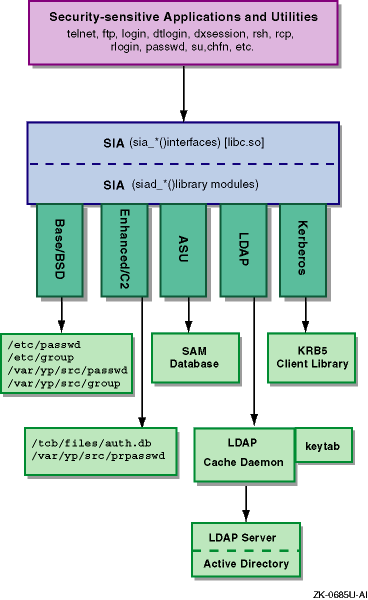
Tru64 UNIX can be configured such that one or more security methods can be used. Tru64 UNIX uses the Security Integration Architecture (SIA) to manage the order in which security methods are used. Each method provides a security mechanism that is added to the SIA. The security mechanism defines its own rules to determine the manner of authentication and the level of trust the mechanism has to achieve before authenticating the entity.
SIA has two layers of interfaces, a mechanism-independent interface for application, command, and utility programmers and a mechanism-dependent interface for system security providers. Security sensitive applications, commands, and utilities call SIA mechanism-independent interfaces to provide security services. The mechanism-independent interfaces call corresponding routines in each configured SIA mechanism layer to determine whether or not the requested access is to be allowed.
A system security provider provides a security mechansim as a shared library that includes a set of predefined entry points. As security needs change, new SIA mechanisms can be added without requiring changes to applications, commands, and utilities.
The following security mechanisms are provided with Tru64 UNIX:
Base (BSD) Security mechanism in the
libc.so
library (default).
Enhanced Security mechanism in the
/usr/shlib/libsecurity.so
library.
This is an optional mechanism located in the
OSFC2SEC
subset.
LDAP mechanism in the
/usr/shlib/libsialdap.so
library.
This is an optional mechanism located in the
OSFLDAPAUTH
and
OSFSSOW2K
subsets.
Kerberos-based mechanism in the
/usr/shlib/libcsfk5siad.so
library.
This is an optional mechanism located in the
OSFSSOW2K
subset.
An SIA mechanism implements a security policy through a set of predefined interfaces that cover the following basic areas:
Session control
Retrieval of authentication (password and authorization) data
Change of the password, finger, and shell data.
An SIA mechanism does not have to provide all the security functionality, but if it provides change functionality to its database, then it must also provide session functionality.
The SIA framework provides the structure through which different mechanisms
can coexist on a Tru64 UNIX system or in a TruCluster Server environment.
For example, if a user tries to log in with a Kerberos password and the authentication
attempt fails because the Kerberos server is not available, then the login
sequence could automatically attempt to use the local
/etc/passwd
file through the default BSD mechanism to authenticate the user.
Figure 1-1
shows the SIA architecture.
Figure 1-1: Security Integration Architecture
1.5.1 SIA and User Change Routines
When a user enters a command for a change routine (for example
the
passwd,
chfn, and
chsh
commands), a call is made to a mechanism-dependent routine to determine
whether or not the mechanism supports the attempted change and if the user
for which the change is being attempted is known to the mechanism.
When using the
chfn
command to change finger information
and the
chsh
command to change shell information, if more
than one mechanism knows the user, a menu is displayed from which the user
selects the security mechanism to affect the change.
When using the
passwd
command to change password
information, the mechanism-independent interface identifies which mechanisms
support password change for any given user.
If more than one mechanism is
identified, a menu is displayed from which the user can select one or every
mechanism for which to change the password.
See
System Administration
for more information about change routines.
1.5.2 Configuring SIA
SIA can be configured such that one or more security mechanisms can be used. A typical set of mechanisms might include a local mechanism, one only concerned with the local system security, and a remote (distributed) security mechanism, one is concerned with aspects of security which span several systems. The SIA layering allows these two mechanisms to coexist. The mechanism-dependent routines handle authentication based on whether a user is recognized by the mechanism. For example, mechanism integration is useful for login or session processing. The SIA layering passes context between the various mechanisms during the session processing. This context contains collected names, passphrases, and the current state of the session processing.
Mechanisms can trust the authentication process of a previously run mechanism thus allowing authentication vouching. In this case, if a user is successfully authenticated by the distributed mechanism, then the local mechanism can accept or trust that authentication and continue with the session processing. SIA also allows the local mechanism to not accept vouching. In this case, the local mechanism would be forced to do its own authentication processing regardless of previous authentication results. This could result in the user being prompted for the password several times. Although SIA allows any ordering of mechanisms, you should configure the mechanisms that accept vouching after those that do not. The mechanisms provided with Tru64 UNIX can accept authentication vouching.
Each SIA mechanism requires an entry in the
/etc/sia/matrix.conf
file.
The order in which entries are listed in the
matrix.conf
file determines the order in which SIA mechanisms are
called.
Use the
/usr/sbin/siacfg
utility to manage SIA
mechanisms entries in the
matrix.conf
file.
The
matrix.conf
file contains a line for each of
the predefined mechanism-dependent
siad_*()
interfaces.
Each line contains attributes of a unique mechanism identifier or
mech_type
and the path to the mechanism's shared library.
The following
is a sample entry in the
matrix.conf
file:
siad_init=(BSD,libc.so)
Where,
siad_init
is the routine,
BSD
is the unique identifier, and
libc.so
is the shared library
with the
siad_init
routine.
Because the
libc.so
library contains a default mechanism, no path to the library is
required because it is already open.
When more than one mechanism is configured,
there will be multiple attributes per entry, for example:
siad_init=(OSFC2,/usr/shlib/libsecurity.so),(BSD,libc.so)
In this
case, the
siad_init
routine in the
libsecurity.so
library is called first followed by the routine in the
libc.so
library.
The
sia_*()
interfaces uses
this set of attributes to call mechanisms in a left to right ordering.
When
a mechanism does not provide support for a particular category of interfaces,
the default BSD mechanism will be used.
Note
Prior to Tru64 UNIX Version 5.0, the
siacfgcommand did not exist and the/etc/sia/matrix.conffile was a link to another file, such as/etc/sia/bsd_matrix.conffile or/etc/sia/OSFC2_matrix.conffile to prevent thematrix.conffile from being edited and to ensure that dependent-mechanism providers supplied a configuration file that included the attributes for their own mechanism.
The Tru64 UNIX operating system provides a default
matrix.conf
file that will use the BSD mechanism routines contained in the
libc.so
library.
Example 1-1
shows the default
matrix.conf
file.
Example 1-1: Default /etc/sia/matrix.conf File
# sia matrix configuration file (BSD only)
siad_init=(BSD,libc.so)
siad_chk_invoker=(BSD,libc.so)
siad_ses_init=(BSD,libc.so)
siad_ses_authent=(BSD,libc.so)
siad_ses_estab=(BSD,libc.so)
siad_ses_launch=(BSD,libc.so)
siad_ses_suauthent=(BSD,libc.so)
siad_ses_reauthent=(BSD,libc.so)
siad_chg_finger=(BSD,libc.so)
siad_chg_password=(BSD,libc.so)
siad_chg_shell=(BSD,libc.so)
siad_getpwent=(BSD,libc.so)
siad_getpwuid=(BSD,libc.so)
siad_getpwnam=(BSD,libc.so)
siad_setpwent=(BSD,libc.so)
siad_endpwent=(BSD,libc.so)
siad_getgrent=(BSD,libc.so)
siad_getgrgid=(BSD,libc.so)
siad_getgrnam=(BSD,libc.so)
siad_setgrent=(BSD,libc.so)
siad_endgrent=(BSD,libc.so)
siad_ses_release=(BSD,libc.so)
siad_chk_user=(BSD,libc.so)
1.5.2.1 SIA Mechanism Initialization
The SIA mechanisms are initialized by the
/usr/sbin/siainit
utility when the system boots.
The
siainit
utility reads the
/etc/sia/matrix.conf
file
and calls each of the configured mechanisms at its
siad_init()
entry point to perform boot initialization.
An error response from any
siad_init()
call will
force the system into single user mode and result in an
SIA Initialization
Failure
message to be displayed on the console.
Consequently, only
problems that would cause a security risk or would not allow the root user
to log in will warrant a failure response from the
siad_init()
call.
Once each
siad_init()
routine is run successfully,
the
/etc/sia/siainitgood
file is created, if it does
not already exist.
Upon failure, the
/etc/sia/siainitgood
file is removed.
In a TruCluster environment, if the
siainitgood
file is removed, processes executing on nodes might begin to have failures
for authentication or authorization requests until the problem is resolved.
Subsequent attempts to use the SIA interfaces will check to ensure that the
siainitgood
file exists prior to setting up the internal structures
that describe the
matrix.conf
entry points for each configured
mechanism.
1.5.2.2 Adding an SIA Mechanism
Each SIA mechanism provider should use the
siacfg
command to update the
matrix.conf
file to support their
mechanism.
When adding a mechanism to the SIA, the
siacfg
command
requires a unique name for the mechanism and the location of a mechanism's
shared library.
The
siacfg
command opens the library and
looks for each of the functional categories, ensuring that each of the required
functions is in the library.
If all are present, an entry for each routine
is added to the
matrix.conf
file.
Follow these steps to manually add an SIA mechanism:
Install the mechanism according to its installation procedure.
Change to the
/etc/sia
directory.
Add the SIA mechanism; for example:
# /sbin/siacfg -a
SIA_mechanism_name
library_path
Reboot the system; for example:
# /usr/sbin/reboot
1.5.2.3 Removing an SIA Mechanism
Follow these steps to remove an SIA mechanism:
Bring the system to single-user mode; for example:
# /usr/sbin/shutdown now
Remove the SIA mechanism; for example:
# /sbin/siacfg -r
SIA_mechanism_name
The
siacfg
command removes routine entries in the
matrix.conf
file with the specified
SIA_mechanism_name.
Reboot the system; for example:
# /usr/sbin/reboot
SIA
supports only the passing of a success or failure response back to the calling
command or utility; therefore, it can be difficult to determine which of the
SIA mechanisms caused an error.
Thus, SIA supports a general logging capability
that produces time-stamped entries in the
/var/adm/sialog
file for the following types of log entries:
EVENT, which is generally a success case
within the SIA processing.
ERROR, which is generally a failure within
the SIA processing.
ALERT, which represents security configuration
or security risks within the SIA interfaces.
You must create the
/var/adm/sialog
file; for example:
# touch /var/adm/sialog
Example 1-2
shows a sample
/var/adm/sialog
file.
Example 1-2: Sample /var/adm/sialog File
SIA:EVENT Wed Feb 3 05:21:31 2002
Successful SIA initialization
SIA:EVENT Wed Feb 3 05:22:08 2002
Successful session authentication for terry on :0
SIA:EVENT Wed Feb 3 05:22:08 2002
Successful establishment of session
SIA:ERROR Wed Feb 3 05:22:47 2002
Failure to authenticate session for root on :0
SIA:ERROR Wed Feb 3 05:22:52 2002
Failure to authenticate session for root on :0
SIA:EVENT Wed Feb 3 05:22:59 2002
Successful session authentication for root on :0
SIA:EVENT Wed Feb 3 05:22:59 2002
Successful establishment of session
SIA:EVENT Wed Feb 3 05:23:00 2002
Successful launching of session
SIA:EVENT Wed Feb 3 05:24:40 2002
Successful authentication for su from root to terry
SIA:EVENT Wed Feb 3 05:25:46 2002
Successful password change for terry