This chapter describes how to prepare systems for a TruCluster Server cluster, using UltraSCSI hardware and the preferred method of radial configuration, including how to connect devices to a shared SCSI bus for the TruCluster Server product. This chapter does not provide detailed information about installing devices; it describes only how to set up the hardware in the context of the TruCluster Server product. Therefore, you must have the documentation that describes how to install the individual pieces of hardware. That documentation typically arrives with the hardware.
The chapter discusses the following topics:
Planning a TruCluster Server hardware configuration (Section 4.1)
Obtaining the firmware release notes (Section 4.2)
Installing hardware in a TruCluster Server configuration (Section 4.3)
All systems in the cluster must be connected via the cluster interconnect (which may be the Memory Channel or a private LAN). Not all members must be connected to a shared SCSI bus.
You need to allocate disks, virtual disks, or storageset partitions for the following uses:
One or more disks to hold the Tru64 UNIX operating system. The disks are either private disks on the system that will become the first cluster member, or disks on a shared bus that the system can access.
One or more disks on a shared SCSI bus to hold the
clusterwide root (/),
/usr, and
/var
AdvFS file systems.
One disk per member, normally on a shared SCSI bus, to hold member boot partitions.
Optionally, one disk on a shared SCSI bus to act as the quorum disk. See Section 1.3.1.4 and, for a more detailed discussion of the quorum disk, see the Cluster Administration manual.
All configurations that are covered in this manual are based on the use of a shared SCSI bus.
Note
If you are using Fibre Channel storage, see Chapter 7.
Before you connect devices to a shared SCSI bus, you must:
Plan your hardware configuration, determining which devices will be connected to each shared SCSI bus, which devices will be connected together, and which devices will be at the ends of each bus.
Planning is especially critical if you will install tape devices on the shared SCSI bus. With the exception of the TL890, TL891, and TL892, tape devices can only be installed at the end of a shared SCSI bus. These tape devices are the only supported tape devices that can be terminated externally.
Place the devices as close together as possible and ensure that shared SCSI buses will be within length limitations.
Prepare the systems and storage shelves for the appropriate bus connection, including installing SCSI controllers, UltraSCSI hubs, trilink connectors, and SCSI signal converters.
After you install all necessary cluster hardware and connect the
shared SCSI buses, be sure that the systems can recognize and access
all the shared disks.
(See
Section 4.3.2.) You can then install the
TruCluster Server software as described in the
Cluster Installation
manual.
4.1 Planning Your TruCluster Server Hardware Configuration
Before you set up a TruCluster Server hardware configuration, you must plan a configuration to meet your performance and availability needs. You must determine the following components for your configuration:
Number and type of member systems and the number of shared buses
You can use two to eight member systems for TruCluster Server. A greater number of member systems connected to shared SCSI buses gives you better application performance and more availability. However, all the systems compete for the same buses to service I/O requests, so a greater number of systems decreases I/O performance.
Each member system must have a supported PCI adapter for each shared bus connection. There must be enough PCI slots for the Memory Channel or LAN cluster interconnects and SCSI or Fibre Channel adapters. The number of available PCI slots depends on the type of AlphaServer system.
You need only one cluster interconnect in a cluster. For TruCluster Server Version 5.1B, the cluster interconnect can be the Memory Channel or a private LAN. (See Chapter 5 for more information on using the Memory Channel as the cluster interconnect. See Chapter 6 for more information on using a private LAN as the cluster interconnect.) However, you can use redundant cluster interconnects to protect against an interconnect failure and for easier hardware maintenance. If you have more than two member systems, you must have a Memory Channel hub or Ethernet hub or switch for each interconnect.
Number of shared SCSI buses and the storage on each shared bus
Using shared buses increases storage availability. You can connect up to 63 shared buses to a cluster member (depending on the type of AlphaServer). You can use any combination of KZPSA-BB, KZPBA, or Fibre Channel host bus adapters.
In addition, RAID array controllers allow you to increase your storage capacity and protect against disk, controller, host bus adapter, and SCSI bus or Fibre Channel failures. Mirroring data across shared buses provides you with more reliable and available data. You can use Logical Storage Manager (LSM) host-based mirroring for all storage except the member-specific boot disks and the quorum disk.
No single-point-of-failure (NSPOF) TruCluster Server cluster
You can use mirroring and multiple-bus failover with the HSZ80 and HSG80 RAID array controllers or the Enterprise Virtual Array virtual RAID storage system to create an NSPOF TruCluster Server cluster (provided that the rest of the hardware is installed).
Tape loaders on a shared SCSI bus
Because of the length of the internal SCSI cables in some tape loaders (up to 3 meters (9.8 feet)), they cannot be externally terminated with a trilink/terminator combination. Therefore, in general, with the exception of the TL890, TL891, and TL892, tape loaders must be on the end of the shared SCSI bus. See Chapter 9 for information on configuring tape devices on a shared SCSI bus.
Note
We recommend that you do not place storage on shared SCSI buses that have tape drives.
You cannot use Prestoserve in a TruCluster Server cluster to cache I/O operations for any storage device, regardless of whether it is located on a shared bus or a bus local to a given system. Because data in the Prestoserve buffer cache of one member is not accessible to other member systems, TruCluster Server cannot provide correct failover when Prestoserve is being used.
Table 4-1
describes how to maximize performance,
availability, and storage capacity in your TruCluster Server hardware
configuration.
For example, if you want greater application performance without decreasing
I/O performance, you can increase the number of member systems
or you can set up additional shared storage.
Table 4-1: Planning Your Configuration
| Improvement | Action |
| Application performance | Increase the number of member systems. |
| I/O performance | Increase the number of shared buses. |
| Member system availability | Increase the number of member systems. |
| Cluster interconnect availability | Use redundant cluster interconnects. |
| Disk availability | Mirror disks across shared buses. |
| Use a RAID array controller. | |
| Shared storage capacity | Increase the number of shared buses. |
| Use a RAID array controller. | |
| Increase disk size. |
4.2 Obtaining the Firmware Release Notes
You may be required to update the system or SCSI controller firmware during a TruCluster Server installation, so you may need the firmware release notes.
You can obtain the firmware release notes from:
The Web at the following URL:
http://thenew.hp.com/
Select Support, then under the Compaq Support heading, select Compaq Downloads, Software Updates, and Patches. Under the Servers heading, select AlphaServer. Select the appropriate system from the AlphaServers pull-down list.
The current Alpha Systems Firmware Update CD-ROM.
Note
To obtain the firmware release notes from the Firmware Update Utility CD-ROM, your kernel must be configured for the ISO 9660 compact disk file system (CDFS).
To obtain the release notes for the firmware update, follow these steps:
At the console prompt, or using the system startup log if the Tru64 UNIX operating system is running, determine the drive number of the CD-ROM.
Boot the Tru64 UNIX operating system if it is not already running.
Log in as root.
Place the Alpha Systems Firmware Update CD-ROM for the installed (or to be installed) Tru64 UNIX version into the drive.
Mount the CD-ROM as follows (/dev/disk/cdrom0c
is used as an example CD-ROM drive):
# mount -rt cdfs -o noversion /dev/disk/cdrom0c /mnt
Copy the appropriate release notes to your system disk. In this example, obtain the firmware release notes for the AlphaServer ES45 from the Version 6.2 Alpha Firmware Update CD-ROM:
# cp /mnt/doc/es45_v62_fw_relnote.pdf es45-rel-notes.pdf
Unmount the CD-ROM drive:
# umount /mnt
View and print, if desired, the release notes.
4.3 TruCluster Server Hardware Installation
Member systems may be connected to a shared SCSI bus with a peripheral component interconnect (PCI) SCSI adapter. Before you install a PCI SCSI adapter into a PCI slot on a member system, ensure that the module is at the correct hardware revision.
The qualification and use of the DS-DWZZH-series UltraSCSI hubs in TruCluster Server clusters allows the PCI host bus adapters to be cabled into a cluster in two different ways:
Preferred method with radial connection to a DWZZH UltraSCSI hub and internal termination: The PCI host bus adapter internal termination resistor SIPs are not removed. The host bus adapters and storage subsystems are connected directly to a DWZZH UltraSCSI hub port. There can be only one member system connected to a DS-DWZZH-05 UltraSCSI hub port.
The use of a DWZZH UltraSCSI hub in a TruCluster Server cluster is preferred because it improves the reliability to detect cable faults.
Old method with external termination: Shared SCSI bus termination is external to the PCI host adapters. This is the old method used to connect a PCI host adapter to the cluster; remove the adapter termination resistor SIPs and install a Y cable and an H879-AA terminator for external termination. This allows the removal of a SCSI bus cable from the host adapter without affecting SCSI bus termination.
This method (which is discussed in Chapter 10 and Chapter 11) may be used with or without a DWZZH UltraSCSI hub. When used with an UltraSCSI hub, there may be more than one member system on a SCSI bus segment attached to a DS-DWZZH-03 hub port. There can be only one member system connected to a DS-DWZZH-05 UltraSCSI hub port.
The following sections describe how to set up the KZPBA PCI-to-UltraSCSI differential host adapter and configure them into TruCluster Server clusters using the preferred method of radial connection with internal termination.
Note
The KZPSA-BB can be used in any configuration in place of the KZPBA. The use of the KZPSA-BB is not mentioned in this chapter because it is not UltraSCSI hardware, and it cannot operate at UltraSCSI speeds.
The use of the KZPSA-BB (and the KZPBA) with external termination is discussed in Chapter 10.
It is assumed that when you start to install the hardware necessary to create a TruCluster Server configuration, you have sufficient storage to install the TruCluster Server software, and that you have set up any RAID storagesets.
Follow the steps in Table 4-2 to start the procedure for TruCluster Server hardware installation. You can save time by installing the Memory Channel adapters or Ethernet adapters for the cluster interconnect, redundant network adapters (if applicable), and KZPBA SCSI adapters all at the same time.
Follow the directions in the referenced documentation, or the steps in the referenced tables, returning to Table 4-2 when you have completed the steps in the referenced table.
Caution
Static electricity can damage modules and electronic components. We recommend using a grounded antistatic wrist strap and a grounded work surface when you handle modules.
Table 4-2: Configuring TruCluster Server Hardware
| Step | Action | Refer to |
| 1 | Install the cluster interconnect hardware: | — |
| Install the Memory Channel modules, cables, and hubs (if a hub is required). | Chapter 5 [Footnote 26] | |
| Install Ethernet adapters and hub or switch for the private LAN | Chapter 6 | |
| 2 | Install Ethernet or FDDI network adapters. | User's guide for the applicable Ethernet or FDDI adapter, and the user's guide for the applicable system |
| Install ATM adapters if using ATM. | The documentation that came with the ATM adapter | |
| 3 | Install a KZPBA UltraSCSI adapter for each radially connected shared SCSI bus in each member system. | Section 4.3.1 and Table 4-3 |
| 4 | Update the system SRM console firmware from the latest Alpha Systems Firmware Update CD-ROM. | The firmware update release notes (Section 4.2) |
|
||
4.3.1 Installation of a KZPBA Using Internal Termination for a Radial Configuration
Use this method of cabling member systems and shared storage in a TruCluster Server cluster if you are using a DWZZH UltraSCSI hub. You must reserve at least one hub port for shared storage.
The DWZZH-series UltraSCSI hubs are designed to allow more distance between member systems and shared storage. Using the UltraSCSI hub also improves the reliability of the detection of cable faults.
Another benefit is the ability to connect the member systems' SCSI adapter directly to a hub port without external termination. This simplifies the configuration by reducing the number of cable connections.
A DWZZH UltraSCSI hub can be installed in:
A StorageWorks UltraSCSI BA356 shelf that has the required 180-watt power supply.
The lower righthand device slot of the BA370 shelf within the RA8000 or ESA12000 RAID array subsystems. This position minimizes cable lengths and interference with disks.
A non-UltraSCSI BA356 that has been upgraded to the 180-watt power supply with the DS-BA35X-HH option.
An UltraSCSI hub only receives power and mechanical support from the storage shelf. There is no SCSI bus continuity between the DWZZH and storage shelf.
The DWZZH contains a differential to single-ended signal converter for each hub port (which is sometimes referred to as a DWZZA on a chip, or DOC chip). The single-ended sides are connected together to form an internal single-ended SCSI bus segment. Each differential SCSI bus port is terminated internal to the DWZZH with terminators that cannot be disabled or removed.
Power for the DWZZH termination (
termpwr) is supplied by the host SCSI bus
adapter or RAID array controller connected to the DWZZH
port.
If the member system or RAID array controller is powered
down, or the cable is removed from the KZPBA, RAID array
controller, or hub port, the loss of
termpwr
disables the hub port without
affecting the remaining hub ports or SCSI bus segments.
This
result is similar to removing a Y cable when using external
termination.
Note
The UltraSCSI BA356 DS-BA35X-DA personality module does not generate
termpwr. Therefore, you cannot connect an UltraSCSI BA356 directly to a DWZZH hub. The use of the UltraSCSI BA356 in a TruCluster Server cluster is discussed in Chapter 11.
The other end of the SCSI bus segment is terminated by the KZPBA onboard termination resistor SIPs, or by a trilink connector/terminator combination installed on the RAID array controller.
The KZPBA UltraSCSI host adapter:
Is a high-performance PCI option connecting the PCI-based host system to the devices on a 16-bit, ultrawide differential SCSI bus.
Is installed in a PCI slot of the supported member system.
Is a single-channel, ultrawide differential adapter.
Operates at the following speeds:
5 MB/sec narrow SCSI at slow speed
10 MB/sec narrow SCSI at fast speed
20 MB/sec wide differential SCSI
40 MB/sec wide differential UltraSCSI
Note
Even though the KZPBA is an UltraSCSI device, it has an HD68 connector.
Make sure that your storage shelves or RAID array subsystems are set up before completing this portion of an installation.
Use the steps in
Table 4-3
to set
up a KZPBA for a TruCluster Server cluster that uses radial
connection to a DWZZH UltraSCSI hub.
Table 4-3: Installing the KZPBA for Radial Connection to a DWZZH UltraSCSI Hub
| Step | Action | Refer to |
| 1 | Ensure that the eight KZPBA internal termination resistor SIPs, RM1-RM8 are installed. | Section 4.3.3.3, Figure 4-1, and KZPBA-CB PCI-to-Ultra SCSI Differential Host Adapter User's Guide |
| 2 | Power down the system. Install a KZPBA PCI-to-UltraSCSI differential host adapter in the PCI slot corresponding to the logical bus to be used for the shared SCSI bus. Ensure that the number of adapters are within limits for the system, and that the placement is acceptable. | TruCluster Server Cluster Administration manual, Section 2.3.3, and KZPBA-CB PCI-to-Ultra SCSI Differential Host Adapter User's Guide |
| 3 | Install a BN38C cable between the KZPBA UltraSCSI host adapter and a DWZZH port. | — |
|
||
| 4 | Power up the system and use the
show
config
and
show
device
console commands to display the installed devices and information
about the KZPBAs on the AlphaServer systems.
Look for
QLogic ISP10x0
in the
show
config
display and
pkx
or
isp
in the
show device
display to determine which devices are KZPBAs.
|
Section 4.3.2 and Example 4-1 through Example 4-4 |
| 5 | Use the
show pk*
or
show isp*
console commands to
determine the KZPBA SCSI bus ID, and then use the
set
console command to set the SCSI bus
ID.
|
Section 4.3.3 and Example 4-5 through Example 4-7 |
|
||
| 6 | Repeat steps 1 through 5 for any other KZPBAs to be installed on this shared SCSI bus on other member systems. | — |
| 7 | Connect a DS-DWZZH-03 or DS-DWZZH-05 UltraSCSI hub to an: | Section 3.6 |
| HSZ80 in transparent failover mode | Section 3.7.1.3 | |
| HSZ80 in multiple-bus failover mode | Section 3.7.1.4 | |
| RAID Array 3000 | Section 3.7.1.5 | |
4.3.2 Displaying KZPBA Adapters with the show Console Commands
Use the
show config
and
show
device
console commands to display system configuration.
Use the output to determine which devices are KZPBAs, and to
determine their SCSI bus IDs.
Example 4-1
shows the output from the
show config
console command on an AlphaServer DS20 system.
Example 4-1: Displaying Configuration on an AlphaServer DS20
P00>>> show config
                        AlphaServer DS20 500 MHz

SRM Console:    V6.1-2
PALcode:        OpenVMS PALcode V1.93-75, Tru64 UNIX PALcode V1.88-70

Processors
CPU 0           Alpha EV6 pass 2.3 500 MHz      SROM Revision: V1.82
                Bcache size: 4 MB

CPU 1           Alpha EV6 pass 2.3 500 MHz      SROM Revision: V1.82
                Bcache size: 4 MB

Core Logic
Cchip           DECchip 21272-CA Rev 2.1
Dchip           DECchip 21272-DA Rev 2.0
Pchip 0         DECchip 21272-EA Rev 2.2
Pchip 1         DECchip 21272-EA Rev 2.2

TIG             Rev 4.14
Arbiter         Rev 2.10 (0x1)

MEMORY

Array #       Size     Base Addr
-------    ----------  ---------
   0         512 MB    000000000
   1         512 MB    020000000

Total Bad Pages = 0
Total Good Memory = 1024 MBytes


PCI Hose 00
     Bus 00  Slot 05/0: Cypress 82C693
                                                         Bridge to Bus 1, ISA
     Bus 00  Slot 05/1: Cypress 82C693 IDE
                                   dqa.0.0.105.0
     Bus 00  Slot 05/2: Cypress 82C693 IDE
                                   dqb.0.1.205.0
     Bus 00  Slot 05/3: Cypress 82C693 USB

     Bus 00  Slot 07: KGPSA-C
                                   pga0.0.0.7.0          WWN 2000-0000-c928-2
     Bus 00  Slot 08: DECchip 21152-AA
                                                         Bridge to Bus 2, PCI
     Bus 00  Slot 09: QLogic ISP10x0
                                   pkd0.15.0.9.0         SCSI Bus ID 15
                                   dkd0.0.0.9.0           HSZ22
                                   dkd1.0.0.9.0           HSZ22
                                   dkd100.1.0.9.0         HSZ22
                                   dkd101.1.0.9.0         HSZ22
                                   dkd102.1.0.9.0         HSZ22
                                   dkd103.1.0.9.0         HSZ22
                                   dkd104.1.0.9.0         HSZ22
                                   dkd105.1.0.9.0         HSZ22
                                   dkd106.1.0.9.0         HSZ22
                                   dkd107.1.0.9.0         HSZ22
                                   dkd2.0.0.9.0           HSZ22
                                   dkd3.0.0.9.0           HSZ22
                                   dkd4.0.0.9.0           HSZ22
                                   dkd5.0.0.9.0           HSZ22
                                   dkd6.0.0.9.0           HSZ22
                                   dkd7.0.0.9.0           HSZ22
     Bus 02  Slot 00: DE500-BA Network Controller
                                   ewb0.0.0.2000.0       00-06-2B-00-83-C9
     Bus 02  Slot 01: DE500-BA Network Controller
                                   ewc0.0.0.2001.0       00-06-2B-00-83-CA
     Bus 02  Slot 02: DE500-BA Network Controller
                                   ewd0.0.0.2002.0       00-06-2B-00-83-CB
     Bus 02  Slot 03: DE500-BA Network Controller
                                   ewe0.0.0.2003.0       00-06-2B-00-83-CC

PCI Hose 01
     Bus 00  Slot 07: DECchip 21152-AA
                                                         Bridge to Bus 2, PCI
     Bus 00  Slot 08: QLogic ISP10x0
                                   pkc0.6.0.8.1          SCSI Bus ID 6
                                   dkc100.1.0.8.1         HSZ80CCL
                                   dkc101.1.0.8.1         HSZ80
                                   dkc102.1.0.8.1         HSZ80
                                   dkc103.1.0.8.1         HSZ80
                                   dkc104.1.0.8.1         HSZ80
                                   dkc105.1.0.8.1         HSZ80
                                   dkc106.1.0.8.1         HSZ80
     Bus 00  Slot 09: DEC PCI MC
                                   mca0.0.0.9.1          Rev: 22, mca0
     Bus 02  Slot 00: NCR 53C875
                                   pka0.6.0.2000.1       SCSI Bus ID 6
                                   dka500.5.0.2000.1      RRD47
     Bus 02  Slot 01: NCR 53C875
                                   pkb0.6.0.2001.1       SCSI Bus ID 6
                                   dkb0.0.0.2001.1        RZ1CD-CS
                                   dkb100.1.0.2001.1      RZ1CD-CS
                                   dkb200.2.0.2001.1      RZ1CD-CS
     Bus 02  Slot 02: DE500-AA Network Controller
                                   ewa0.0.0.2002.1       00-06-2B-00-A3-AA


ISA
Slot    Device  Name            Type         Enabled  BaseAddr  IRQ     DMA
0
        0       MOUSE           Embedded        Yes     60       12
        1       KBD             Embedded        Yes     60       1
        2       COM1            Embedded        Yes     3f8      4
        3       COM2            Embedded        Yes     2f8      3
        4       LPT1            Embedded        Yes     3bc      7
        5       FLOPPY          Embedded        Yes     3f0      6      2
Example 4-2
shows the output from the
show device
console command entered on an
AlphaServer DS20 system.
Example 4-2: Displaying Devices on an AlphaServer DS20
P00>>> show device
dka500.5.0.2000.1          DKA500                        RRD47  1206
dkb0.0.0.2001.1            DKB0                       RZ1CD-CS  0306
dkb100.1.0.2001.1          DKB100                     RZ1CD-CS  0306
dkb200.2.0.2001.1          DKB200                     RZ1CD-CS  0306
dkc100.1.0.8.1             DKC100                     HSZ80CCL  V83Z
dkc101.1.0.8.1             DKC101                        HSZ80  V83Z
dkc102.1.0.8.1             DKC102                        HSZ80  V83Z
dkc103.1.0.8.1             DKC103                        HSZ80  V83Z
dkc104.1.0.8.1             DKC104                        HSZ80  V83Z
dkc105.1.0.8.1             DKC105                        HSZ80  V83Z
dkc106.1.0.8.1             DKC106                        HSZ80  V83Z
dkd0.0.0.9.0               DKD0                          HSZ22  D11O
dkd1.0.0.9.0               DKD1                          HSZ22  D11O
dkd100.1.0.9.0             DKD100                        HSZ22  D11O
dkd101.1.0.9.0             DKD101                        HSZ22  D11O
dkd102.1.0.9.0             DKD102                        HSZ22  D11O
dkd103.1.0.9.0             DKD103                        HSZ22  D11O
dkd104.1.0.9.0             DKD104                        HSZ22  D11O
dkd105.1.0.9.0             DKD105                        HSZ22  D11O
dkd106.1.0.9.0             DKD106                        HSZ22  D11O
dkd107.1.0.9.0             DKD107                        HSZ22  D11O
dkd2.0.0.9.0               DKD2                          HSZ22  D11O
dkd3.0.0.9.0               DKD3                          HSZ22  D11O
dkd4.0.0.9.0               DKD4                          HSZ22  D11O
dkd5.0.0.9.0               DKD5                          HSZ22  D11O
dkd6.0.0.9.0               DKD6                          HSZ22  D11O
dkd7.0.0.9.0               DKD7                          HSZ22  D11O
dva0.0.0.0.0               DVA0
ewa0.0.0.2002.1            EWA0              00-06-2B-00-A3-AA
ewb0.0.0.2000.0            EWB0              00-06-2B-00-83-C9
ewc0.0.0.2001.0            EWC0              00-06-2B-00-83-CA
ewd0.0.0.2002.0            EWD0              00-06-2B-00-83-CB
ewe0.0.0.2003.0            EWE0              00-06-2B-00-83-CC
pga0.0.0.7.0               PGA0        WWN 2000-0000-c928-2c95
pka0.6.0.2000.1            PKA0                  SCSI Bus ID 6
pkb0.6.0.2001.1            PKB0                  SCSI Bus ID 6
pkc0.6.0.8.1               PKC0                  SCSI Bus ID 6  5.57
pkd0.15.0.9.0              PKD0                 SCSI Bus ID 15  5.57
Example 4-3
shows the output from the
show config
console command entered on an AlphaServer
8200 system.
Example 4-3: Displaying Configuration on an AlphaServer 8200
>>> show config
        Name            Type    Rev    Mnemonic
TLSB
 4++    KN7CC-AB        8014    0000    kn7cc-ab0
 5+     MS7CC           5000    0000    ms7cc0
 8+     KFTIA           2020    0000    kftia0

 C0  Internal PCI connected to kftia0   pci0
 0+  QLogic ISP1020 10201077    0001    isp0
 1+  QLogic ISP1020 10201077    0001    isp1
 2+  DECchip 21040-AA  21011    0023  tulip0
 4+  QLogic ISP1020 10201077    0001    isp2
 5+  QLogic ISP1020 10201077    0001    isp3
 6+  DECchip 21040-AA  21011    0023  tulip1

 C1  PCI connected to kftia0
 0+  KZPAA             11000    0001  kzpaa0
 1+  QLogic ISP1020 10201077    0005    isp4
 2+  KZPSA             81011    0000  kzpsa0
 3+  KZPSA             81011    0000  kzpsa1
 4+  KZPSA             81011    0000  kzpsa2
 7+  DEC PCI MC       181011    000B     mc0
Example 4-4
shows the output from the
show device
console command entered on an AlphaServer
8200 system.
Example 4-4: Displaying Devices on an AlphaServer 8200
>>> show device
polling for units on isp0, slot0, bus0, hose0...
polling for units on isp1, slot1, bus0, hose0...
polling for units on isp2, slot4, bus0, hose0...
polling for units on isp3, slot5, bus0, hose0...
polling for units kzpaa0, slot0, bus0, hose1...
pke0.7.0.0.1      kzpaa4        SCSI Bus ID 7
dke0.0.0.0.1      DKE0                RZ28    442D
dke200.2.0.0.1    DKE200              RZ28    442D
dke400.4.0.0.1    DKE400              RRD43   0064

polling for units isp4, slot1, bus0, hose1...
dkf0.0.0.1.1      DKF0               HSZ80    V83Z
dkf1.0.0.1.1      DKF1               HSZ80    V83Z
dkf2.0.0.1.1      DKF2               HSZ80    V83Z
dkf3.0.0.1.1      DKF3               HSZ80    V83Z
dkf4.0.0.1.1      DKF4               HSZ80    V83Z
dkf5.0.0.1.1      DKF5               HSZ80    V83Z
dkf6.0.0.1.1      DKF6               HSZ80    V83Z
dkf100.1.0.1.1    DKF100             RZ28M    0568
dkf200.2.0.1.1    DKF200             RZ28M    0568
dkf300.3.0.1.1    DKF300             RZ28     442D

polling for units on kzpsa0, slot 2, bus 0, hose1...
kzpsa0.4.0.2.1    dkg     TPwr 1 Fast 1 Bus ID 7   L01 A11
dkg0.0.0.2.1      DKG0               HSZ80    V83Z
dkg1.0.0.2.1      DKG1               HSZ80    V83Z
dkg2.0.0.2.1      DKG2               HSZ80    V83Z
dkg100.1.0.2.1    DKG100             RZ26N    0568
dkg200.2.0.2.1    DKG200             RZ28     392A
dkg300.3.0.2.1    DKG300             RZ26N    0568

polling for units on kzpsa1, slot 3, bus 0, hose1...
kzpsa1.4.0.3.1    dkh     TPwr 1 Fast 1 Bus ID 7   L01 A11
dkh100.1.0.3.1    DKH100             RZ28     442D
dkh200.2.0.3.1    DKH200             RZ26     392A
dkh300.3.0.3.1    DKH300            RZ26L     442D

polling for units on kzpsa2, slot 4, bus 0, hose1...
kzpsa2.4.0.4.1    dki     TPwr 1 Fast 1 Bus ID 7   L01 A10
dki100.1.0.3.1    DKI100             RZ26     392A
dki200.2.0.3.1    DKI200             RZ28     442C
dki300.3.0.3.1    DKI300             RZ26     392A
4.3.3 Displaying Console Environment Variables and Setting the KZPBA SCSI ID
The following sections show how to use the
show
console command to display the
pk*
and
isp*
console
environment variables, and set the KZPBA SCSI ID on
various AlphaServer systems.
Use these examples as guides for
your system.
Console environment variables that are used
for the SCSI options vary from system to system.
Also, a class of
environment variables (for example,
pk*
or
isp*) may show both internal and external options.
Compare the following examples with the devices shown in the
show config
and
show dev
examples to determine which devices are KZPSA-BBs or KZPBAs on the
shared SCSI bus.
4.3.3.1 Displaying KZPBA pk* or isp* Console Environment Variables
To determine the console environment variables to use, execute the
show pk*
and
show isp*
console
commands.
Example 4-5
shows the
pk
console environment variables for an AlphaServer DS20.
Example 4-5: Displaying the pk* Console Environment Variables on an AlphaServer DS20 System
P00>>>show pk*
pka0_disconnect         1
pka0_fast               1
pka0_host_id            6

pkb0_disconnect         1
pkb0_fast               1
pkb0_host_id            6

pkc0_host_id            6
pkc0_soft_term          on

pkd0_host_id            15
pkd0_soft_term          on
Comparing the
show pk*
command display in
Example 4-5
with the
show config
command in
Example 4-1, you determine that
the first two devices shown in
Example 4-5,
pkao
and
pkb0
are for NCR 53C875
SCSI controllers.
The next two devices,
pkc0
and
pkd0, shown in
Example 4-1
as Qlogic ISP10x0 devices, are KZPBAs, which are really Qlogic
ISP1040 devices (regardless of what the console indicates).
Our interest then, is in
pkc0
and
pkd0.
Example 4-5
shows two
pk*0_soft_term
environment variables,
pkc0_soft_term
and
pkd0_soft_term, both
of which are
on.
The
pk*0_soft_term
environment variable applies to systems using the QLogic ISP1020 SCSI
controller, which implements the 16-bit wide SCSI bus and uses dynamic
termination.
The QLogic ISP1020 module has two terminators, one for the 8 low bits
and one for the high 8 bits.
There are five possible values for
pk*0_soft_term:
off
— Turns off both low 8 bits and high 8 bits
low
— Turns on low 8 bits and turns off high 8 bits
high
— Turns on high 8 bits and turns off low 8
bits
on
— Turns on both low 8 bits and high 8 bits
diff
— Places the bus in differential mode
The KZPBA is a Qlogic ISP1040 module, and its termination is
determined by the presence or absence of internal termination resistor
SIPs RM1-RM8.
Therefore, the
pk*0_soft_term
environment variable has no
meaning and it may be ignored.
Example 4-6
shows the use of the
show
isp
console command to display the
console environment variables for KZPBAs on an AlphaServer 8x00.
Example 4-6: Displaying Console Variables for a KZPBA on an AlphaServer 8x00 System
P00>>>show isp*
isp0_host_id      7
isp0_soft_term    on

isp1_host_id      7
isp1_soft_term    on

isp2_host_id      7
isp2_soft_term    on

isp3_host_id      7
isp3_soft_term    on

isp5_host_id      7
isp5_soft_term    diff
Both
Example 4-3
and
Example 4-4
show five
isp
devices;
isp0,
isp1,
isp2,
isp3, and
isp4.
In
Example 4-6, the
show isp*
console command shows
isp0,
isp1,
isp2,
isp3, and
isp5.
The console code that assigns console environment variables counts
every I/O adapter including the KZPAA, which is the device after
isp3, and therefore
logically
isp4
in the
numbering scheme.
The
show isp
console command
skips over
isp4
because
the KZPAA is not a QLogic 1020/1040 class module.
Example 4-3
and
Example 4-4
show that
isp0,
isp1,
isp2, and
isp3
are devices on the internal KFTIA PCI bus
and not on a shared SCSI bus.
Only
isp4, the KZPBA, is on a shared
SCSI bus (and the
show isp
console command displays
it as
isp5).
The other
three shared SCSI buses use KZPSA-BBs.
(Use the
show
pk*
console command to display the KZPSA console environment
variables.)
4.3.3.2 Setting the KZPBA SCSI Bus ID
After you determine the console environment variables for the
KZPBAs on the shared SCSI bus, use the
set
console command to set the SCSI ID.
For a TruCluster Server cluster,
you will most likely have to set the SCSI ID for all KZPBA
UltraSCSI adapters except one.
And, if you are using a DS-DWZZH-05, you
will have to set the SCSI IDs for all KZPBA UltraSCSI adapters.
Cautions
You will have problems accessing storage if you have two or more SCSI adapters at the same SCSI ID on any one SCSI bus.
If you are using a DS-DWZZH-05, you cannot use SCSI ID 7 for a KZPBA UltraSCSI adapter; SCSI ID 7 is reserved for DS-DWZZH-05 use.
If DS-DWZZH-05 fair arbitration is enabled, the SCSI ID of the host adapter must match the SCSI ID assigned to the hub port. Mismatching or duplicating SCSI IDs will cause the hub to hang. (See Section 3.6.1.2.)
SCSI ID 7 is reserved for the DS-DWZZH-05 whether fair arbitration is enabled or not.
Use the
set
console command as shown in
Example 4-7
to set the SCSI ID.
In this
example, the SCSI ID is set for KZPBA
pkc
on the
AlphaServer DS20 shown in
Example 4-5.
Example 4-7: Setting the KZPBA SCSI Bus ID
P00>>> show pkc0_host_id
6
P00>>> set pkc0_host_id 7
P00>>> show pkc0_host_id
7
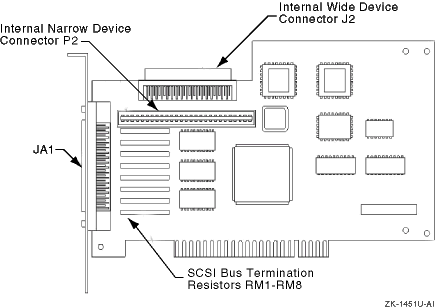
4.3.3.3 KZPBA Termination Resistors
The KZPBA internal termination is disabled by removing the termination
resistors RM1-RM8, as shown in
Figure 4-1.
Figure 4-1: KZPBA Termination Resistors