This appendix shows you how to use GSS-APIs to secure an application using C-programming language example code. It also explains the sample programs provided Application Security SDK. This appendix contains the following information:
Read this section if you are unfamiliar with network authentication using Kerberos. The following information is contained in this section:
Start with the fundamental concepts explained below:
Identification — Who are you? A secure system answers this question based on your system identity and a unique personal characteristic such as a smart card or a password.
Authentication — Can you prove who you are? The authentication process verifies that you are who you say you are, generally through a third party such as a security server. Authentication is also used to prove the origin of a message.
Authorization — What are you allowed to do on the system? Authorization depends on authentication. Once the system knows you are who you say you are, your access privileges are allocated based on your identity.
Confidentiality — Is the message protected from unauthorized disclosure? Encryption is a method for implementing confidentiality. Only people who know how to decrypt the information can access it. Encryption and decryption is usually provided by some kind of key (secret) and an algorithm (public).
Integrity — Was a message corrupted in transit? Integrity is usually achieved by comparing checksums computed on the message before and after transmission. Message stream integrity is also provided by features such as replay detection, message sequencing, and so forth.
Kerberos is a two-way third-party authentication and key distribution
system that was developed at the Massachusetts Institute of Technology.
C.1.2.1 Definitions
Client—A program or process that makes use of a network service on a user's behalf. Note that in some cases a server may itself be a client of some other server (for example, a print server may be a client of a file server).
User—A person who uses a client program.
Application Servers and Services—A host system which provides services from one side of a distributed application. Users run client programs to access services running on application servers.
Principal—Means for identifying entities using the HP security system, that is, any user, client, service, application, or host system that has stored a secret key with the security server.
Key Distribution Center (KDC)—The security server that contains the principal database, authentication service, and ticket-granting service. These KDC components provide principals with credentials that allow the principals to prove their identity and subsequently exchange messages:
The principal database holds the secret keys for all principals used in network authentication.
The Authentication Service verifies the identity of a principal and issues Ticket-Granting Tickets (TGT).
The Ticket-Granting Service distributes service tickets after validating the TGT and the authenticator.
Principal Database—A database (usually located on the same machine as the KDC) that holds the shared secrets (that is, secret keys) used in Kerberos authentication. Each user has a principal in the database.
Realm—A name for a collection of principals in a network served by one or more KDCs. All principal names within a realm must be unique. Within a realm, the administration policy is the same for all principals.
Service—An application running on a server that is available to clients on a network.
Key—A secret value such as a password that is used during the process of encryption and decryption.
Ticket—A credential used to authenticate one principal to
another.
Only a KDC can issue a Kerberos ticket.
C.1.2.2 Concepts and Processes
The following sections describe Kerberos concepts and processes.
C.1.2.2.1 A Shared Secret
Two principals that wish to communicate with each other securely first
need to share a
secret key.
This secret key, called a session key, is generated
randomly and given to the two principals and no one else.
The session key
is used by both principals for authentication and encryption.
C.1.2.2.2 Trusted Third Party Arbitration
Each principal has a secret key, which remains unchanged until the principal changes it. The session key, on the other hand, is random and exists only for as long as a session is needed between the two principals.
A service doesn't trust a client, and a client doesn't trust
a service.
The client and service trust only the Key Distribution Center,
which generates and distributes session keys.
C.1.2.2.3 The Kerberos Network
A Kerberos network is divided into security domains, called realms. Each realm has its own authentication server (KDC) and implements its own security policy. This allows organizations implementing Kerberos to have different levels of security for different information classes within the organization.
A realm can accept authentication from other realms or not accept them without a re-authentication if the information security policy requires re-authentication. This is called inter-realm authentication.
Realms are hierarchical.
That is, each realm may have child realms,
and each realm may have a parent.
This structure allows realms that have no
direct contact to share authentication information.
C.1.2.2.4 Three Phases to Authentication
There are three phases to the Kerberos authentication process:
The client obtains an initial credential (ticket-granting ticket or TGT) for use in requesting access to other services by using their password.
The client and the KDC exchange Authentication Service messages when acquiring initial credentials.
The client requests authentication to a specific service.
The client and the KDC exchange Ticket-Granting Service messages when acquiring a service ticket.
The client presents a service ticket to the service.
The client and the requested service exchange application messages to do this.
C.1.2.2.5 Authentication Service Message Exchange
The Authentication Service (AS) exchange provides the client with its initial credentials and a session key (shared secret) to be used with the Ticket-Granting Service (TGS). These credentials can be presented to the Ticket-Granting Service to request credentials (that is, a service ticket) that prove the client's identity to a specific service.
This message exchange consists of a request generated by the client and the reply generated by the KDC Authentication Service. At the end of this exchange, the client has initial credentials (the Ticket-Granting Ticket) that allow it to authenticate itself to the Ticket-Granting Service.
When the Authentication Service receives the request message from the client, it checks to see if it knows the client. If it does, it generates a random session key (which becomes a shared secret between the client and the Ticket-Granting Service) and the TGT (which is used by the client to authenticate itself to the Ticket-Granting Service).
The Authentication Service sends both the session key and the TGT as
part of a reply message.
Since the Authentication Service doesn't know
if the client is authentic, it encrypts part of the reply message using the
client's secret key, knowing that only the authentic client will be
able to decrypt it.
C.1.2.2.6 Ticket-Granting Service Message Exchange
A ticket is only good for a single service; this includes the TGT, which is a ticket to use the services of the Ticket-Granting Service. As such, it is necessary to obtain a separate service ticket for each service the client wants to use. The client obtains service tickets from the ticket-granting service by sending a message to the KDC Ticket-Granting Service. No prompt for a username and password is required in this case since the TGT is used to prove identity.
When a client presents a ticket (including the TGT) to a service, it also presents an authenticator. The authenticator contains the client's name encrypted in the session key of the ticket. In this way, if the service can decrypt the authenticator using the ticket's session key, and the client's name matches the one in the ticket, it can be guaranteed that the client is authentic. It certifies a client's knowledge of a session key and aids in detection of an unauthorized replay of credentials. Authenticators can only be used once.
After receiving the ticket request message, the Ticket-Granting Service decrypts the TGT. The session key is then used to decrypt the authenticator. If the client name matches in both the authenticator and the TGT, the client has successfully authenticated itself to the Ticket-Granting Service and can be granted a service ticket.
The service ticket is sent to the client in the reply message encrypted in the service's secret key. The encrypted part of the message is encrypted using the TGT session key instead of the client's secret key. This way, there is no need for the user to enter her/his password again.
After receiving the reply message, the client decrypts the encrypted
part.
It then stores the service ticket and the corresponding session key
in the credentials cache.
C.1.2.2.7 Application Message Exchange
After a client obtains a service ticket for a service, it can authenticate
and exchange messages with the service securely.
The client sends the service
ticket along with an authenticator to the service for verification.
C.1.2.3 Credential Attributes
The client can request that the credentials issued to it by the KDC carry certain characteristics:
LIFETIME — credentials are issued for a specific length of time. This time is usually determined by the local security policy.
RENEWABLE — an attribute that allows the client to renew its credentials before they expire without entering a principal name and password.
POSTDATED — the client can request a POSTDATED ticket for later use. For example, this ticket could be used by applications to process batch jobs.
FORWARDABLE — these credentials are used when it is necessary for a client to allow a service to perform an operation on its behalf using the client's ticket.
Initial decisions you need to think about before using Application Security SDK to secure a distributed application are listed below:
Before the application is started, will an initial credential (TGT) already exist for the application user?
If no, the application will need to establish a
user context
by calling
csf_gss_acq_user().
This function fetches a initial credential (TGT)
from the security server for the application user.
These credentials are then
used by the initiating application during subsequent processes, and are frequently
referred to in this documentation as the initiator's credentials.
If DES3 encryption or public-key credentials are being used, the application
will need to pass these attributes to
csf_gss_acq_user().
Will the application require mutual authentication?
Mutual authentication is recommended when the initiating application needs to verify the identify of the accepting application, such as in the case of submitting sensitive data like a credit card number to the accepting application.
If yes, the initiating application will need to request mutual authentication
during context establishment when it calls
gss_init_sec_context().
What messages (if any) need to be secured between the application and its peer?
In some cases, authentication is the only needed service required by an application.
In the case where messages need to be protected, what kind of protection is required?
Types of protection fall into two basic categories: confidentiality and integrity.
Confidentiality (or privacy) protects a message from being viewed by an intruder.
Integrity protects a message from being tampered with by an intruder. For example, during a financial transaction, integrity services would be used to protect the currency amount from being altered, or from the account number from being changed.
What Quality of Protection (QOP) is required for message protection?
Lowest quality (DES encryption) will be the fastest but less secure; highest quality (DES3 encryption) will be the slowest but most secure. If the application is using DES3 encryption, there are several prerequisites that must be met.
C.3 Using Basic GSS-API Functions
In the GSS-API world, a security context is either initiated or accepted. The role of the application determines whether it is initiating or accepting the security context. In a client-server application, typically the client initiates the security context and the server accepts the security context. A server may also act as a client of another secure service.
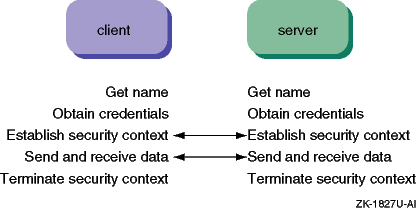
The process of implementing security between an initiator and an acceptor using GSS-API functions entails five major steps:
Both the initiating and the accepting applications should incorporate the steps in the same order. However, not all the steps may be necessary. For example, acquiring credentials can be omitted if default credentials are to be used.
Both applications must execute these steps in the order shown below. For example, each application must acquire credentials before a context can be established between them.
In this explanation of basic GSS functions, it is assumed that the initiating application (or initiator), is a user and the accepting application (or acceptor) is a service.
This explanation further assumes that both applications already possess
initial credentials, that is, a TGT or a service key, from a security server.
If you want to acquire the initial credentials at runtime, you must use the HP
GSS-API extension
csf_gss_acq_user()
to establish a user
context.
The functions described for each of the steps in this section are a
subset of the available GSS-API functions.
They represent the minimum calls
necessary to secure an application with Application Security SDK.
C.4 Step 1: Getting Names
Before you can secure an application, you must get names for the parties involved. This step demonstrates how to import a user name for the initiator and a service name for the acceptor. These names are used to acquire credentials and establish a security context.
Use the
gss_import_name()
function to convert a name
to an
internal format which other GSS-API
functions can use.
There are many formats, or name types, from which to choose
for the conversion.
An internal form name is unintelligible if printed out but you can convert
it into a
human-readable form using
gss_display_name().
This function is handy for displaying the principal associated with an existing
credential if the default credential was acquired.
The same process occurs when either an initiator or the acceptor imports and displays a principal name, either a user name or a service name. GSS-API Name Management Functions describes what you can do with other naming functions.
Note
The call by the initiator to
gss_import_name()is optional. Ifgss_import_name()was not called by the initiator for itself, then the default principal name is retrieved from the credentials cache when thegss_acquire_cred()orgss_init_sec_context()call is made if default credentials are requested. The initiator must still import the name of the acceptor as it is required by thegss_init_sec_context()call.The call by the acceptor to
gss_import_name()is also optional. Ifgss_import_name()was not called by the acceptor for itself, then the default service principal name (host/hostname@REALM) is created when thegss_acquire_cred()orgss_accept_sec_context()call is made.
The
gss_import_name()
function includes the following
parameters:
| Input Parameters | |
input_name_buffer |
Text name to be converted |
input_name_type |
Type of name — public key, Kerberos, and generic name types are supported |
| Output Parameters | |
minor_status |
Kerberos 5 error code |
output_name |
Returned name in internal form |
The following excerpt from the
sample programs
illustrates importing a name for the initiator and
converting it to human-readable form.
The name type specifies
the
Kerberos 5 default which, in this case, is
GSS_C_NT_USER_NAME, a name type that is commonly used for user principals.
This name
type converts a user name user into the form
user@LOCAL_REALM.
/***************************************************************/

char            szUserName[]      = "walth@APPSEC.CYBERSAFE.COM";
OM_uint32       gMaj, gMin        = 0;
gss_buffer_desc input_name        = GSS_C_EMPTY_BUFFER;
gss_buffer_desc display_name      = GSS_C_EMPTY_BUFFER;
gss_name_t      principal_name    = GSS_C_NO_NAME;
gss_OID         display_name_type = GSS_C_NO_OID;

/* Copy the principal name into the GSS buffer structure */
input_name.length = strlen( szUserName );
input_name.value  = strdup( szUserName );

/* Convert the user principal name into GSS internal form */
gMaj = gss_import_name( &gMin,
                        &input_name,
                        GSS_C_NT_USER_NAME,
                        &principal_name );

/* Convert the imported name to human-readable form */
gMaj = gss_display_name( &gMin,
                         principal_name,
                         &display_name,
                         &display_name_type );

/***************************************************************/
The following excerpt from the
sample
programs
illustrates importing a name for the acceptor and converting
it to human-readable form.
The name type specifies the Kerberos 5 default
which, in this case, is
GSS_KRB5_NT_HOSTBASED_SERVICE_NAME,
a name type that is often used for an
unattended host.
This name
type converts the Kerberos host service principal
service@host
into the form
service/fqdn@REALM.
As an example, the converts
ftp@fuji
to
ftp/fuji.company.com@COMPANY.COM.
/***************************************************************/

char            szHostName[]      = "host@dev007.cybersafe.com";
OM_uint32       gMaj, gMin        = 0;
gss_buffer_desc input_name        = GSS_C_EMPTY_BUFFER;
gss_buffer_desc display_name      = GSS_C_EMPTY_BUFFER;
gss_name_t      principal_name    = GSS_C_NO_NAME;
gss_OID         display_name_type = GSS_C_NO_OID;

/* Copy the host service principal name
   into the GSS buffer structure */
input_name.length = strlen( szHostName );
input_name.value  = strdup( szHostName );

/* Convert the host service principal name
   into GSS internal form */
gMaj = gss_import_name( &gMin,
                        &input_name,
                        GSS_KRB5_NT_HOSTBASED_SERVICE_NAME,
                        &principal_name );

/* Convert the imported name to human-readable form */
gMaj = gss_display_name( &gMin,
                         principal_name,
                         &display_name,
                         &display_name_type );

/***************************************************************/
C.5 Step 2: Acquiring Credentials
This step demonstrates how credentials can be acquired for the initiator and the acceptor. The credentials contain TGTs and service key table entries from the security server that the initiator and the acceptor use to authenticate themselves to each other. Therefore, both the initiator and the acceptor must obtain credentials before a security context can be established.
Three types of credentials may be requested:
GSS_C_INITIATE— for an application
that is going to initiate a security context by calling
gss_init_sec_context().
GSS_C_ACCEPT
— for an application
that is going to accept a security context by calling
gss_accept_sec_context().
GSS_C_BOTH
— for an application that
is going to be both initiating and accepting security contexts, in other words,
acting as both a client and a server.
As shown below, acquiring credentials is a local process. No communication with a peer application is needed.
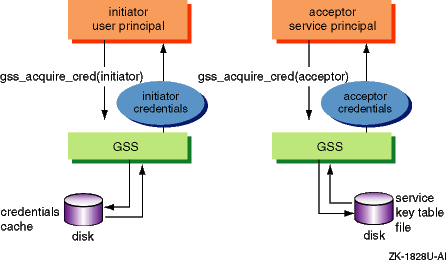
The
gss_acquire_cred()
function uses an imported
name to look for a valid ticket associated with the user or service name.
The credentials must already exist in the HP credentials cache
for the initiator or the service key table for the acceptor.
An exception
is an acceptor application that also initiates security contexts with other
acceptor applications.
A common example is a proxy.
In this case, both a credentials
cache and a service key table file entry is required to support either role.
The
service key table file is named
v5srvtab
by default on the Windows and UNIX platforms.
When
gss_acquire_cred()
is called by an
initiator
requesting
GSS_C_INITIATE
credentials,
the function verifies that a principal name was passed in and looks for a
corresponding
TGT in the credentials cache.
If a principal
name was
not
specified, the function looks for a valid
TGT in the credentials cache using a default name which is the same as default
principal name of the credential cache.
(User login name is
not
used.)
When
gss_acquire_cred()
is called by an
acceptor
requesting
GSS_C_ACCEPT
credentials,
the function verifies that a principal name was passed in and looks for a
corresponding entry in the service key table file.
If a principal name was
not specified, the function looks for a service key table file entry corresponding
to the default acceptor principal name of
host/fqdn@REALM.
An application that is going to be both initiating and accepting security
contexts should have both a credentials cache and a service key table.
In
this case, when
gss_acquire_cred()
is called by the application
requesting
GSS_C_INITIATE
credentials, the function verifies
that a principal name was passed in and looks for a valid TGT for the principal
name in the credentials cache.
If a TGT is not found in the credentials cache,
the function looks for an appropriate entry in the service key table.
If a
service key table entry is found, the function fetches a TGT from the KDC
using the key from the table file.
Note
The initiator's call to
gss_acquire_cred()is optional. If the initiator does not callgss_acquire_cred()before thegss_init_sec_context()call is made, credentials with the default name and typeGSS_C_INITIATEare acquired.The acceptor's call to
gss_acquire_cred()is also optional. In this case,gss_accept_sec_context()obtains credentials with the default name and typeGSS_C_ACCEPT. You will have improved performance if the accepting application acquires the credentials withgss_acquire_cred(), and then re-uses them as required.
The following parameters are used by
gss_acquire_cred():
| Input Parameters | |
desired_name |
Principal or service name requiring credentials. If unspecified, the default principal is used. |
time_req |
Credential lifetime requested (ignored). You cannot specify the lifetime of the credentials because the credentials already exist. The lifetime is dictated by the circumstances under which the credentials were created. |
desired_mechs |
Security mechanism desired (Kerberos 5) |
cred_usage |
Credentials usage (initiate, accept, or both) |
| Output Parameters | |
minor_status |
Kerberos 5 error code |
output_cred_handle |
Credentials acquired |
actual_mechs |
Security mechanism used (Kerberos 5) |
time_rec |
Credential lifetime received. This is only supported for initiators; acceptor lifetimes are indefinite. |
The following excerpt from the
sample
programs
illustrates acquiring
GSS_C_INITIATE
credentials
for the initiator and
GSS_C_ACCEPT
credentials for the
acceptor.
The principal names were imported in Step 1.
/****************************************************************\


OM_uint32     gMaj, gMin              = 0;
OM_uint32     cred_lifetime_requested = 600;
OM_uint32     cred_lifetime_received  = 0;
i_32          cred_usage              = GSS_C_INITIATE;
gss_cred_id_t cred_handle             = GSS_C_NO_CREDENTIAL;
gss_OID_set   actual_mechs            = GSS_C_NO_OID_SET;

/* Get an Initiator credential from the cred cache */
gMaj = gss_acquire_cred( &gMin,
                         principal_name,
                         cred_lifetime_requested,
                         rfc_krb5_c_OID_set,
                         cred_usage,
                         &cred_handle,
                         &actual_mechs,
                         &cred_lifetime_received );
     :
     :
     :

OM_uint32     gMaj, gMin             = 0;
OM_uint32     cred_lifetime_received = 0;
i_32          cred_usage             = GSS_C_ACCEPT;
gss_cred_id_t cred_handle            = GSS_C_NO_CREDENTIAL;
gss_OID_set   actual_mechs           = GSS_C_NO_OID_SET;

/* Get an Acceptor credential from the cred cache
   or from the v5srvtab key table file */
gMaj = gss_acquire_cred( &gMin,
                         principal_name,
                         GSS_C_INDEFINITE,
                         GSS_C_NO_OID_SET,
                         cred_usage,
                         &cred_handle,
                         &actual_mechs,
                         &cred_lifetime_received );

/****************************************************************\
After the credentials are acquired, it is necessary to free storage
allocated using the
gss_release_cred()
function.
The
sample programs
contain examples.
In general, if a buffer was locally allocated by the user (using
malloc
or
strdup, for example), the application
must free it.
If a buffer was allocated by a GSS-API function, it must be
freed using
gss_release_xxx()
functions.
These actions
prevent memory leaks.
Credential Management Functions shows you what you can do with other
credentials functions.
C.6 Step 3: Establishing a Security Context
Once an application and its peer have credentials, a security context can be established. A security context is essentially a set of security parameters used to secure a conversation between the application and its peer.
Several security contexts may exist simultaneously between an application and its peer. However, one context should not be used for more than one conversation. For example, in a client-server application, if ten clients were communicating with a server application, each client would have a unique security context and the server would manage ten security contexts, one for each client.
When initiating a context, an application can select various security options which are discussed further in Security Context Management Functions:
Channel bindings
Confidentiality and integrity
Replay detection
Out-of-sequence message detection
Mutual authentication
Encryption algorithm (DES or DES3)
Ticket forwarding (credentials delegation)
The sequence of steps taken when an application establishes a security context is described below. Several invocations of the function calls used by the initiator and the acceptor may be necessary before the context is fully established.
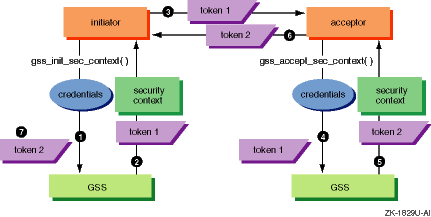
The initiator starts a security context with the acceptor
by calling
gss_init_sec_context(), passing the credentials
it previously acquired and the identity used by the acceptor.
The
gss_init_sec_context()
function returns
a partially-built security context plus a token and a status code.
The token contains GSS-API information that must be sent to the acceptor. The token is opaque to the initiating application, although the application knows the length of the token so it can transfer the token to the acceptor.
The status code indicates whether the function will need to be called again. If the function is called again, a return token must be received from the acceptor and passed to it.
A token may even be returned when an error status is returned. Regardless of the status code returned, the token must be transferred to the other application.
The initiator sends the token across the communications protocol to the acceptor, which is waiting for a context to be established.
How tokens are transferred is application dependent. However, the GSS-API standard requires that tokens be sent in the sequence in which they are generated during context establishment.
The acceptor reads the token from the communications protocol
and calls
gss_accept_sec_context(), passing the credentials
it previously acquired and the token it received.
The
gss_accept_sec_context()
function returns
a status code and may return a token.
The status code indicates whether the function will need to be called again. If the function is called again, a return token must be received from the initiator and passed to it.
A token may even be returned when an error status is returned. Regardless of the returned status code, the token must be transferred to the other application.
If
gss_accept_sec_context()
returned a
token, the acceptor must send it across the communications protocol to the
initiator, which is waiting for this token to continue the security context
establishment.
If the initiator received a return token, it calls
gss_init_sec_context()
and passes the token to it.
Steps 1 through 5 show the minimum set of exchanges between the initiator
and the acceptor.
Steps 6 and 7 illustrate multiple invocations of the
gss_init_sec_context()
and
gss_accept_sec_context()
functions.
These functions loop when the
GSS_S_CONTINUE
major status is returned.
When a token is returned from
gss_init_sec_context(), it must be sent to the acceptor.
If
GSS_S_CONTINUE
is returned, a token is expected back from the acceptor and must be provided
as input to the next invocation of
gss_init_sec_context().
This behavior typically occurs when Kerberos performs mutual authentication.
When a
GSS_S_CONTINUE
status is returned as the major
status code and any token returned by the call is sent to the peer application,
the security context is fully established on the local application.
The
gss_init_sec_context()
function uses the following
parameters:
| Input Parameters | |
initiator_cred_handle |
Credentials for the initiator (or default credentials from the credentials cache). |
target_name |
Name of the acceptor |
mech_type |
Security mechanism desired (Kerberos 5) |
req_flags |
Service options such as DES3/DES encryption, credentials delegation, mutual authentication, and detection of replayed or out-of-sequence messages |
time_req |
Context lifetime requested (ignored) |
input_chan_bindings |
Channel bindings |
input_token |
Token returned from the acceptor |
| Output Parameters | |
minor_status |
Kerberos 5 error code |
context_handle |
Security context to be initiated |
actual_mech_type |
Security mechanism used (Kerberos 5) |
output_token |
Token to be sent to the acceptor |
ret_flags |
Flags identifying the service options supported by the context |
time_rec |
Context lifetime received (always indefinite) |
The following excerpt from the
sample
programs
illustrates how to use the
gss_init_sec_context()
call to establish a security context with the following options:
Mutual authentication
Replay detection
Out-of-sequence message detection
Since no encryption method is specified, it defaults to that assigned to the credentials in the principal database.
/***************************************************************/

char            szHostName[]      = "host@dev007.cybersafe.com";
OM_uint32       gMaj, gMin        = 0;
OM_uint32       req_flags         = GSS_C_MUTUAL_FLAG |
                                    GSS_C_REPLAY_FLAG |
                                    GSS_C_SEQUENCE_FLAG;
OM_uint32       req_time          = 3600;
OM_uint32       ret_flags         = 0;
OM_uint32       ret_time;         = 0;
gss_buffer_desc input_name        = GSS_C_EMPTY_BUFFER;
gss_buffer_desc input_token       = GSS_C_EMPTY_BUFFER;
gss_buffer_desc output_token      = GSS_C_EMPTY_BUFFER;
gss_buffer_t    token_handle      = GSS_C_NO_BUFFER;
gss_ctx_id_t    context_handle    = GSS_C_NO_CONTEXT;
gss_name_t      service_name      = GSS_C_NO_NAME;
gss_OID         actual_mech_type  = GSS_C_NO_OID;

/* Copy the host service principal name
   into the GSS buffer structure */
input_name.length = strlen( szHostName );
input_name.value  = strdup( szHostName );

/* Convert the host service principal name
   into GSS internal form */
gMaj = gss_import_name( &gMin,
                        &input_name,
                        GSS_KRB5_NT_HOSTBASED_SERVICE_NAME,
                        &service_name );

/* Establish a context. The default claimant credential is
   specified. In that case, the credential is pulled from the
   credential cache. Alternatively, the claimant credential
   could have been acquired via gss_acquire_cred and passed
   to gss_init_sec_context. */
do {
    token_handle = input_token.length ?
                   &input_token : GSS_C_NO_BUFFER;

    /* Initiate a security context with the Acceptor */
    gMaj = gss_init_sec_context( &gMin,
                                 GSS_C_NO_CREDENTIAL,
                                 &context_handle,
                                 service_name,
                                 GSS_C_NO_OID,
                                 req_flags,
                                 req_time,
                                 GSS_C_NO_CHANNEL_BINDINGS,
                                 token_handle,
                                 &actual_mech_type,
                                 &output_token,
                                 &ret_flags,
                                 &ret_time);


    /* If there is a token to send, regardless of
       error condition, then send it to the peer */
    if ( output_token.length != 0 ) {
        SendToken( &output_token );
    }

    /* Clear the buffers for the next iteration */
    Local_Release_Buffer( &input_token );
    gss_release_buffer( &tmpMinor, &output_token );

    /* Now is the proper time to check the status code */
    if ( GSS_ERROR( gMaj ) {
        /* Process error and exit */
    }

    /* If context establishment requires a token in response,
       then fetch it from the peer */
    if ( gMaj & GSS_S_CONTINUE_NEEDED ) {
        RecvToken( &input_token );
    }

} while ( gMaj & GSS_S_CONTINUE_NEEDED );

/***************************************************************/
After the context is no longer needed, it should be destroyed using
the
gss_delete_sec_context()
function.
The
sample programs
contain examples.
The
gss_accept_sec_context()
function uses the following
parameters:
| Input Parameters | |
context_handle |
Security context being established |
acceptor_cred_handle |
Credentials for the acceptor |
input_token_buffer |
Token from the initiator |
input_chan_bindings |
Channel bindings |
| Output Parameters | |
minor_status |
Kerberos 5 error code |
src_name |
Name of the initiator |
mech_type |
Security mechanism used (Kerberos 5) |
output_token |
Token to be sent to the initiator |
ret_flags |
Flags identifying the service options supported by the context |
time_rec |
Context lifetime received (always indefinite) |
delegated_cred_handle |
Delegated credentials from the context initiator |
The following excerpt from the
sample
programs
illustrates how to use the
gss_accept_sec_context()
call to establish a security context.
*****************************************************************

OM_uint32       gMaj, gMin       = 0;
OM_uint32       ret_flags        = 0;
OM_uint32       ret_time         = 0;
OM_uint32       ctx_flags        = 0;
gss_buffer_desc input_token      = GSS_C_EMPTY_BUFFER;
gss_buffer_desc output_token     = GSS_C_EMPTY_BUFFER;
gss_cred_id_t   delegated_cred   = GSS_C_NO_CREDENTIAL;
gss_ctx_id_t    context_handle   = GSS_C_NO_CONTEXT;
gss_name_t      src_name         = GSS_C_NO_NAME;
gss_OID         actual_mech_type = GSS_C_NO_OID;

/* Loop based on the example in
   "draft-ietf-cat-gssv2-cbind-07.txt" */
do {
    OM_uint32  tmpMinor = 0;

    /*  Fetch next security context token from the Initiator */
    RecvToken( &input_token );

    /*  Wait for the Initiator to try to establish a security
        context. The acceptor will use a previously acquired
        acceptor credential. */
    gMaj = gss_accept_sec_context( &gMin,
                                   &context_handle,
                                   cred_handle,
                                   &input_token,
                                   GSS_C_NO_CHANNEL_BINDINGS,
                                   &src_name,
                                   &actual_mech_type,
                                   &output_token,
                                   &ret_flags,
                                   &ret_time,
                                   &delegated_cred );

    /* If the authentication routine forms a token to send to
       the Initiator, then send it now -- before function error
       checking, so that if an error token is generated, the
       Initiator will receive it. */
    if ( output_token.length != 0 ) {
        SendToken( &output_token );
    }

    /* Clear the buffers for the next iteration */
    Local_Release_Buffer( &input_token );
    gss_release_buffer( &tmpMinor, &output_token );

    /* Now is the proper time to check the status code */
    if ( GSS_ERROR( gMaj ) ) {
        /* Process error and exit */
    }

} while ( gMaj & GSS_S_CONTINUE_NEEDED );

******************************************************************
After the context is no longer needed, it should be destroyed using
the
gss_delete_sec_context()
function.
The
sample programs
contain examples.
C.7 Step 4: Exchanging Messages
After credentials are acquired and the security context is established between an application and its peer, messages can be secured and sent. This step explains the options for securing messages that are available in Application Security SDK.
Version 2 of the GSS-API standard has two pairs of functions for securing data:
gss_get_mic()
and
gss_verify_mic()
provide
message integrity.
gss_wrap()
and
gss_unwrap()
provide message integrity and, optionally,
confidentiality.
When a sending application calls one of these functions, a token is
returned by the function.
The token contains a signature computed on the message
being sent using an integrity algorithm.
In the case of
gss_wrap(), the token may also contain the message itself which, optionally,
can be encrypted for confidentiality.
Application Security SDK provides four integrity algorithms:
DES3 MD5
DES MAC
DES MD5
MD5
Two encryption algorithms are provided: DES3 and DES.
The application then uses a communications protocol such as TCP/IP to send the token (and the message if it is not included in the token) to the receiving application. The receiving application calls the complementary function to perform the reciprocal action on the data passed to it.
These functions offer three options for securing data:
Message and signature are sent separately.
With this option, the token contains a signature created by the sending
application using the
gss_get_mic()
function.
The message
is not part of the token.
When the receiving application gets the token and the message, it calls
the
gss_verify_mic()
function which verifies the signature
to ensure that the message and the signature were not modified in transit.
Message and signature sent together.
With this option, the token contains a signature created by the sending
application using the
gss_wrap()
function.
The message
is encapsulated in the token.
When the receiving application gets the token, it calls the
gss_unwrap()
function, which verifies the signature to ensure that
the message and the signature were not modified in transit.
Encrypted message and signature sent together.
This option is the same as option 2 except that the message and the
signature are encrypted by the
gss_wrap()
function and
decrypted by the
gss_unwrap()
function.
Each option serves a specific use when securing distributed application data.
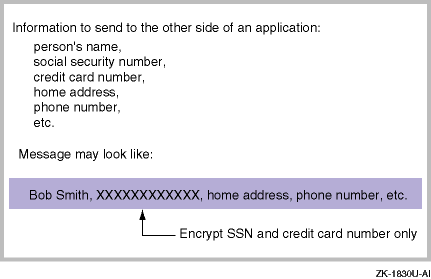
For example, if an application has some data that needs to be secured and other data that does not need to be secured, the application can choose to secure only the data that must be secured. These considerations are application dependent, based on the length of the data and the speed, efficiency, and strength of the encryption algorithm. If the data length is large, it may be efficient to secure only a piece of the message; however, it is not unusual to secure the entire message.
An example of when an application might use
gss_wrap()
with confidentiality is below.
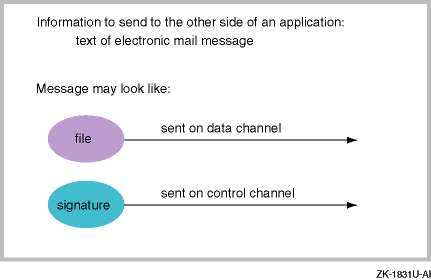
In another example, if an application wanted to ensure that a message's
integrity was preserved during transmission, and the application requires
that data be sent on one channel and checksum on another, out-of-band (control),
channel such as ftp, the application needs to use the
gss_get_mic()
function as shown below.
C.7.1 Using gss_get_mic( ) and gss_verify_mic( )
Calling
gss_get_mic()
allows an application to create
a signature for data that can be verified by a peer application using
gss_verify_mic().
This ensures message integrity, that is, that the
message and its signature were not modified in transit.
The sequence of steps for using these functions to send a message from an initiator to an acceptor follows:
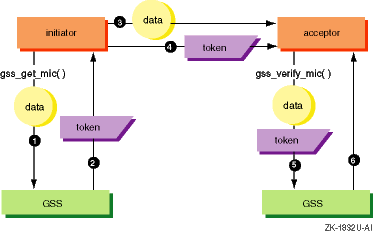
The initiator calls
gss_get_mic(), passing
the data for which it wants to have a signature generated.
The function returns a token, which contains a signature for the data, but not the data itself.
The initiator sends the data to the acceptor.
The token and data can be sent in any order, as separate messages, within the same message, or any other option.
The initiator sends the token to the acceptor.
The acceptor calls
gss_verify_mic(), passing
the data and the token it received from the initiator.
The
gss_verify_mic()
function returns a
status indicating whether the signature was successfully verified against
the data.
The
gss_get_mic()
function includes the following
parameters:
| Input Parameters | |
context_handle |
Security context being used |
qop_req |
Quality of protection (QOP) requested. |
message_buffer |
Message to be protected |
| Output Parameters | |
minor_status |
Kerberos 5 error code |
message_token |
Token containing a signature |
The following excerpt from the sample programs illustrates sending a message with this function call. The default QOP is specified which, in this case, is determined by the encryption type specified for the security context.
/****************************************************************/

char             szMessage[]   = "This is a test message";
OM_uint32        gMaj, gMin    = 0;
gss_buffer_desc  input_buffer  = GSS_C_EMPTY_BUFFER;
gss_buffer_desc  output_buffer = GSS_C_EMPTY_BUFFER;
gss_qop_t        qop_req       = GSS_C_QOP_DEFAULT;

/* Stuff plaintext message into the input buffer*/
input_buffer.value  = strdup( szMessage );
input_buffer.length = strlen( szMessage );

/* Create a message integrity code (MIC) from the message */
gMaj = gss_get_mic( &gMin,
                    context_handle,
                    qop_req,
                    &input_buffer,
                    &output_buffer );

/* Send the MIC token */
SendToken( &output_buffer );

/****************************************************************/
Storage associated with the token should be freed after use using the
gss_release_buffer()
function to avoid memory leaks.
The
gss_verify_mic()
function includes the following
parameters:
| Input Parameters | |
context_handle |
Security context being used |
message_buffer |
Message to be verified |
token_buffer |
Token containing a signature |
| Output Parameters | |
minor_status |
Kerberos 5 error code |
qop_state |
Quality of protection used |
When the
gss_verify_mic()
function returns
GSS_S_COMPLETE, the signature was verified successfully.
The following excerpt from the sample programs illustrates receiving a message with this function call.
/****************************************************************/

char             szMessage[]    = "This is a test message";
OM_uint32        gMaj, gMin     = 0;
gss_buffer_desc  input_buffer   = GSS_C_EMPTY_BUFFER;
gss_buffer_desc  message_buffer = GSS_C_EMPTY_BUFFER;
gss_qop_t        qop_state      = 0;

/* Stuff plaintext message into the message buffer*/
message_buffer.value  = strdup( szMessage );
message_buffer.length = strlen( szMessage );

/* Receive the MIC token */
RecvToken( &input_buffer );

/* Verify the message against the message integrity code (MIC) */
gMaj = gss_verify_mic( &gMin,
                       context_handle,
                       &message_buffer,
                       &input_buffer,
                       &qop_state );

/****************************************************************/
C.7.2 Using gss_wrap( ) and gss_unwrap( )
Calling
gss_wrap()
allows an application to wrap
data that can be verified by the peer application using
gss_unwrap().
This ensures that the message has not been modified in transit
(message integrity).
Additionally, the application can encrypt the data being sent for confidentiality, ensuring that no one can view the data. Encapsulating data into a token creates a secure envelope for data that can be sent over the network.
The sequence of steps for using these functions to send a message from an initiator to an acceptor follows:
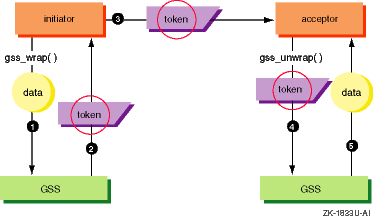
The initiator calls
gss_wrap()
with data
that it wants to wrap into a token.
Confidentiality may be requested at the
same time.
A token is returned containing the data and the signature of the data. If confidentiality was requested, both are encrypted.
The initiator sends the token to the acceptor.
The acceptor calls
gss_unwrap(), passing
the token it received from the initiator.
The
gss_unwrap()
function returns both
a status code, verifying the signature, and the original data.
The data is
also decrypted if confidentiality was originally requested.
The
gss_wrap()
function includes the following parameters:
| Input Parameters | |
context_handle |
Security context being used |
conf_req_flag |
Confidentiality request (true or false) |
qop_req |
Quality of protection (QOP) requested |
input_message_buffer |
Message to be protected |
| Output Parameters | |
minor_status |
Kerberos 5 error code |
conf_state |
Confidentiality confirmation (true or false) |
conf_state |
Protected message |
The following excerpt from the sample programs illustrates sending an encrypted message with this function call. The default QOP is specified which, in this case, is determined by the encryption type specified for the security context.
/**********************************************************/
char             szMessage[]   = "This is a test message";
OM_uint32        gMaj, gMin    = 0;
int              conf_req_flag = 1;
i_32             conf_state    = 0;
gss_buffer_desc  input_buffer  = GSS_C_EMPTY_BUFFER;
gss_buffer_desc  output_buffer = GSS_C_EMPTY_BUFFER;
gss_qop_t        qop_req       = GSS_C_QOP_DEFAULT;

/* Stuff plaintext message into the input buffer*/
input_buffer.value  = strdup( szMessage );
input_buffer.length = strlen( szMessage );

/* Wrap (Seal) the message into a token */
gMaj = gss_wrap( &gMin,
                 context_handle,
                 conf_req_flag,
                 qop_req,
                 &input_buffer,
                 &conf_state,
                 &output_buffer );

/* Send the message token */
SendToken( &output_buffer );
/**********************************************************/
Storage associated with the protected message should be freed after
use using the
gss_release_buffer()
function to avoid memory
leaks.
The
gss_unwrap()
function includes the following
parameters:
| Input Parameters | |
context_handle |
Security context being used |
input_message_buffer |
Message to be unwrapped, verified, and, optionally, decrypted |
| Output Parameters | |
minor_status |
Kerberos 5 error code |
output_message_buffer |
Unwrapped message |
conf_state |
Confidentiality confirmation (true or false) |
qop_state |
Quality of protection used |
When the
gss_unwrap()
function returns
GSS_S_COMPLETE, the signature was verified successfully.
The following excerpt from the sample programs illustrates receiving a message with this function call.
/****************************************************************/

char             szMessage[256];
OM_uint32        gMaj, gMin    = 0;
i_32             conf_state    = 0;
gss_buffer_desc  input_buffer  = GSS_C_EMPTY_BUFFER;
gss_buffer_desc  output_buffer = GSS_C_EMPTY_BUFFER;
gss_qop_t        qop_state     = 0;

/* Receive the message token */
RecvToken( &input_buffer );

/* Unwrap (Unseal) the message token */
gMaj = gss_unwrap( &gMin,
                   context_handle,
                   &input_buffer,
                   &output_buffer,
                   &conf_state,
                   &qop_state );

/* Extract plaintext message from the output buffer*/
if ( output_buffer.value != NULL ) {
    strcpy( szMessage, output_buffer.value );
}

/****************************************************************/
Storage associated with the unwrapped message should be freed after
use using the
gss_release_buffer()
function to avoid memory
leaks.
C.8 Step 5: Terminating the Security Context
When either application has completed communications with its peer, it may terminate the security context. The GSS-API standard allows a security context to be terminated by the initiating and the accepting application.
The process for terminating a security context is the same for both the initiator and the acceptor. If several security contexts coexist between an application and its peer, each context must be terminated separately.
The
gss_delete_sec_context()
function includes the
following parameters:
| Input Parameters | |
| context_handle | Security context being deleted |
| Output Parameters | |
| minor_status | Kerberos 5 error code |
| output_token | Specify GSS_C_NO_BUFFER to request local deletion. This is recommended by HP. |
The following excerpt from the sample programs illustrates terminating a security context and releasing credentials acquired earlier.
/****************************************************************/

/* The V2 GSS_API specs recommend setting the output token
   parameter to NULL to signify that no token is to be
   returned. */

gMaj = gss_delete_sec_context( &gMin,
                               &context_handle,
                               GSS_C_NO_BUFFER );

context_handle = GSS_C_NO_CONTEXT;
     :
     :
     :
..gMaj = gss_release_cred( &gMin,
                         &cred_handle );

cred_handle = GSS_C_NO_CREDENTIAL;

/****************************************************************/
HP extensions to the GSS-API standard give applications better control of their security environment. These extensions allow you to:
Obtain initial credentials for a user
Set the required time synchronization between initiators, acceptors, and security servers
Use DES3 encryption for improved confidentiality
These extensions are mechanism and implementation specific.
If you use
them, the portability of your application may be affected.
For example, the HP
implementation of DES3 will not interoperate with other GSS-API vendors offering
DES3.
C.9.1 Obtaining Initial Credentials
When the standard GSS-API functions are used with Kerberos 5, the application must already have obtained a ticket-granting ticket (TGT) prior to running the GSS-API secured application. A user can obtain a TGT by running kinit or an equivalent application (for example, HP Single Sign-On).
In some situations it may be desirable to have the user execute only a single program that incudes the acquisition of the TGT. Therefore, Application Security SDK includes extension functions that can be used to obtain initial credentials from a security server.
The
csf_gss_acq_user()
function is an HP
extension that acquires initial credentials from within an application using
secret key or public key authentication, optionally, with DES3 encryption.
When this function establishes a user context, it constructs a credentials cache for the user if it does not exist. If the credentials cache does exist but contains credentials that do not match those requested, the cache is re-initialized. In this case, the application must ensure that no other application is using the credentials cache.
This function also provides prompts and labels that the application must display. The application must collect the resulting responses and return them to GSS.
The
csf_gss_acq_user()
function includes the following
parameters:
| Input Parameters | |
user_name |
Name of user or service needing initial credentials. If not specified, a default principal or login name can be used. |
desired_mechs |
Security mechanism desired (Kerberos 5) |
options |
Options that determine the protocol key, attributes (such as lifetime, renewable, forwardable, pre-authenticated and proxiable), and encryption method (DES or DES3) of the initial credentials. |
user_response |
Passes a user response to an application prompt |
| Output Parameters | |
minor_status |
Kerberos 5 error code |
user |
User context being acquired |
user_prompt |
Passes prompts to the application |
user_label |
Passes prompting information to the application |
prompt_state |
Passes prompting display hints to the application |
prompting_mech |
Security mechanism used (Kerberos 5) |
pwd_exp_time |
Expiration time of user's password |
To use the
csf_gss_acq_user()
function:
Specify Kerberos 5 as the security mechanism.
Select the desired options for the TGT.
Respond to prompts. The function returns parameters that identify how the prompt should be processed and any user input needed.
This function is a looping function, that is, it may need to be called more than once:
If it returns
GSS_S_COMPLETE, the
function has completed its task.
If it returns
GSS_S_CONTINUE_NEEDED,
one or more prompts from Kerberos 5 must be satisfied.
Other special HP functions are available for
managing initial credentials, for example,
csf_gss_inq_user()
for querying the TGT.
To release the storage associated
with a user context after it is no longer needed, use
csf_gss_release_user().
The following excerpt from the sample programs illustrates establishing a user context for initial credentials with the following options:
Forwardable
Lifetime of 10 hours
Renew time of 48 hours
DES3 encryption
It also checks for prompts of a password, challenge, and one-time password (OTP). The principal name was imported previously. Calls releasing storage no longer needed are not shown.
/****************************************************************/

OM_uint32             gMaj           = 0;
OM_uint32             gMin           = 0;
i_32                  done           = 0;
i_32                  prompt_state   = CSF_GSS_C_USER_STATE_NULL;
int                   optCount       = 0;
gss_buffer_desc       user_prompt1   = GSS_C_EMPTY_BUFFER;
gss_buffer_desc       user_label1    = GSS_C_EMPTY_BUFFER;
gss_buffer_desc       response1      = GSS_C_EMPTY_BUFFER;
gss_buffer_t          user_prompt    = &user_prompt1;
gss_buffer_t          user_label     = &user_label1;
gss_buffer_t          response       = GSS_C_NO_BUFFER;
csf_gss_user_t        gss_user       = CSF_GSS_C_NO_USER;
gss_OID               prompting_mech = GSS_C_NO_OID;
csf_gss_mech_opt_desc opts[10];
char                  buff[256];
time_t                pwd_exp_time;

/* Set up the csf_gss_acq_user options */
opts[optCount].mechOID = rfc_krb5_c_OID;
opts[optCount].id  = CSF_GSS_C_ACQ_USER_OPT_FORWARDABLE;
++optCount;

opts[optCount].mechOID = rfc_krb5_c_OID;
opts[optCount].id  = CSF_GSS_C_ACQ_USER_OPT_LIFETIME;
opts[optCount].val = "10h";
++optCount;

opts[optCount].mechOID = rfc_krb5_c_OID;
opts[optCount].id  = CSF_GSS_C_ACQ_USER_OPT_RENEWABLE;
opts[optCount].val = "48h";
++optCount;

opts[optCount].mechOID = rfc_krb5_c_OID;
opts[optCount].id      = CSF_GSS_C_ACQ_USER_OPT_DES3;
++optCount;

opts[optCount].mechOID = GSS_C_NO_OID;

/* Acquire the user context */
do {
    gMaj = csf_gss_acq_user( &gMin,
                             principal_name,
                             rfc_krb5_c_OID_set,
                             opts,
                             response,
                             &gss_user,
                             user_prompt,
                             user_label,
                             &prompt_state,
                             &prompting_mech,
                             &pwd_exp_time );


    /* Check whether user needs to provide more information */
    if ( gMaj & GSS_S_CONTINUE_NEEDED ) {


        switch ( prompt_state )
        {
            case CSF_GSS_C_USER_STATE_PASSWORD_NOECHO:
            case CSF_GSS_C_USER_STATE_PASSWORD_ECHO:
            printf( "Password information is requested...\n");
            break;

            case CSF_GSS_C_USER_STATE_CHALLENGE_NOECHO:
            case CSF_GSS_C_USER_STATE_CHALLENGE_ECHO:
            printf( "Challenge information is requested...\n");
            break;

            case CSF_GSS_C_USER_STATE_OTP_NOECHO:
            case CSF_GSS_C_USER_STATE_OTP_ECHO:
            printf( "OTP information is requested...\n");
            break;

            default:
            printf( "Unrecognized prompt state.\n");
        }

        printf( "%s\n", user_label->value);
        printf( "Enter %s", user_prompt->value);
        fflush(stdout);

        response = &response1;

        fgets(buff, 256, stdin);
        response->value  = buff;
        response->length = strlen(buff);
        buff[response->length - 1] = '\0';
    }
    else {
        done = 1;
    }

} while (!done);

/***************************************************************/
C.9.2 Required time synchronization
The host for an accepting application must be synchronized within five minutes of the security server granting credentials. If the host for an initiating application is synchronized to within five minutes of the security server, it must also be synchronized within five minutes of the accepting application. If the clock skew is greater than five minutes, authentication will fail. When credentials are being forwarded from an application to its peer, the clocks on all systems must be synchronized to within five minutes.
As a consequence of the allowed five minute variation in host clocks,
the security server will reject tickets before the actual expiration time
if the remaining lifetime is less than the time skew limit.
The actual valid
lifetime
in minutes required by the time skew limit depends on whether the initiator's
clock is ahead or lags the security server's clock, but ranges from
1 to 5 minutes.
As an example of a GSS failure related to this time skew limit,
the function
gss_init_sec_context()
will fail and set the
context_handle parameter to
GSS_C_NO_CONTEXT
if the initiator's
Kerberos credentials are within the time skew limit of expiration.
If this
occurs, the function returns the Kerberos error "Credentials Not Found"
(hex value
C0001507).
In this case, the initiator application
must acquire a new initial credential (TGT) from the security server before
a context can be established with an acceptor application using
gss_init_sec_context().
C.9.3 Using DES3 Encryption
Application Security SDK supports both DES and DES3 encryption. However, multiple encryption systems for a single security context are not allowed.
The following conditions must be met before DES3 encryption can used to encrypt messages:
TrustBroker Security Server must be configured for DES3 when its database is created.
The principals for the initiating and accepting applications must be DES3 enabled in the principal database. This means that if a user is running the initiating application, that user's principal must be DES3 enabled.
The initiating application must obtain a TGT using DES3.
The
preceding excerpt contains an example using
csf_gss_acq_user().
The acceptor must have a key table entry for DES3.
The initiating application must use the DES3 flag when initiating the security context.
It is not necessary to use HP extensions to enable DES3.
However, you should always make sure the requested encryption is being used.
A context can be downgraded from DES3 to DES if the above conditions are not
met.
After the context is established, check the flags returned with
csf_gss_get_context_options()
to determine whether DES or DES3 was
used.
C.10 Status Codes for GSS-API Functions
GSS-API functions have two return status codes: major status and minor status. It is important for an application to efficiently handle errors returned from the GSS-API using these status codes.
The major status is the GSS-API function error code. The major status is composed of three bit fields: the routine (function) error, the calling error, and supplementary information.
The
minor status
is a mechanism-specific error code.
It may provide
additional error information when
GSS_ERROR()
indicates
there was an error with the Kerberos 5 mechanism.
The presence of an error code is determined by sending a major status
to the
GSS_ERROR()
macro and by testing the result obtained.
If zero is returned, there was no error; any other value indicates an error.
Warning
You must use the
GSS_ERROR()macro to test for the presence of an error; do not compare the status to the number zero.
The
GSS_ERROR()
macro indicates errors by testing
whether a code is present in the routine (function), calling, or supplementary
information fields.
The following code excerpt shows an example of this usage.
/***************************************************************/

OM_uint32       status_value = <--- value passed in to test
OM_uint32       majErr, minErr  = 0;
OM_uint32       message_context = 0;
gss_buffer_desc status_string   = GSS_C_EMPTY_BUFFER;

if ( GSS_ERROR(status_value) ||
     GSS_SUPPLEMENTARY_INFO(status_value) ) {

    /* First process the Major status code */
    do {
        /* Get the status string associated
           with the Major (GSS=API) status code */
        majErr = gss_display_status( &minErr,
                                     status_value,
                                     GSS_C_GSS_CODE,
                                     GSS_C_NO_OID,
                                     &message_context,
                                     &status_string );

        /* Print the status string */
        printf( "Major status string: %s\n",
        (char*)status_string.value );

        /* Free the status string buffer */
        gss_release_buffer( &minErr, &status_string );

    } while( message_context && !GSS_ERROR( majErr ) );

    /* Then process the Minor status code */
    do {
        /* Get the status string associated
           with the Minor (mechanism) status code */
        majErr = gss_display_status( &minErr,
                                     status_value,
                                     GSS_C_MECH_CODE,
                                     GSS_C_NO_OID,
                                     &message_context,
                                     &status_string );

        /* Print the status string */
        printf( "Minor status string: %s\n",
        (char*)status_string.value );

        /* Free the status string buffer */
        gss_release_buffer( &minErr, &status_string );

    } while( message_context && !GSS_ERROR( majErr ) );
}

/***************************************************************/
The supplemental information field provides additional function information.
For example, if the
gss_init_sec_context()
function returned
a major status code indicating no error, the supplemental information field
may indicate that
gss_init_sec_context()
requires a response
token from the other side of the application.
In another example, if the function
gss_unwrap()
returned a major status code indicating an error, the
supplemental information field indicates whether the error is because the
token is out of sequence, a replay, or old.
Supplemental information values are tested by ANDing the major status
code with a named identifier.
The example code fragment below shows the processing
that occurs if
gss_unwrap()
detects a replay.
/***************************************************************/

major_status = gss_unwrap(. . .);
if (GSS_ERROR(major_status)) {
   /* An error has occurred. */
   . . .
   if (major_status & GSS_S_DUPLICATE_TOKEN) {
     /* The token is a replay of a previous token. */
     printf ("Warning: Replay detected\n");
   }
}

/***************************************************************/
The minor error codes for Kerberos mechanism are located in the
.hs
files in the
include/csf/sts
and
include/csfc5/sts
directories.
Any of these error codes may be referenced by your application, and
your code may branch as needed, depending on the Kerberos error conditions
that result.
Applications need to refer to the macro that defines the value
(the symbol after the
#define).
Typically a minor error indicates a Kerberos configuration issue or
a problem with a principal in the principal database.
C.11 Sample Programs
Application Security SDK includes a client/server sample application. The programs demonstrate the use of GSS-API functions. The sample program uses the following GSS-API functions:
gss_accept_sec_context()
gss_acquire_cred()
gss_delete_sec_context()
gss_display_name()
gss_display_status()
gss_export_sec_context()
gss_get_mic()
gss_import_name()
gss_import_sec_context()
gss_init_sec_context()
gss_inquire_context()
gss_inquire_names_for_mech()
gss_oid_to_str()
gss_release_buffer()
gss_release_cred()
gss_release_name()
gss_release_oid()
gss_release_oid_set()
gss_str_to_oid()
gss_unwrap()
gss_verify_mic()
gss_wrap()
The client program initiates a security context with the server program. After a security context is established, the client and server exchange protected messages. The client and server programs can be distrubuted across any two systems in the same realm, or across two systems in different realms (which have been set up for interrealm authentication).
Each time the client is invoked, it performs one or more exchanges with the server. Each exchange with the server consists primarily of the following steps:
A TCP/IP connection is established.
(Optional, on by default:) The client and server establish a GSS-API context, and the server prints the identity of the client.
The client sends a message to the server. The message may be plaintext, cryptographically "signed" but not encrypted, or encrypted (default).
The server decrypts the message (if necessary), verifies its signature (if there is one) and prints it.
The server sends either a signature block (the default) or an empty token back to the client to acknowledge the message.
If the server sent a signature block, the client verifies it and prints a message indicating that it was verified.
The client sends an empty block to the server to tell it that the exchange is finished.
The client and server close the TCP/IP connection and destroy the GSS-API context.
| Source Code | Description |
gss-server.c |
Main server source code |
gss-client.c |
Main client source code |
gss-misc.h |
Header file for miscellaneous tasks |
gss-misc.c |
Performs miscellaneous tasks |
Makefile_CPQ |
Build file |
README |
Information file |
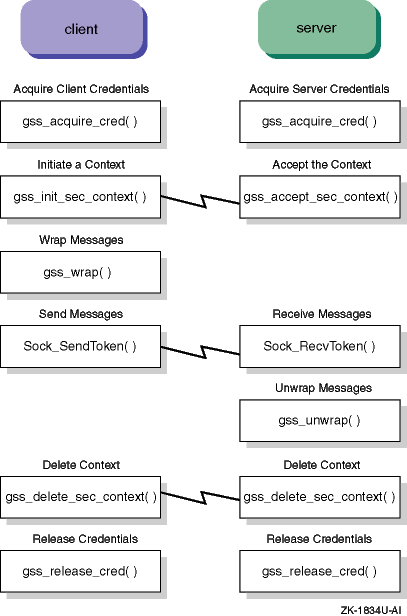
The following diagram shows how the GSS functions are implemented in the sample programs.
C.11.1 Building the Sample Programs
HP recommends that you copy the sample code to a new location,
so the original code is preserved in case you need to make changes to it.
A makefile (Makefile_CPQ) is provided that needs little
or no modification.
Debugging is disabled by default.
To build the executables, use the make command as follows:
To build the executables with the default settings, enter:
# make -f Makefile_CPQ
To enable debugging, enter:
# make -f Makefile_CPQ OPTDEBUG=-g2
To remove objects and executables, enter:
# make -f Makefile_CPQ clean
C.11.2 Running the Sample Programs
This section describes:
Prerequisites that must be met before the sample programs can run
How to start the sample programs
Sample server program commands
Sample client program commands
Typical sample program output
Troubleshooting guidelines
You must satisfy the following requirements before you can run the sample programs.
Define a principal for the client.
The client program authenticates using the principal
host/host_name@REALM, where
host_name
is the acceptor host's
fully qualified domain name and
REALM
is the acceptor host's
default realm.
Therefore, the principal
host/host_name@REALM
must be registered with the security server (KDC).
Extract the server principal.
The host principal for the server must be present in the service key
table file (called
v5srvtab), and the service key table
file must be readable by the server program.
If the service key table file
is not present on the security server, it can be created by extracting the
host principal.
Add a principal for the client to the principal database.
To run the server on a host, you need to make sure that the principal
corresponding to
service_name
is in the default keytab
on the server host (/krb5/v5srvtab), and that the gss-server
process can read the keytab.
For example, the service name "sample@server" corresponds to the Kerberos principal "sample/KDChost.domain.com@REALM."
C.11.2.2 Starting the Sample Programs
Always run the sample server program first, then start the sample client program. Run each program in a separate shell so that you can see the sample output separately. The client and server may be run on the same machine or separate machines.
The client/server programs accept mandatory command line arguments and all switches are optional.
The server program requires the following arguments:
service_name—The GSS-API service
name of the form "service@host."
For example:
# gss-server sample@REALM
The client program requires the following arguments:
hostThe host running the server.
service_nameThe service name that the server will use to establish connections.
If gss-server is running on a different machine from gss-client, and you do not specify the host name in the service name when running gss-client, you must specify the server's host name in the service name you specify to gss-client.
msgThe message.
For more than one word you must enclose the message within double quotes; for example:
# gss-client unix1 sample@REALM "Hello Kerberos"
C.11.2.3 Server Command Line Switches (Optional)
The server command line switches are defined below. All are optional.
| -port | The TCP port on which to accept connections. |
| -once | Tells the server to exit after a single exchange, rather than persisting. |
| -inetd | Tells the server that it is running out of
inetd, so it should interact with the client on
stdin
rather than binding to a network port.
Implies
-once. |
| -export | Tells the server to test the
gss_export_sec_context()
function after establishing a context with a client. |
| -logfile | The file to which the server should append its output,
rather than sending it to
stdout. |
C.11.2.4 Client Command Line Switches (Optional)
The client command line switches are defined below. All are optional.
| -port | The TCP port to which to connect. Default is 4444. |
| -mech | The OID of the GSS-API mechanism to use. |
| -d | Tells the client to delegate credentials to the server.
For the Kerberos GSS-API mechanism, this means that a forwardable TGT will
be sent to the server, which will put it in its credential cache (you must
have acquired your tickets with
kinit
-f
for this to work). |
| -f | Tells the client that the
msg
argument
is actually the name of a file whose contents should be used as the message. |
| -q | Tells the client to be quiet, i.e., to only print error messages. |
| -ccount | Specifies how many sessions the client should initiate with the server (the "connection count"). |
| -mcount | Specifies how many times the message should be sent to the server in each session (the "message count"). |
| -na | Tells the client not to do any authentication with the server. Implies -nw, -nx and -nm. |
| -nw | Tells the client not to "wrap" messages. Implies -nx. |
| -nx | Tells the client not to encrypt messages. |
| -nm | Tells the client not to ask the server to send back a cryptographic checksum ("MIC"). |
The client/server sample usage message will be displayed if no arguments are specified or when the program is not used correctly:
# gss-server
Usage: gss-server [-port port] [-verbose] [-once]
       [-inetd] [-export] [-logfile file] [service_name]

# gss-client
Usage: gss-client [-port port] [-mech mechanism] [-d]
       [-f] [-q] [-ccount count] [-mcount count]
       [-na] [-nw] [-nx] [-nm] host service msg
This section contains output from the sample client and server programs, demonstrating the client passing a text file as the message and the server authenticating the client and printing out the message.
# gss-server -verbose -once sample@REALM
Server waiting:
Received token (size=600):
60 82 02 54 06 05 2b 05 01 05 02 01 00 6e 82 02
47 30 82 02 43 a0 03 02 01 05 a1 03 02 01 0e a2
07 03 05 00 20 00 00 00 a3 82 01 56 61 82 01 52
30 82 01 4e a0 03 02 01 05 a1 15 1b 13 43 59 42
45 52 4e 54 2e 5a 4b 33 2e 44 45 43 2e 43 4f 4d
a2 28 30 26 a0 03 02 01 03 a1 1f 30 1d 1b 06 73
61 6d 70 6c 65 1b 13 63 79 62 65 72 6e 74 2e 7a
6b 33 2e 64 65 63 2e 63 6f 6d a3 82 01 04 30 82
01 00 a0 03 02 01 05 a1 03 02 01 01 a2 81 f3 04
81 f0 8e 80 d6 1d b4 11 51 61 75 24 f4 e4 96 c5
db 1b ba 94 be c1 60 11 1a 24 c3 13 ae 22 50 90
e2 ba 18 7b 9e 8f 6a 42 ca fa 96 b8 cf f0 8c 3f
b8 ea 33 e9 21 24 ab ab e2 7e 4a 90 ee 75 93 11
99 4e 15 ad 2e 47 83 5b de 74 eb b7 92 ad 86 e6
27 fd c0 02 13 6d 56 38 3d 7e 80 dc ea a0 1c 79
37 34 6f fa 4b dc 79 ed 2b ee ef 93 37 ae 6c 1f
2c 83 62 c1 7a 0b 5a aa 10 47 e4 70 1d 31 9c 2c
24 ee 8e 69 4a e2 c2 cd 7e 52 d4 ff 19 d6 d4 77
e9 ee 78 19 e8 2d 5b 31 5c a0 89 28 f5 b2 e2 ef
bf 2a 12 b5 1b 88 e3 e8 a3 21 5b d5 93 a1 21 44
77 e8 e1 71 f3 2f b8 e1 06 20 fe 21 42 9a f5 bf
e3 7b 55 76 a2 54 34 05 43 14 0b aa 2e d2 da 91
31 02 8d 65 53 fe 4d 32 b6 b6 31 6f b2 7c d4 77
bb 87 0f 85 6d 61 8d 2c 21 e8 be 3d fb fd a7 72
bd 71 a4 81 d3 30 81 d0 a0 03 02 01 05 a1 03 02
01 00 a2 81 c3 04 81 c0 aa b1 ae d7 0a 9b 75 c9
ce ca b4 b1 1d a4 a4 4b bc 3a 73 4d b8 9e c0 fb
51 44 8a 67 8d ad 25 87 6e 66 ed bf d7 fb fc b1
6b 38 89 74 2b f8 eb 04 be 76 70 03 e3 2f db 7d
15 53 53 9e 8d e4 f1 a1 60 b6 01 33 42 90 60 a5
4c 75 dd af af 64 75 86 5a f8 25 57 c1 22 bc 12
b1 54 c9 c1 0b a6 27 c0 44 2a 84 48 a6 6a 00 62
f8 4d d7 27 9e 35 a5 74 2c 8f 04 c0 a8 c4 48 b6
d9 52 84 40 5b 19 fe 4d bf eb 07 d0 e0 f9 46 8c
72 5b bc df d0 0e 55 4a e2 e8 39 10 83 63 9f 02
cd 07 8b 00 f9 d6 46 77 29 6d 13 64 e4 3c b3 53
f7 46 12 9c 88 8b 5d e6 9e 05 f2 f7 6d 4e d8 15
dd eb 9b a6 37 28 77 9a
Sending accept_sec_context token (size=107):
60 69 06 05 2b 05 01 05 02 02 00 6f 5e 30 5c a0
03 02 01 05 a1 03 02 01 0f a2 50 30 4e a0 03 02
01 05 a1 03 02 01 00 a2 42 04 40 b1 61 8f 22 03
93 d2 d4 df 6f 6e 19 99 99 68 64 78 53 27 22 8a
c4 e8 42 b3 b5 23 3f 5d 0d 6a 6d 87 42 7b ca 8b
10 13 ff 34 66 23 cf 75 a0 24 e9 4a a7 d6 cd 9c
e2 a5 1b 98 55 02 ba 85 e8 3c b3
context flag: GSS_C_MUTUAL_FLAG
context flag: GSS_C_REPLAY_FLAG
context flag: GSS_C_CONF_FLAG
context flag: GSS_C_INTEG_FLAG
Accepted connection using mechanism OID { 1 2 840 113554 1 2 2 }.
Accepted connection: "user@REALM"
Message token (flags=228):
60 57 06 05 2b 05 01 05 02 02 01 dd fa de fa ff
ff e7 ad 91 9a ca e2 08 aa 32 27 86 fa 8a 0c 17
44 18 9c 8c 7b f4 65 8c 63 88 6f be 70 f0 a8 ef
95 17 da 92 48 44 e6 70 1c 4a 80 97 c0 f3 d3 34
39 1f 03 b3 55 df 50 75 f0 40 9d 8a 9b 5d 0f aa
3d 6b a0 c6 6d 34 42 29 58
Received message: "
Hello Kerberos.
I am a text file.
"
NOOP token
#
The following is the output from the client, using a test file called
test:
# gss-client -f unix1 sample@REALM "test"
Sending init_sec_context token (size=600)...continue needed...
context flag: GSS_C_MUTUAL_FLAG
context flag: GSS_C_REPLAY_FLAG
context flag: GSS_C_CONF_FLAG
context flag: GSS_C_INTEG_FLAG
"user@REALM" to "sample/host.domain@REALM", lifetime -1,
flags 1b6, locally initiated, open
Name type of source name is { 1 2 840 113554 1 2 2 1 }.
Mechanism { 1 2 840 113554 1 2 2 } supports 7 names
  0: { 1 2 840 113554 1 2 1 1 }
  1: { 1 2 840 113554 1 2 1 2 }
  2: { 1 2 840 113554 1 2 1 3 }
  3: { 1 2 840 113554 1 2 1 4 }
  4: { 0 18 18 18 18 18 18 18 18 18 18 }
  5: { 1 2 840 113554 1 2 2 1 }
  6: { 1 2 840 113554 1 2 2 2 }
Signature verified.
#
C.11.4 Troubleshooting Guidelines
Most problems associated with running the sample programs are related to the setup and administration of the security server. However, if you have trouble getting the sample program to run correctly, there are several things to check:
A non-root user typically runs the server program. However, by default, the service key table file is readable only by root.
Make sure the server program can read the service key table file and
that the file contains an entry for
sample/KDC_host_name@REALM.
The Kerberos library for Application Security SDK supports
two
environment variables that specify
the location of the service key table file:
CSFC5KTNAME
and
KRB5KTNAME.
If both variables are set, the former variable
has precedence.
Make sure these variables properly specify where the service
key table file is located, and ensure that you have a valid TGT (klist).
The sample programs work across realms only if those realms are set up for interrealm authentication.
Remember that Application Security SDK overlays the Kerberos mechanism, so, if anything goes wrong, it's usually a failure in the underlying mechanism. The sample program is merely passing on the error. For example, if the wrong password is entered, Kerberos generates a message such as "Decrypt integrity check failed" and sends it to Application Security SDK. In this case, the sample program simply reports the error, cleans up, and exits.