A cluster alias is an IP address that makes some or all of the systems in a cluster look like a single system to clients rather than individual systems. A cluster can have more than one cluster alias. The default cluster alias includes all members of a cluster, and all members can receive packets addressed to this alias.
This chapter provides examples of multi-instance applications that use the default cluster alias to distribute requests among all cluster members. See the Cluster Administration manual for information on how to modify alias attributes.
This chapter covers the following topics:
When to use cluster aliasing (Section 3.1)
Example applications (Section 3.2)
3.1 When to Use Cluster Aliasing
Because a cluster alias sends requests and packets to members of
aliases, it is most useful for applications that run on more than one
cluster member.
Incoming packets or connection requests are distributed
among members of a cluster alias.
If one member belonging to that alias
fails, the cluster alias software transparently routes
application-related traffic to the remaining members of the cluster alias.
Any new requests will be distributed among members according to
administrator-provided metrics.
(See the
Cluster Technical Overview
manual for a summary of the cluster alias
features.)
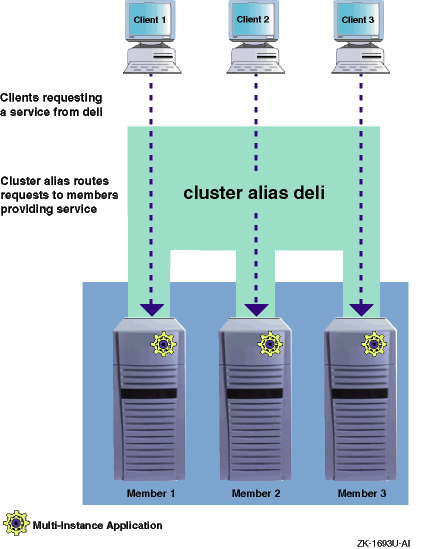
Figure 3-1
shows how the cluster alias
subsystem distributes client requests.
Figure 3-1: Accessing a Multi-Instance Application Through a Cluster Alias
For single-instance applications, use the cluster application
availability (CAA) facility for application control and failover.
The
cluster alias subsystem still routes packets addressed to an alias, but
because CAA ensures that only one member is running the application, the
cluster alias will always route requests to that member.
(Make sure that
the member who is running the application is also a member of the
cluster alias being used.) See the
Cluster Administration
manual for a general discussion about the
differences between the cluster alias subsystem and CAA.
3.2 Using the Default Cluster Alias to Access a Multi-Instance Apache HTTP Server
To access a highly available, multi-instance Apache HTTP server using the default cluster alias to distribute requests among all cluster members, follow these steps:
Download the latest standard Apache distribution from
www.apache.org
and follow the site's
instructions for building and installing Apache in the
/usr/local/apache
directory.
Edit the
apache/conf/http.conf
configuration file to
set the
KeepAlive
parameter to
off:
KeepAlive Off
If the
KeepAlive
parameter is set to
on, the Apache server daemon (httpd)
will keep an existing TCP connection open and reuse it for however many
seconds are defined in
KeepAliveTimeout.
(The default
is 15 seconds.) If you want to load balance requests on a request-by-request
basis, turn off the
KeepAlive
timer that
keeps these connections open.
Create member-specific subdirectories for Apache log files in the
/usr/local/apache
directory:
# mkdir -p /usr/local/apache/member1/logs
# mkdir -p /usr/local/apache/member2/logs
Create a context-dependent symbolic link (CDSL) for the log directory:
# mkcdsl /usr/local/apache/{memb}/logs /usr/local/apache/logs
Note
If you are using the C shell, you must escape the braces in the
{memb}string; that is:\{memb\}. Otherwise, the braces are stripped by the shell. If you are using the Bourne shell or the Korn shell, you do not have to escape the braces.
Add the following entry to the cluster alias services file,
/etc/clua_services:
http 80/tcp in_multi,out_alias
Setting the
in_multi
attribute for port 80
means that the cluster alias subsystem will distribute connection
requests directed to the default cluster alias among all members
of the alias.
To reload service definitions, enter the following command on all members:
# cluamgr -f
On each member, start the Apache server daemon:
# /usr/local/apache/bin/httpd