A cluster must have a dedicated cluster interconnect to which all cluster members are connected. This interconnect serves as a private communication channel between cluster members. For hardware, the cluster interconnect can use either Memory Channel or a private local area network (LAN), but not both.
This chapter describes the purpose of a cluster interconnect, its uses, methods of controlling traffic over it, and how to decide what kind of interconnect to use. The chapter discusses the following topics:
Controlling storage traffic across the cluster interconnect (Section 7.1)
Controlling application traffic across the cluster interconnect (Section 7.2)
Controlling cluster alias traffic across the cluster interconnect (Section 7.3)
Understanding the effect of cluster size and cluster interconnect traffic (Section 7.4)
Selecting a cluster interconnect (Section 7.5)
Understanding the Memory Channel interconnect (Section 7.6)
Understanding the LAN interconnect (Section 7.7)
In general, the cluster interconnect is used for the following high-level functions:
Health, status, and synchronization messages
The connection manager uses these messages to monitor the state of the cluster and its members and to coordinate membership and application placement within the cluster. This type of message traffic increases during membership transitions (for example, when a member joins or leaves the cluster), but is minimal in a steady-state cluster. (See Section 7.4 for additional information.)
Distributed lock manager (DLM) messages
TruCluster Server uses the DLM to coordinate access to shared resources. User applications can also use this coordination function through the DLM application programming interface (API) library. The message traffic required to coordinate these locking functions is transmitted over the cluster interconnect. Although an application can make heavy use of this capability, the DLM traffic created by the cluster software itself is minimal.
Accessing remote file systems
TruCluster Server software presents a uniform picture of the availability of storage devices across all cluster members. Storage located on one member's private storage bus is visible to all cluster members. Reads and writes from other cluster members to file systems on this storage are transmitted by means of the cluster interconnect. Whenever possible, I/O requests (reads, in particular) to files on shared storage are sent directly to the storage and bypass the cluster interconnect. How file systems and storage are configured within the cluster can significantly impact the throughput requirements placed on the cluster interconnect. (See Section 7.1 for additional information.)
Application-specific traffic
The cluster interconnect has a
TCP/IP address associated with a virtual network interface
(ics0) on each member.
User applications can use this address to communicate over the interconnect.
The load that this traffic places on the interconnect varies with the
application mix.
(See
Section 7.2
for additional information.)
Cluster alias routing
Although a cluster alias presents a single TCP/IP address that clients use to reference all or a subset of cluster members, the alias subsystem balances establishes each TCP/IP connection to a process on a given cluster member. For example, while multiple simultaneous network file system (NFS) operations to a cluster alias are balanced across cluster members, each individual NFS operation directed at the cluster alias is served by an NFS daemon on one member. The cluster interconnect is used when it is necessary to route the TCP/IP packets addressed to the cluster alias to the specific member that is hosting the connection. The bandwidth requirements that the cluster alias places on the interconnect depend upon the degree to which the cluster alias is being used. (See Section 7.3 for additional information.)
Considering these high-level uses, the communications load of the cluster interconnect can be seen as being heavily influenced both by the cluster's storage configuration and by the set of applications the cluster runs.
Table 7-1
compares a LAN interconnect
and a Memory Channel interconnect with respect to cost, performance, size,
distance between members, support of the Memory Channel application
programming interface (API) library, and redundancy.
Subsequent sections
discuss
how to manage cluster interconnect bandwidth and make an appropriate
choice of interconnect based on several factors.
Table 7-1: Comparison of Memory Channel and LAN Interconnect Characteristics
| Memory Channel | LAN |
| Higher cost | Generally lower cost |
| High bandwidth, low latency | Medium bandwidth, medium to high latency (100 Mb/s); high bandwidth, medium to high latency (1000 Mb/s). |
| Up to eight members, limited by the capacity of the Memory Channel hub | Up to eight members initially; will support more in the future |
Up to 20 meters (65.6 feet) between members with copper cable; up to 2000 meters (1.2 miles) with fiber-optic cable in virtual hub mode; up to 6000 meters (3.7 miles) with fiber-optic cable using a physical hub |
The length of a network segment is determined by the capabilities of and options allowed for the Ethernet hardware that is being used. Using the requirements and configuration guidelines for LAN interconnect hardware discussed in the Cluster Hardware Configuration manual, see the individual network adapter's QuickSpecs at http://www.compaq.com/quickspecs for this information. |
| Supports the use of the Memory Channel application programming interface (API) library | Does not support the Memory Channel API
library.
Some applications may find the general
mechanism, introduced in TruCluster Server Version 5.1B, for sending
signals from one cluster member to another (clusterwide
kill) sufficient for communicating between members. |
| Multirail (failover pair) redundant Memory Channel configuration | Redundancy by configuring multiple network adapters as a redundant array of independent network adapters (NetRAIN) virtual interface on each member, distributing their connections across multiple switches |
7.1 Controlling Storage Traffic Across the Cluster Interconnect
The cluster file system (CFS) coordinates accesses to file systems across the cluster by designating a cluster member as the CFS server for a given file system. The CFS server performs all accesses, reads or writes, to that file system on behalf of all cluster members.
Starting in TruCluster Server Version 5.1A, read accesses to a given file system can bypass the CFS server and go directly to the disk, thus not having to pass over the cluster interconnect. If all storage in the cluster is equally accessible from all cluster members, this feature minimizes the bandwidth read operations require of the cluster interconnect. Although some read accesses can bypass the interconnect, all non-direct-I/O write accesses to a file system served by another member must pass through the interconnect. To mitigate this traffic, we recommend that, where possible, applications that write large quantities of data to a file system be located on the same member that is the CFS server for that file system. Given these recommendations, the file system I/O that must traverse the interconnect is limited to remote writes. Understanding the application mix, the CFS server placement, and the volume of data that will be remotely written, can help you determine the most appropriate interconnect for the cluster.
An application, such as
Oracle Parallel Server (OPS), can avoid traversing the cluster interconnect
to the CFS server by having its disk writes sent directly to disk.
This direct-I/O method
(enabled by the application's specifying the
O_DIRECTIO
flag on a file open) asserts to CFS that the
application is coordinating its own writes
to this file across the entire cluster.
Applications that use this feature can both
increase their clusterwide write throughput to the specified files
and eliminate their remote write traffic from the cluster interconnect.
This method is useful only to those applications, such as OPS, that otherwise cannot obtain the performance benefit of data caching, read-aheads, or asynchronous writes. Application developers considering using this flag must be very careful, however. Setting this flag means that the operating system will not apply its normal write synchronization functions to this file for the duration of it being opened by the application. If the application does not perform its own cache management, locking, and asynchronous I/Os, severe performance degradation and data corruption can ensue.
See the
Cluster Administration
manual for additional information on the use of the
cluster interconnect by CFS and the device request dispatcher and on the
optimizations provided by the direct-I/O feature.
7.2 Controlling Application Traffic Across the Cluster Interconnect
Applications use a cluster's compute resources in different ways. In some clusters, members can be considered as separate islands of computing that share a common storage and management environment (for example, a timesharing cluster in which users are running their own programs on one system). Other applications, such as OPS, use distributed processing to focus the compute power of all cluster members onto a single clusterwide application. In this case, you need to understand how the distributed application's components communicate:
Do they communicate information by means of shared disk files?
Do they communicate through direct process-to-process communications over the interconnect?
How often do these pieces communicate and how much data is transferred per unit of time?
What does the application require in terms of transmission latency?
With the answers to these questions, you can map the application's
requirements to the characteristics of the interconnect options.
For example,
an application that requires only 10,000 bytes per second of coordination
messaging can fully utilize the compute resources of even a large cluster
without stressing a LAN interconnect.
On the other hand, distributed
applications with high data rate and low latency requirements, such as OPS,
benefit from having a Memory Channel as the interconnect, even in smaller
clusters.
7.3 Controlling Cluster Alias Traffic Across the Cluster Interconnect
The mix of applications that will use a cluster alias, the amount of data being sent to the cluster via the cluster aliases, and the cluster network topology (for example, are members symmetrically or asymmetrically connected to the external networks?) are important factors to consider when deciding which type of cluster interconnect is appropriate.
Some common uses for the cluster alias (such as
telnet,
ftp, and Web hosting)
typically make only small communication demands of the interconnect.
For such applications, the amount of data sent to the
cluster's alias is generally far outweighed by the amount
of data returned to clients from the cluster.
Only the
incoming data packets might need to traverse the interconnect to reach the
process serving the request.
All outgoing packets go directly to the
external network and thus do not need to be conveyed over the interconnect.
(This presumes that all members have connectivity to the external network.)
Applications like these, in
most cases, place low bandwidth requirements on the interconnect.
The network file system (NFS), on the other hand, is a commonly used application that can place a significant bandwidth requirement on the cluster interconnect. While reads from the served disks do not cause much interconnect traffic (only the read request itself potentially traverses the interconnect), disk writes through NFS can create interconnect traffic. In this case, the incoming data that might need to be delivered over the interconnect is comprised of disk blocks. If the cluster is going to serve NFS volumes, compare the average rate that disk writes are likely to occur with the bandwidth offered by the various interconnect options.
TruCluster Server Version 5.1B introduces a feature that can lessen the impact of NFS writes. For the purposes of NFS serving, you can assign alternate cluster aliases to subsets of cluster members. This allows a selected set of cluster members to be identified as the NFS servers, thus lowering the average number of inbound packets that must be sent over the interconnect to reach that connection's serving process. (In a randomly distributed four-member cluster, an average of 75 percent of the disk writes will traverse the interconnect. If two of those members are assigned an alternate cluster alias for their NFS serving, the average number of writes traversing the interconnect drops to 50 percent.)
See the
Cluster Administration
manual for
information on how to use and tune a cluster alias.
7.4 Effect of Cluster Size on Cluster Interconnect Traffic
You cannot consider solely the number or size of the members in a cluster when determining the most appropriate interconnect, but must also look at how the cluster's use will affect the load placed on the interconnect. Although larger clusters tend to have higher data transfer requirements for a given application mix, how the cluster's storage is configured and the characteristics of its applications are better guides to determining the proper interconnect. However, one aspect of cluster size can impact the interconnect bandwidth requirements. Presuming a perfectly random (and unmanaged) distribution of work across the cluster and an equally random distribution of CFS servers, the percentage of disk writes that must traverse the cluster interconnect increases as the cluster size increases. In a two-member cluster, for example, 50 percent of the average writes might go over the interconnect. In a four-node cluster, this increases to 75 percent. In Section 7.1 we recommend the system that will be performing most writes to a file system be the CFS server for that file system. This recommendation minimizes the number of writes that must be sent over the interconnect and is appropriate regardless of which type of interconnect is used. To the degree that you can meet this recommendation, the less interconnect bandwidth the disk writes will require.
However, there is one situation in which the size of the cluster (measured
both in terms of the number of members and the number of
disks in use) has a direct impact on the interconnect traffic:
cluster membership transitions.
In particular, when a member leaves the cluster, the remaining members
must pass coordination messages to the other cluster members.
Due to the lower latency
characteristics of the Memory Channel interconnect, these transitions can be
completed faster on a Memory Channel-based cluster.
When deciding which
interconnect to use, consider how often you expect membership
transitions to occur (for example, whether cluster members will routinely be
rebooted).
7.5 Selecting a Cluster Interconnect
In addition to the recommendations provided in the previous sections, the following rules and restrictions apply to the selection of a cluster interconnect:
All cluster members must be configured either to use a LAN interconnect or to use Memory Channel. You cannot mix interconnect types within a cluster.
Applications using the Memory Channel API library require Memory Channel. A cluster using a LAN interconnect can also be configured with a Memory Channel that is used by Memory Channel API applications only. Use of the Memory Channel API also generates some slight TCP/IP traffic over the cluster interconnect.
A Fast Ethernet (100Base-T) LAN interconnect is required when configuring one or more AlphaServer DS10L systems in a cluster. An AlphaServer DS10L system is shipped with two 10/100 Mb/s Ethernet ports, one 64-bit peripheral component interconnect (PCI) expansion slot, and a fixed internal integrated device electronic (IDE) disk. When you configure an AlphaServer DS10L in a cluster, we recommend that you use the single PCI expansion slot for the shared storage (where the cluster root, member boot disks, and optional quorum disk reside), one Ethernet port for the external network, and the other 10/100 Mb/s Ethernet port for the LAN interconnect.
Replacing a Memory Channel interconnect with a LAN interconnect (or vice versa) requires some cluster downtime. Similarly, replacing a Fast Ethernet LAN interconnect with a Gigabit Ethernet LAN interconnect (or vice versa) requires cluster downtime.
Although the Logical Storage Manager (LSM) provides for transparent mirroring and highly available access to storage, LSM is not a suitable data replication technology in an extended cluster. Although a disaster-tolerant configuration using a LAN-based or Memory Channel-based interconnect and LSM is not supported, there are supported configurations using the StorageWorks Data Replication Manager (DRM) solution.
7.6 Memory Channel Interconnect
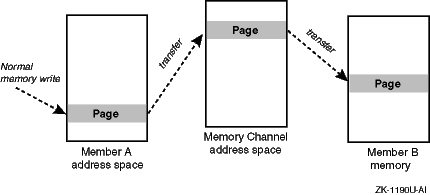
The Memory Channel interconnect is a specialized interconnect designed specifically for the needs of clusters. This interconnect provides both broadcast and point-to-point connections between cluster members. The Memory Channel interconnect:
Allows a cluster member to set up a high-performance, memory-mapped connection to other cluster members. These other cluster members can, in turn, map transfers from the Memory Channel interconnect directly into their memory. A cluster member can thus obtain a write-only window into the memory of other cluster systems. Normal memory transfers across this connection can be accomplished at extremely low latency (3 to 5 microseconds).
Has built-in error checking, virtually guaranteeing no undetected errors and allowing software error detection mechanisms, such as checksums, to be eliminated. The detected error rate is very low (on the order of one error per year per connection).
Supports high-performance mutual exclusion locking (by means of spinlocks) for synchronized resource control among cooperating applications.
Figure 7-1
shows the general flow of a Memory Channel transfer.
Figure 7-1: Memory Channel Logical Diagram
A Memory Channel adapter must be installed in a PCI slot on each member system. A link cable connects the adapters. If the cluster contains more than two members, a Memory Channel hub is also required.
A redundant, multirail Memory Channel configuration can further improve reliability and availability. It requires a second Memory Channel adapter in each cluster member, and link cables to connect the adapters. A second Memory Channel hub is required for clusters containing more than two members.
The Memory Channel multirail model operates on the concept of physical rails and logical rails. A physical rail is defined as a Memory Channel hub with its cables and Memory Channel adapters and the Memory Channel driver for the adapters on each node. A logical rail is made up of one or two physical rails.
A cluster can have one or more logical rails, up to a maximum of four. Logical rails can be configured in the following styles:
If a cluster is configured in the single-rail style, there is a one-to-one relationship between physical rails and logical rails. This configuration has no failover properties; if the physical rail fails, the logical rail fails. Its primary use is for high-performance computing applications using the Memory Channel application programming interface (API) library and not for highly available applications.
If a cluster is configured in the failover pair style, a logical rail consists of two physical rails, with one physical rail active and the other inactive. If the active physical rail fails, a failover takes place and the inactive physical rail is used, allowing the logical rail to remain active after the failover. This failover is transparent to the user. The failover pair style is the default for all multirail configurations.
A cluster fails over from one Memory Channel interconnect to another if a configured and available secondary Memory Channel interconnect exists on all member systems, and if one of the following situations occurs in the primary interconnect:
More than 10 errors are logged within 1 minute.
A link cable is disconnected.
The hub is turned off.
After the failover completes, the secondary Memory Channel interconnect becomes the primary interconnect. Another interconnect failover cannot occur until you fix the problem with the interconnect that was originally the primary.
If more than 10 Memory Channel errors occur on any member system within a 1-minute interval, the Memory Channel error recovery code attempts to determine whether a secondary Memory Channel interconnect has been configured on the member as follows:
If a secondary Memory Channel interconnect exists on all member systems, the member system that encountered the error marks the primary Memory Channel interconnect as bad and instructs all member systems (including itself) to fail over to their secondary Memory Channel interconnect.
If any member system does not have a secondary Memory Channel interconnect configured and available, the member system that encountered the error displays a message indicating that it has exceeded the Memory Channel hardware error limit and panics.
See the Cluster Hardware Configuration manual for information on how to configure the Memory Channel interconnect in a cluster.
The Memory Channel API library implements highly efficient memory sharing
between Memory Channel API cluster members, with automatic error
handling, locking, and UNIX style protections.
See the
Cluster Highly Available Applications
manual for a discussion of the Memory Channel API
library.
7.7 LAN Interconnect
Any Ethernet adapter, switch, or hub that works in a standard LAN at 100 Mb/s or 1000 Mb/s probably will work within a LAN interconnect.
Note
Fiber Distributed Data Interface (FDDI), ATM LAN Emulation (LANE), and 10 Mb/s Ethernet are not supported in a LAN interconnect.
The following features are required of Ethernet hardware participating in a cluster LAN interconnect:
The LAN interconnect must be private to cluster members. A packet that is transmitted by one cluster member's LAN interconnect adapter can be received only by other members' LAN interconnect adapters.
A LAN interconnect can be a single direct full-duplex connection between two cluster members or can employ either switches or hubs (but not both). One or more switches are required for a cluster of three or more members and for a cluster whose members use a redundant array of independent network adapters (NetRAIN) virtual interface for their cluster interconnect device.
Note
Although hubs and switches are interchangeable in most LAN interconnect configurations, switches are recommended for performance and scalability. Because hubs run in half-duplex mode, their use in a LAN interconnect may limit cluster performance. Additionally, hubs do not provide the features required for a dual redundant LAN interconnect configuration. Overall, using a switch, rather than a hub, in a LAN interconnect provides greater scalability for clusters with three or more members.
Adapters and switch ports must be configured compatibly for 100 Mb/s or 1000 Mb/s full-duplex operation.
If you are using a switch with any of the DE60x
family
of adapters (which have a console name of the form
eix0) or a
DEGPA-xx
adapter,
use a switch that
supports autonegotiation.
If you are using
a switch with network
adapters in the DE50x
family
(which have a console name of the form
ew
x0) that do not autonegotiate
properly, the switch must be capable of disabling autonegotiation.
If you use two crossover cables to link two switches in a fully redundant LAN cluster interconnect, you must configure the switches to avoid packet-forwarding problems caused by the routing loop created by the second link. Typical switches provide at least one of the following three mechanisms for support of parallel interswitch links. In order of decreasing desirability for cluster configurations, the mechanisms are:
Treats multiple physical links between a pair of switches as a single link and distributes packet traffic among them.
Treats multiple physical links between a pair of switches as an active link and one or more standby links and fails over between them.
Employs a distributed routing algorithm that allows switches to cooperate to discover and remove routing loops.
Although it may be used to eliminate routing loops on switch ports used for parallel links between switches, Spanning Tree Protocol (STP) must be disabled on all Ethernet switch ports connected to cluster members, whether the members are using single adapters or multiple adapters included in NetRAIN devices. If this is not the case, cluster members will be flooded by broadcast messages which, in effect, create denial-of-service symptoms in the cluster.
All cluster members must have at least one point-to-point connection to all other members. If the Ethernet adapters that are used for the LAN interconnect fail on a given member, that member loses communication with all other members. A cluster interconnect configuration that requires a member to route interconnect traffic from another member to a different subnet is unsupported. That is, you cannot replace a switch with a member system.
Up to two switches are allowed between two cluster members. You must not introduce unacceptable latencies by using, for example, a satellite uplink or a wide area network (WAN) as the path between two components of a LAN interconnect.
Link aggregation of Ethernet adapters using Tru64 UNIX features
(including the
lagconfig
command) is not supported for a LAN
interconnect.
To simplify management, configure the LAN interconnect network adapters symmetrically on all cluster members. Installing the same type of adapter in each member in the same relative position with respect to other network adapters helps ensure that the adapters have similar names across cluster members. In a fully redundant LAN interconnect configuration using two or more interconnected switches, and NetRAIN virtual interfaces as member interconnect devices, you should uniformly connect the first network adapter listed in each member's NetRAIN set to the first switch and the second network adapter to the second switch. This simplifies the identification of the adapters for monitoring and maintenance. Additionally, it ensures that the active adapters of each member are connected to the same switch when the cluster is initially booted. One method for guarding against a network partition of the cluster in certain failure conditions is to ensure that all active adapters in the LAN interconnect are connected to the same switch. See the Cluster Hardware Configuration manual for additional information.