This chapter provides the following information:
A general overview of the cluster application availability (CAA) subsystem (Section 5.1)
A discussion of the CAA architecture (Section 5.2)
An introduction to CAA resources (Section 5.3)
A description of resource profiles and their use (Section 5.4)
A description of the action scripts used by CAA commands to manage applications and other resources (Section 5.5)
The cluster application availability (CAA) subsystem provides high
availability for single-instance applications and the capability to monitor
applications and the state of other types of resources, such as network
interfaces, tape devices, and media changer devices.
(A single-instance
application runs on a single member of a cluster, and cannot be run on more
than one member at a time.) A single instance of any application that can
run on Tru64 UNIX can be made highly available in a cluster with CAA.
For example, in a cluster, the daemons for BIND (named),
DHCP (joind), and network locking
(rpc.lockd
and
rpc.statd) are
managed by CAA.
Each application under CAA control has a resource profile, which describes that application's resource requirements and the circumstances under which it can be relocated to another cluster member. CAA monitors the state of cluster members and resources to ensure that each application runs on a member that meets its resource requirements. Resource profiles can be created and managed through either a command-line interface or a graphical user interface (GUI).
CAA can automatically relocate an application to another cluster member if a required resource, or the current member itself, becomes unavailable. This feature requires no changes to the application itself, and can be used with any single-instance application. CAA also monitors resources so that it can restart applications resources that have gone off line due to a resource failure.
CAA can also reevaluate the placement of any application resource at a regularly scheduled time or at any time that the administrator decides to balance applications manually. Balancing decisions are made using the standard placement decision mechanism of CAA and is not based on any load considerations. Any applications that are not placed optimally are relocated to the most favored cluster member.
Note
CAA's resource monitoring and application restart capabilities are enhancements to the type of application availability provided by available server environment (ASE) for user-defined services in previous TruCluster products.
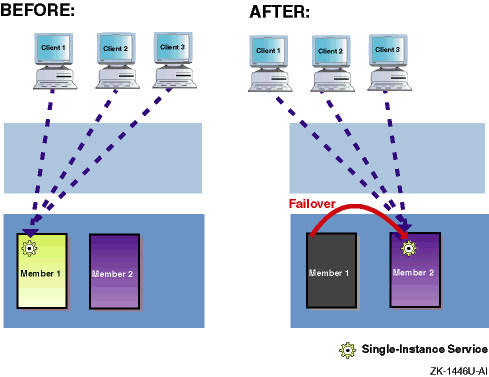
Figure 5-1
shows how the failure of one member
results in the
failover
of an
application to the second member.
If clients access the application
through a cluster alias, the cluster alias subsystem automatically
forwards connection requests to the second member.
Figure 5-1: Application Failover with CAA
The CAA subsystem consists of the following components:
A resource is a cluster software or hardware component that provides a service to end users or to other software components. Resources are the building blocks that CAA uses to make services highly available to clients. CAA supports the following types of resources: applications, network interfaces, tape drives, and media changers.
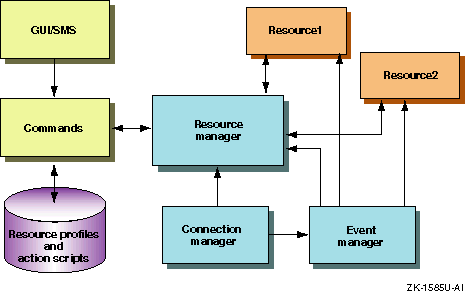
The resource manager communicates with all the components of the CAA subsystem, as well as the connection manager and the Event Manager (EVM).
The resource manager consists of all the CAA daemons running on
cluster members.
Each CAA daemon (caad) starts, stops,
relocates, and restarts application resources when a required resource, the
application itself, or a cluster member fails.
Each cluster member runs a CAA
daemon.
These daemons are independent but they communicate with each other,
sharing information about the status of the resources.
If any
caad
daemon fails, the Essential Services Monitor daemon
esmd
restarts the
caad
daemon and
management of resources can continue.
The resource manager also uses the resource monitors that monitor the status of a particular type of resource.
A resource monitor is a shared library located in
/var/cluster/caa/monitors, which is loaded by the
resource manager,
caad,
at boot time.
There is one resource monitor for each type of resource
(application, network, tape, and media changer).
Resource profiles contain the information needed by the resource manager and monitors to control application relocation and monitor resources.
A resource profile contains keyword/value pairs that define a
resource,
its dependencies (for application resources), and how the resource is
managed by CAA.
After the resource is registered with
caa_register, the resource manager can use the resource
profile.
The
caa_profile
command and SysMan can
create
resource profiles, or they can be created in any text editor.
(Use
caa_profile -validate
to ensure the correct syntax of
profiles that are created or modified using a text editor.) Errors other than
syntactical
errors are detected at the time of registration.
This two-stage
validation allows for profiles to be created with dependencies on
resources that are
currently off line or yet to be created.
Resource profiles are located in the
/var/cluster/caa/profile
directory.
The file
names of resource profiles take the form
resource_name.cap.
An action script is a set of commands that are used by CAA to start, stop, and check an application. The name of an application's action script is defined in that application's resource profile .
You can create or update an action script using the command-line interface, SysMan, or a text editor.
Action scripts can make use of variables that are available from CAA. The values of all profile attributes are available to an action script. The reason code variable tells why an action script is being executed. Many locale variables for the environment in which the script is being executed are available to an action script. User-defined attributes are also available to an action script.
You can optionally allow standard output of action scripts to be forwarded to the standard output of the command that invokes the action script. This is not turned on by default.
Action scripts are located in the
/var/cluster/caa/script
directory.
The file names of action scripts take the form
resource_name.scr.
The CAA subsystem provides the
caa_profile,
caa_register,
caa_unregister,
caa_start,
caa_stop,
caa_relocate,
caa_balance,
caa_report, and
caa_stat
commands to manage and monitor resources.
See
caa(4)
The command-line interface interacts with resource profiles, action scripts, and the resource manager.
SysMan Menu
and SysMan Station provide graphical user interfaces (GUIs) to
perform
system management tasks for the cluster, cluster members, and CAA
applications.
For more information on using the GUIs for performing system management
tasks for CAA applications, see
sysman(8) and the online
help for the SysMan Menu and SysMan Station.
The CAA GUI calls the command-line interface to interact with resource profiles, action scripts, and the resource manager.
Although the connection manager and Event Manager are not part of the CAA subsystem, the subsystem makes extensive use of these facilities.
Figure 5-2
shows a graphical representation of
the CAA architecture.
Figure 5-2: CAA Architecture
A resource is a cluster software or hardware component that provides a service to end users or to other software components. Resources are the building blocks that CAA uses to make services highly available to clients. CAA supports the following types of resources:
applicationAn executable program.
An application resource can have dependencies on other resources,
including another application resource.
In the resource profile that defines an
application resource, these dependencies are defined as either required,
REQUIRED_RESOURCES, or optional,
OPTIONAL_RESOURCES.
If you define a resource as a required resource and the required resource becomes unavailable, CAA stops the application. CAA then attempts to restart the application on another member that has the required resource. If CAA cannot restart the application on another member because the other member is down or because the placement policy forbids starting the application on that member, the application is stopped. CAA does not restart the application until all required resources are available.
You can use optional resources in conjunction with required resources and the placement policy to help determine the optimal system on which to start an application. If an optional resource becomes unavailable the application does not fail over.
networkA network interface. All cluster members can indirectly access any network attached to any member. An application that makes extensive use of a network connection available on another cluster member can add traffic to the cluster interconnect, and slow down performance of both the application and the cluster. Defining a network resource as a required resource for an application is useful when you want an application to run on a member with direct connectivity to a specific network.
If you define a network resource as a required resource for an application and the network interface adapter fails, CAA relocates or stops the application if it cannot relocate the resource.
If you define a network resource as an optional resource for an application, CAA starts the application on a member that is directly connected to the network. If the subnet adapter fails, the application reverts to accessing the network indirectly.
tape
or
changerA tape drive or media changer. If you define a tape or media changer resource as a required resource for an application, the application always runs on a cluster member with direct connectivity to the tape device or changer. If the device fails, CAA attempts to relocate the application, or stops the application if relocation is not possible.
If you define a tape or media changer resource as an optional resource for an application, CAA attempts to start the application on a member with direct connectivity, but it also runs the application on a member that does not have direct connectivity to the device. Running on a member with direct connectivity to a tape device is desirable to maximize performance.
Each resource has a resource profile, which defines the resource,
lists any dependencies, and provides instructions for how CAA should manage
the resource.
A resource profile is a simple text file containing a list of
keyword/value pairs, which are described in
caa(4)/var/cluster/caa/profile
directory.
A resource profile must be registered through the
caa_register
command in order for CAA to monitor
and manage the resource.
The following sections describe the two types of resource profiles:
Application resource profiles (Section 5.4.1)
Nonapplication resource profiles (Section 5.4.2)
5.4.1 Application Resource Profiles
For an application resource, a resource profile can contain the
application's type, name, check interval, monitoring thresholds,
resource dependencies (required
resources), optional resources, hosting member list, placement policy,
restart attempts, failover delay, auto start value, active placement value,
re-balance time, and name of the resource's action script.
Some keywords are
optional.
For example, the following sample
named.cap
resource profile does not set an active placement value, which means that the
placement of the application will not be reevaluated when a member
boots into the cluster.
# cat named.cap
TYPE = application
NAME = named
DESCRIPTION = BIND Server
CHECK_INTERVAL =
FAILURE_THRESHOLD = 0
FAILURE_INTERVAL = 0
REQUIRED_RESOURCES =
OPTIONAL_RESOURCES =
HOSTING_MEMBERS =
PLACEMENT = balanced
RESTART_ATTEMPTS =
FAILOVER_DELAY =
AUTO_START =
ACTION_SCRIPT = named.scr
For detailed descriptions of each type of profile and keyword, see
caa(4)caa_profile(8)
Application profiles can be extended with User-defined Attributes. The value of these attributes can be defined either in an application profile, or on the command line of the CAA commands. The value of these attributes can then be accessed in an action script to customize how the action script executes during a start, stop or check of the resource. Any user-defined attributes are defined for all application resources in the application type definition file. For more information, see the Cluster Highly Available Applications manual.
The remainder of this section discusses placement policies, hosting members, active placement, and failure threshold and failure interval. Action scripts are described in Section 5.5.
An application's placement policy determines where the application
is started.
Supported policies are:
balanced,
favored, and
restricted.
balancedCAA favors starting or restarting the application resource on the member that is currently running the fewest application resources. Placement that is due to optional resources is considered first. Next, the host with the fewest application resources running is chosen. If no cluster member is favored by these criteria, any available member is chosen.
favoredCAA refers to the list
of members in the
HOSTING_MEMBERS
attribute of the
resource profile.
Only cluster members that are both in this list and
satisfy the required
resources are eligible for placement consideration.
Placement due to
optional resources is considered first.
If no member can be chosen based on
optional resources, the order of the hosting members decides which member will
run the application resource.
If none of the members in the hosting member
list are available, CAA favors placing the application resource on the member
that is running the fewest application resources.
You must specify a hosting members list when you select a favored placement policy.
restrictedThis policy is similar to the favored placement policy, except that if none of the members on the hosting members list are available, CAA will not start or restart the application resource. A restricted placement policy ensures that the resource never runs on a member that is not on the list, unless you manually relocate it to that member.
You must specify a hosting members list when you select a restricted placement policy.
Hosting members are, in order of preference, members to consider when the application is (a) started, or (b) relocated. A hosting member list is used in conjunction only with the favored or restricted placement policies.
Active placement causes CAA to reevaluate the placement of an application when a new cluster member is added to a cluster or rebooted. If a more highly favored cluster member joins the cluster and active placement is on, then the application will stop on its current member and restart on the more favored member.
If you want application failback based on time of day, you can use
the
REBALANCE
profile attribute instead of active
placement.
The application will be relocated to a preferred member
at the time specified instead of when the cluster member rejoins
the cluster.
Failure threshold and failure interval values are used together to stop an application that repeatedly fails. If an application fails too many times during the failure interval time, the application is not started again. These values are considered only when a check of the application fails, and not at initial start attempts.
The restart attempts value defines the maximum number of times
that an application start or restart is attempted on one cluster member
before that attempt is considered failed.
5.4.2 Nonapplication Resource Profiles
All other types of currently supported resources (network, tape, and media changer) have resource profiles that define which resource to monitor and specify the failure threshold and failure interval values. If a nonapplication resource fails too many times during the failure interval time, monitoring of the resource is stopped.
For tape and media changer resources, you define which tape to monitor by its device name; for a network resource you must define a subnet.
See the
Cluster Highly Available Applications
manual,
caa_profile(8)caa(4)5.5 Action Scripts
An action script is a set of commands used by CAA to start, stop,
and check an application.
Only application resources have action scripts.
The name of an action script is specified as the
ACTION_SCRIPT
value in the application's resource profile.
By default, action scripts are located in the
/var/cluster/caa/script
directory although they
can be placed anywhere on a cluster file system.
The file names of action
scripts take the form
resource_name.scr.
The Cluster Highly Available Applications manual provides examples of action scripts.
In function, an action script is similar to available server environment
(ASE) scripts, and to the system initialization scripts located in the
/sbin/init.d
directory.
An action script has multiple entry points that are executed by
the CAA commands when an application resource needs to be started or
stopped.
The
start
entry point is used by
caa_start
and
caa_relocate
to
start an application, and the
stop
entry point is
used by
caa_stop
and
caa_relocate
to stop an application.
The
check
entry point is used by the
resource manager
to
validate that an application is still running.
Each action script has an associated timeout value defined in its application resource profile. If the action script does not finish executing within this time, CAA considers the start attempt a failure and either attempts to start the application on another member or fails completely.
Optionally, standard output from a action scripts can be directed to standard output of the CAA command that invoked it.
Both the
caa_profile
command and the
SysMan suite of applications can be used to create simple
action scripts when creating
resource profiles.
You may need to edit these action scripts to
customize the start, stop, and check procedures for an application.