This appendix discusses programming features for local language support
that are available in the DECterm terminal emulator.
C.1 Drawing Ruled Lines in a DECterm Window
Programming manuals for video terminals discuss how you use ANSI escape sequences to perform operations, such as inserting and deleting characters, inserting and removing blank lines, and requesting character display in double height and width. Because a DECterm window is a terminal emulator, these escape sequences also apply to programs that display text and graphics in a DECterm window.
Operating system enhancements for Asian languages include additional escape sequences for drawing and removing ruled lines in a specified area of a DECterm window. These additional escape sequences allow applications to construct tables and diagrams.
The following sections describe the escape sequences that draw and erase
lines according to pattern and area parameters.
C.1.1 Drawing Ruled Lines in a Pattern
The escape sequence identified by the mnemonic
DECDRLBR
draws ruled lines on the boundaries of a rectangular area according
to a specified pattern.
The
DECDRLBR
format is as follows:
CSI P1;Px;Plx;Py;Ply ,r
where:
P1 indicates the pattern of drawing ruled lines
P1 indicates whether lines are drawn on all sides of the rectangular area, on the left and right sides only, on the top and bottom only, and so forth.
Px indicates the absolute position of the start point in columns
Plx indicates the width of the area in columns
Py indicates the absolute position of the start point in rows
Ply indicates the height of the area in rows
When the
DECDRLBR
escape sequence is received from
an application, DECterm software draws ruled lines on one or more of the boundaries
of the area between the coordinates(Px,Py
)
and(Px+Plx-1,
Py+Ply
-1)
according to the pattern specified in
P1.
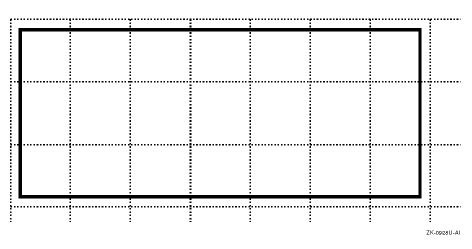
Consider the following example:
CSI 15 ; 1 ; 5 ; 1 ; 2 , r
The preceding escape sequence causes the DECterm software to draw the
ruled lines shown in
Figure C-1.
Figure C-1: Drawing Ruled Lines with the DECDRLBR Sequence
DECterm software draws ruled lines that are one pixel in width. When the display scrolls, these lines scroll in the same manner as text.
Figure C-2
and
the table following the figure describe the bit pattern to which the
DECDRLBR
parameters map.
Figure C-2: Bit Pattern for DECDRLBR Parameters
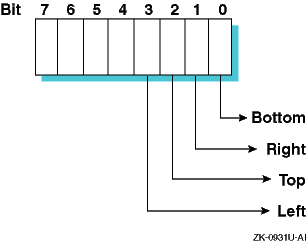
| Bit | Bit Value | Description |
| Bit 0 | 1 | Draws line on the bottom boundary |
| Bit 1 | 2 | Draws line on the right boundary |
| Bit 2 | 4 | Draws line on the top boundary |
| Bit 3 | 8 | Draws line on the left boundary |
The
DECDRLBR
parameters are more
completely described in the following list:
Pattern of ruled lines(P1
)
The pattern is a bitmask that controls how the ruled lines are drawn on the boundaries of the area. Ruled lines are drawn according to whether the bits for the boundaries are set on or off. For example, ruled lines are drawn on all boundaries if P1 is set to 15 and on the top and bottom boundary if P1 is set to 5, for example:
Boundary : Bottom   Right   Top    Left
P1       = Bit0   + Bit1  + Bit2 + Bit3
P1       = 1      + 2     + 4    + 8      = 15
P1       = 1              + 4             =  5
Absolute position of the start point(Px,Py
)
Px is the starting column position and Py is the starting row position. If you omit these parameters or explicitly set them to 0 (zero), the starting position is at column 1 and row 1. In other words, the upper left corner of the rectangle is at the coordinates (1,1).
Plx is the width of the area in columns and Ply is the height of the area in rows. If you omit these parameters or explicitly set them to 0 (zero), the area is 1 column in width and 1 row in height.
C.1.2 Erasing Ruled Lines in a Pattern
The
DECERLBRP
escape sequence erases ruled
lines on the boundaries of a rectangular area according to a specified pattern.
The
DECERLBRP
format is as follows:
CSI P1;Px;Plx;Ply;Py,s
where:
P1 indicates the pattern of drawing ruled lines
P1 indicates whether lines are drawn on all sides of the rectangular area, on the left and right sides only, on the top and bottom only, and so forth.
Px indicates the absolute position of the start point in columns
Plx indicates the width of the area in columns
Py indicates the absolute position of the start point in rows
Ply indicates the height of the area in rows
C.1.3 Erasing All Ruled Lines in an Area
The escape
sequence
DECERLBRA
erases all ruled lines in a rectangular
area, not just those drawn on the area boundaries.
The
DECERLBRA
format is as follows:
CSI P1;Px;Plx;Py;Ply ,t
where:
P1 determines whether the area encompasses the entire display screen or a specific section of the screen
When P1 is the value 1, DECterm software erases all ruled lines on the screen. In this case, the Px, Plx, Py, and Ply parameters are ignored. When P1 is the value 2, DECterm software erases all ruled lines within a rectangular area defined by the Px, Plx, Py, and Ply parameters. When P1 is omitted or explicitly set to 0 (zero), DECterm software erases all ruled lines on the screen (the same result as for the value 1, which is the default).
Px indicates the absolute position of the start point in columns
Plx indicates the width of the area in columns
Py indicates the absolute position of the start point in rows
Ply indicates the height of the area in rows
C.1.4 Interaction of Ruled Lines and Other DECterm Escape Sequences
Table C-1
describes the effect
of using standard DECterm escape sequences when ruled lines are drawn on the
screen.
Table C-1: Behavior of Standard Escape Sequences with Ruled Lines
| Mnemonic | Description | Effect on Ruled Lines |
DECDWL,
DECDHLT,
DECDHLB |
Display as double width or double height | These escape sequences have no effect on ruled lines, whose width is always one pixel. Furthermore, the parameter units for the escape sequences controlling ruled line display are always specified in terms of single width and single height columns and rows, even when the escape sequences are used with those that double the height and width of text. |
GSM |
Modify graphic size | These escape sequences have no effect on
ruled lines, whose width is always one pixel.
Comments made in the entry
for
DECDWL,
DECDHLT, and
DECDHLB
also apply to
GSM. |
ED,
EL,
ECH |
Erase display, erase line, and erase character | These escape sequences do not erase ruled lines, only the characters within the boundaries of the ruled lines. For example: 
|
DL |
Delete line | This escape sequence erases both lines of characters and ruled lines at the active position of deletion. The text lines and accompanying ruled lines that follow the deletion point scroll up the screen. For example: 
|
IL |
Insert line | This escape sequence causes insertion of blank lines at the active position. It causes both text and accompanying ruled lines currently at the active position to scroll down the screen. For example: 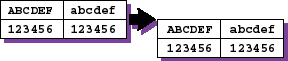
|
DCH |
Delete character | This escape sequence does not delete ruled lines. The following example demonstrates the deletion of four characters at the third column position: 
|
ICH |
Insert character | This escape sequence causes blank spaces to be inserted at the active position but has no effect on ruled lines. The following example demonstrates the insertion of four characters at the third column position: 
|
IRM |
Invoke insert/replace mode | Insert/replace mode has no effect on ruled lines. The following example demonstrates the insertion of the characters w, x, y, and z at the third column position and the replacement of the character f with s: 
|
DECCOLM |
Invoke column mode | Ruled lines are erased with accompanying text when column mode is in effect. |
RIS,
DECSTR |
Reset to initial state and soft terminal, invoke reset SETUP mode | The
RIS
sequence erases
all ruled lines displayed on the screen while the
DECSTR
sequence does not.
The Clear Display option on the DECterm Commands Menu erases
all ruled lines whereas the Reset Terminal option does not. |
C.1.5 Determining DECterm Support for Ruled Lines
The feature that allows applications to draw ruled lines is enabled only when a DECterm window is emulating a terminal type that supports this feature. Your application can check for device support by requesting primary device attributes from DECterm software.
VT terminals and DECterm software return a primary device attributes report on request from applications. If the extension value 43 is included in this report, drawing ruled lines is enabled for the device. This extension is valid at a level-2 video display or higher. For example, if a DECterm window is emulating a VT382-J terminal, which is the Japanese version of a VT382, the primary device attributes are generated as follows:
CSI ? 63 ; 1 ; 2 ; 4 ; 5 ; 6 ; 7 ; 8 ; 10 ; 15 ; 43 c
Applications can send either the
CSI c
or
CSI 0 c
escape sequence to a VT terminal or DECterm software to
request a device attributes report.
C.2 DECterm Programming Restrictions
This section discusses DECterm software
restrictions with respect to terminal programming features discussed in hardware
manuals.
C.2.1 Downline Loadable Characters
DECterm software does not support the downline loadable
characters that are used for preloading and on-demand loading of terminals.
The software ignores the escape sequence for these characters.
C.2.2 DRCS Characters
DECterm software supports
only the Standard Character Set (SCS) component of the DIGITAL Replacement
Character Set (DRCS).
When DECterm software receives the SCS characters, it
searches the X Window server for the fonts with XLFD named as
-*-dec-drcs
and treats them as a soft character set.
The software ignores the
DECDLD control string sent by the terminal programming application.