A
message catalog
is a file of localization data that programs can access.
While
the same definition applies to the
langinfo
database, there
are differences between the two.
The localization data elements in the
langinfo
database
are used by all applications, including the library routines, commands, and
utilities provided by the operating system.
The
langinfo
database is generated from the source files that define locales.
In contrast to the
langinfo
database, message catalogs
meet the specific localization needs of one program or a set of related programs.
Message catalogs are generated from message text source files that contain
error and informational messages, prompts, background text for forms, and
miscellaneous strings and constants that must vary for language and cultural
reasons.
X and Motif applications with graphical user interfaces, usually access X resource files, rather than message catalogs, for the small segments of text that belong to the title bars, menus, buttons, and simple messages for a particular window. Motif applications can also use a user interface language (UIL) file, along with a text library file, to access help, error message, and other kinds of text. However, both X and Motif applications can access text in message catalogs as well.
This chapter focuses on message catalogs.
Section 3.1.1 contains general guidelines you can apply to defining the contents of message text source files.
Section 3.1.2 describes message sets, an optional component of message text source files that you use to group messages.
Section 3.1.3 describes the message entries that comprise a message text source file.
Section 3.1.4 describes the quote directive and Section 3.1.5 describes comment lines that you use to delimit text or enter nonexecutable comments in message text source files.
Section 3.1.6 contains style guidelines to use when you create message text.
Section 3.2 describes how to extract message text from existing programs.
Section 3.3 describes how to edit and translate message text source files.
Section 3.4
describes how to generate
message catalogs, including the use of the
mkcatdefs
and
gencat
commands, and hints for designing and maintaining message
catalogs.
Section 3.5 describes how to display messages and locale data interactively and from scripts.
Section 3.6
describes how to access
message catalogs from programs, including the use of
catopen(),
catclose(), and
catgets()
functions to open, close,
and read message catalogs.
See
Section 3.1.6
for X and Motif programming guidelines
that apply to the translation of message catalog text, regardless of the method
used to retrieve and display the text.
3.1 Creating Message Text Source Files
Before
creating and using a message catalog, you must first understand the components,
syntax, and semantics of a message text source file.
A brief overview of a
source file example can help provide context for later sections of this chapter,
which focus on particular kinds of file entries and processing operations.
Example 3-1
contains extracts from a message text
source file for the online example,
xpg4demo.
Example 3-1: Message Text Source File
$ /*   [1]
$  * XPG4 demo program message catalogue.    [1]
$  *   [1]
$  */  [1]
[2]
$quote "   [3]
$set MSGError   [4]
E_COM_EXISTBADGE        "Employee entry for badge number %ld \   [5]
already exists"
E_COM_FINDBADGE         "Cannot find badge number %ld"   [5]
E_COM_INPUT             "Cannot input"   [5]
E_COM_MODIFY            "Data file contains no records to modify"  [5]
E_COM_NOENT             "Data file contains no records to display" [5]
E_COM_NOTDEL            "Data file contains no records to delete"  [5]

.
.
.
$set MSGInfo   [4]
I_COM_NEWEMP            "New employee"    [5]
I_COM_YN_DELETE         "Do you want to delete this record?"   [5]
I_COM_YN_MODIFY         "Do you want to modify this record?"   [5]
I_COM_YN_REPLACE        "Are these the changes you want to make?"  [5]

.
.
.
$ NOTE - Message contains the format used to display numeric dates
$ The first descriptor, 1$, contains the year
$ The second descriptor, 2$, contains the month
$ The third descriptor, 3$, contains the day
I_SCR_IN_DATE_FMT       "%2$d/%3$d/%1$d"   [6]
$set MSGString   [4]
$
$ One-character commands.
$ Note: These should not be translated because they are keywords for the application.
$S_COM_CREATE           "c"    [7]
S_COM_DELETE            "d"    [7]
S_COM_EXIT              "e"    [7]


.
.
.
$ Note: These are column heads and spacing and should be maintained
$ Column one begins at space 1.
$ Column two begins at space 15.
$ Column three begins on space 37.
$ Column four (an abbreviation of Department) begins at space 60.
$ Column five (an abbreviation of Date of Birth) begins at space 68.
$ S_COM_LIST_TITLE is output to underscore headers and should be
$ increased or decreased as appropriate for translation.
S_COM_LIST_TITLE        "Badge         Name                  Surname \
               Dept      DOB\n"    [8]
S_COM_LIST_LINE         "--------------------------------------------\
---------------------------------\n"    [8]

.
.
.
$
$ If surname comes before first name, "y" should be specified.
$
S_SCR_SNAME1ST          "n"    [9]

.
.
.
Lines that begin with the dollar sign ($), followed by either a space or tab, are comment lines. Section 3.1.5 discusses comment lines. [Return to example]
To improve readability, blank lines are allowed anywhere in the file. [Return to example]
The quote character delimits message text. Section 3.1.4 discusses quote directives. [Return to example]
Identifiers are used to mark the beginning of a message set. There are three sets of messages in this source file: error messages (in the MSGError set), informational messages (in the MSGInfo set), and miscellaneous strings and formats (in the MSGString set). See Section 3.1.2 for more information about defining and removing message sets. [Return to example]
Most lines in the source file are message entries, whose components
are a unique identifier and a message text string.
The first message entry
is continued to the next line by using the backslash (\).
Other entries contain special character sequences, such as
\n
(newline), that affect how the message is printed.
See
Section 3.1.3
for more information about message entries.
Section 3.1.1
also discusses some rules and options that apply to message entries.
[Return to example]
This type of message entry allows translators to vary the order in which users are prompted to enter date elements. You frequently use message entries to allow format control, although use of program logic to format messages is a better alternative. This line also illustrates the value of providing comments that identify variables to potential translators. [Return to example]
This type of message entry defines word abbreviations, which often need special attention to preserve uniqueness from one language to another. [Return to example]
This type of message entry defines header lines for menu displays so that translators can adjust the field order and line length to match other adjustments that the program allows for cultural variation. This line also illustrates the value of providing comments to translators who may be unfamiliar with abbreviations or who need to know the amount of spacing in the formatting of columns. [Return to example]
This type of message entry defines a constant
whose value controls how the program positions name fields.
For example, in
the
xpg4demo
program, you can change the position of first
and last name (surname).
[Return to example]
You can use one or more message text source
files to create message catalogs (.cat
files) that programs
can access at run time.
To create a message catalog from the source file in
Example 3-1, perform the following tasks:
Use the
mkcatdefs
command to convert symbolic
identifiers for message sets and messages to numbers that indicate the ordinal
positions of the message sets within the catalog and of messages within each
set.
Use the
gencat
command to create the message
catalog from
mkcatdefs
output.
Section 3.4
discusses the
mkcatdefs
and
gencat
commands.
3.1.1 General Rules
This section contains general guidelines that apply to the syntax of message text source files. Section 3.1.6 contains stylistic guidelines for the content of message text.
A message text source
file (.msg
file) contains sequences of messages.
Optionally,
you can order these messages within one or more message sets.
For a given
application, there are usually separate message source files for each localization;
for example, there are source files for each locale (each combination of codeset,
language, and territory) with which users can run the application.
If you do not quote values for identifiers, specify a single space
or tab, as defined by the source codeset, to separate fields in lines of the
source file.
Otherwise, the extra spaces or tabs are treated as part of the
value.
Using the character specified in a
quote
directive
to delimit all message strings prevents extra spaces or tabs between the identifier
and the string from being treated as part of the string (see
Section 3.1.4
for a description of the
quote
directive).
Quoting message
strings is also the only way to indicate that the message text includes a
trailing space or tab.
Message
text strings can contain ordinary characters plus sequences for special characters,
as described in
Table 3-1.
Table 3-1: Coding of Special Characters in Message Text Source Files
| Description | Symbol | Coding Sequence |
| Newline | NL (LF) | \n |
| Horizontal tab | HT | \t |
| Vertical tab | VT | \v |
| Backspace | BS | \b |
| Carriage return | CR | \r |
| Form feed | FF | \f |
| Backslash | \ | \\ |
| Octal value | ddd | \ddd [Footnote 1] |
| Hexadecimal value | dddd | \xdddd [Footnote 2] |
A backslash
in a message file is ignored when followed by coding sequences other than
those described in
Table 3-1.
For example,
the sequence
\m
prints in the message as
m.
When you use octal or hexadecimal values to represent characters, include
leading zeros if the characters following the numeric encoding of the special
character are also valid octal or hexadecimal digits.
For example, to print
$5.00 when 44 is the octal number for the dollar sign, you must specify
\0445.00
to prevent the
5
from being parsed as
part of the octal value.
A newline character normally separates message entries. However, you can continue the same message string from one line to another by entering a backslash before the newline character. In this context, entering a newline character means pressing the Return or Enter key on English language keyboards. For example, the following two entries are equivalent and do not affect how the string appears to the program user:
MSG_ID        This line continues \
to the next line.
MSG_ID        This line continues to the next line.
Any empty lines in a message source file are ignored.
Thus, you can use blank lines to improve the readability of the file.
3.1.2 Message Sets
Message sets are an optional component within message
text source files.
You can use message sets to group messages for any reason.
In an application built from multiple program source files, you can create
message sets to organize messages by program module or, as done for the online
example
xpg4demo, group messages that belong to the same
semantic category (error, informational, defined strings).
An advantage of grouping messages by program module is that, should the module later be removed from the application, you can easily find and delete its messages from the catalog.
Grouping messages by semantic category supports message sharing among modules of the same application. When messages are grouped by semantic category, programmers writing new modules or maintaining existing modules for an application can easily determine if a message meeting their needs already exists in the file.
A set directive specifies the set identifier of subsequent messages until another set directive or end-of-file is encountered. Set directives have the following format:
$SET
set_id
[comment]
The set_id variable can be one of the following:
A number in the range
[1 - NL_SETMAX]
The
NL_SETMAX
constant
is defined in the
/usr/include/limits.h
file.
Numeric
set identifiers must occur in ascending order within the source file; however,
the numbers need not be contiguous values.
Furthermore, set identifier numbers
must occur in ascending order from one source file to the next when multiple
message source files are processed by the
gencat
command
to create a message catalog.
A user-defined symbolic identifier, such as
MSGErrors
When you specify symbolic set identifiers,
you must use the
mkcatdefs
command to convert the symbols
to the numeric set identifiers required by the
gencat
command.
Any characters following the set identifier are treated as comments.
If the message text source
file contains no set directives, all messages are assigned to a default message
set.
The numeric value for this set is defined by the constant
NL_SETD
in the
/usr/include/nl_types.h
file.
When a program calls the
catgets()
function to retrieve
a message from a catalog that has been generated from sources that do not
contain
set
directives, the
NL_SETD
constant is specified on the call as the set identifier.
Note
Do not specify
NL_SETDin asetdirective of a message text source file or try to mix default and user-defined message sets in the same message catalog. Doing so can result in errors from themkcatdefsorgencatutility. Furthermore, the value assigned to theNL_SETDconstant is vendor defined; usingNL_SETDas a symbolic identifier in the message text source file can result inmkcatdefsoutput that is not portable from one system to another.
The rest of this section discusses entries that delete message sets from an existing message catalog. Section 3.4.3 addresses the topic of catalog maintenance more generally.
Message text source files can contain
delset
directives, which are used to delete message sets from existing
message catalogs.
The
delset
directive has the following
format:
$delset
n
[comment]
The
n
variable must be the number that identifies the set in the
existing catalog to the
gencat
command.
Unlike the case
for the
set
directive, you cannot specify symbolic set
identifiers in
delset
directives.
When message files are
preprocessed using the
mkcatdefs
command, you have the
option of creating a separate header file that equates your symbolic identifiers
with the set numbers and message numbers assigned by the
mkcatdefs
utility.
If you later want to delete one of the message sets, you
first refer to this header file to find the number that corresponds to the
symbolic identifier for the set you want to delete.
This is the number that
you specify in the
delset
directive to delete that set.
Suppose that you are removing program module
a_mod.c
from an application whose associated message text source file is
appl.msg.
Messages used only by
a_mod.c
are
contained in the message set whose symbolic identifier is
A_MOD_MSGS.
The file
appl_msg.h
contains the following
definition statement:
.
.
.
#define A_MOD_MSGS 2

.
.
.
The associated
delset
directive could then be the
following:
$delset 2 Removing A_MOD_MSG set for a_mod.c in appl.cat.
You can specify
delset
directives either in a source file by themselves or as part
of a more general message source file revision that includes both
delset
and
set
directives.
In the latter case,
make sure that multiple directives occur in ascending order according to the
specifier.
Assume that the preceding example is contained
in a single-directive source file named
kill_mod_a_msgs.msg
and existing message catalogs reside in the
/usr/lib/nls/msg
directory.
In this case, the following
ksh
loop would carry
out the message set deletion in catalogs for all locales:
for i in /usr/lib/nls/msg/*/appl.cat
do
        gencat $i kill_mod_a_msgs.msg
done
A message entry has the following format:
msg_id message_text
The msg_id can be either of the following:
A number in the range
[1 - NL_MSGMAX]
The constant
NL_MSGMAX
is defined in the
/usr/include/limits.h
file.
Message numbers are associated with the message set defined by the preceding
set
directive or, if not preceded by a
set
directive,
with the default message set
NL_SETD, a constant defined
in the
/usr/include/nl_types.h
file.
Message numbers must occur in ascending order within a message
set; however, the numbers need not be contiguous values.
If message numbers
are not in ascending order within a set, the
gencat
command
returns an error on attempts to generate a message catalog from the source
file.
A user-defined symbolic name, for example,
ERR_INVALID_ID
When a message text source file contains symbolic names, you must
use the
mkcatdefs
command to convert the symbolic names
to numbers that the
gencat
command can process.
The
message_text
is a string that the program
refers to by
msg_id.
You can quote this string
if a
quote
directive enables a quotation character before
the message entry is encountered.
Section 3.1.1
discusses the advantages of quoting message text.
Section 3.1.4
lists the rules for
quote
directives.
The total length of
message_text
cannot exceed the maximum number of bytes defined for the
NL_TEXTMAX
constant in the
/usr/include/limits.h
file.
The rest of this section discusses entries that delete specific messages from an existing message catalog. See Section 3.4.3 for a general discussion of message catalog maintenance.
To delete a particular message from an existing message catalog, enter the identifier for the message on a line by itself. This type of entry allows you to delete a message without affecting the ordinal position of subsequent messages. For the message deletion to be carried out correctly, use the following guidelines:
Specify a numeric message identifier.
If you usually
use symbolic identifiers in your message text source files, you can obtain
the associated numbers from the message header file that is produced when
the source file was last processed by the
mkcatdefs
command.
Unlike the case for deleting message sets with the
delset
directive,
mkcatdefs
does not generate an error if you
use a symbolic message identifier to delete a message; however, you will delete
the wrong message if the symbol is not preceded by the same number of message
entries as is in the catalog.
The identifier cannot be followed by any character other than a newline. If msg_id is followed by a space or tab separator, the message is not deleted; rather, the message text is revised to be an empty string.
If
the catalog contains user-defined message sets, make sure the appropriate
set
directive precedes the entry to delete the message; otherwise,
the message may be deleted from the wrong message set.
For reasons similar
to those noted for message identifiers in step 1, use a numeric rather than
symbolic set identifier in the
set
directive.
Unless you
are replacing all messages in a set, use only the
gencat
command to process the file.
To replace all messages in a set, use the
mkcatdefs
utility, which generates a
delset
directive
before each
set
directive you specify in the input file.
This is helpful when you want to replace all messages in a message set, but
it will not produce the results you intend if your input source refers only
to one or two messages that you want to delete.
Consider the following two examples:
This example uses message text source input processed with
the
gencat
command.
The command in this example results
in the deletion of message 5 from message set 2.
$set 2
5
This example uses
the same source input.
However, in this case, the source is preprocessed with
the
mkcatdefs
command.
The addition of the
delset
directive results in the deletion of all messages in set 2 from
the message catalog.
$delset 2
$set 2
5
A
quote
directive enables or disables
a quote character that you use to surround message text strings.
The
quote
directive has the following format:
$quote[
character]
The
character
variable
is the character to be recognized as the message string delimiter.
In the
following example, the
quote
directive specifies the double
quotation mark as the message string delimiter:
$quote "
By default, or if a character is omitted, quoting of message text strings is not recognized.
A source text message
file can contain more than one
quote
directive, in which
case each directive affects the message entries that follow it in the file.
Usually, however, a message file contains only one
quote
directive, which occurs before the first message entry.
3.1.5 Comment Lines
A
line beginning with the dollar sign ($) followed by a space
or tab is treated as a comment.
Neither the
mkcatdefs
nor
the
gencat
commands interpret comment lines.
Remember that message files may be translated by individuals who are not programmers. Be sure to include comment lines with instructions to translators on how to handle message entries whose strings contain literals and substitution format specifiers. For example:
$ Note to translators: Translate only the text that is within
$ quotation marks ("text text text") on a given line.
$ If you need to continue your translation onto the next line,
$ type a backslash (\) before pressing the newline
$ (Return or Enter) key to finish the message.
$ For an example of line continuation, see the
$ line that starts with the message identifier E_COM_EXISTBADGE.

.
.
.
$ Note to translator: When users see the following message, a badge
$ number appears in place of the %ld directive.
$ You can move the %ld directive to another position
$ in the translated message, but do not delete %ld or replace %ld with
$ a word.
$
E_COM_EXISTBADGE        "Employee entry for badge number %ld \
already exists"

.
.
.
$
$ Note to translator:  The item %2$d/%1$d/%3$d indicates month/day/year
$ as expressed in decimal numbers; for example, 3/28/81.
$ To improve the appropriateness of this date input format, you can change
$ only the order of the date elements and the delimiter (/).
$ For example, you can change the string to %1$d/%2$d/%3$d or
$ %1$d.%2$d.%3$d to indicate day/month/year or day.month.year
$ (28/3/81 or 28.3.81).
$
I_SCR_IN_DATE_FMT        "%2$d/%1$d/%3$d"

.
.
.
The operating
system provides the
trans
utility, discussed in
Section 3.3,
to help translators quickly locate and edit the translatable text in a message
source file.
This utility does not eliminate the need for information from
the programmer on message context and program syntax.
3.1.6 Style Guidelines for Messages
When creating messages and other text strings in the English language, keep the following information in mind:
Text strings in the English language are usually shorter than equivalent text strings in other languages. When text strings are translated, their length can increase an average of 30 to 40 percent. Expect even larger percentage increases for strings containing fewer than 20 characters.
The following guidelines address the likelihood that text strings will grow when translated from the English language to another language:
If you must limit a text string to one line (for example, 80 characters), make sure the English language text occupies no more than half of the available space. Whenever possible, allow text to wrap to a subsequent line rather than restricting it to an arbitrary length.
Do not design a menu, form, screen, or window in which English language text uses most of the available space.
Design a dialog box so that its components can be moved around. The developers who localize your application may have to reorganize the contents of a dialog box because of text length changes and, for Asian languages, to accommodate Asian character input.
Do not embed text in a graphic. If text is embedded in a graphic, the entire graphic must be redone when the application is localized. Furthermore, the translated text may cause the graphic to grow in size or to lose visual appeal.
Nouns in languages other than English may have gender that affects the spelling of the noun itself and associated adjectives and verbs. The way a noun is spelled can also change, depending on whether the noun is the subject or object of a verb, or the object of a preposition. There can be additional grammatical rules, such as those for creating affirmative, negative and imperative verb forms, that are different from the English language. These conditions lead to the following rules:
Do not create a message at run time by concatenating different kinds of strings. For example, do not concatenate strings that represent different nouns, adjectives, verbs, or combinations of these.
If adjectives and verbs can have multiple referents, each with a different gender, the translator may not be able to create a grammatically correct counterpart for all the possible sentences that the user may see. In this case, the developer who is localizing the application may have to redesign the error-handling logic so that the application returns several distinct messages rather than one.
Be careful about inserting the same text variable into different strings. Word spelling may have to change if each string represents a different grammatical context. Furthermore, you cannot assume that there is a one-to-one correspondence between English language words and their counterparts in other languages. For example, you can create a negative statement in the English language by creating a text variable that contains the word "not" and inserting that variable into a verb phrase. The message could not be translated to the French language, however, which usually requires two words, "ne" before the verb and "pas" after the verb, to negate meaning.
Pathnames, file names, and strings that are complete sentences are usually safe to insert into other strings.
Avoid using the word "None" as a button label or menu item; this word may be impossible to translate if its referents have different gender.
In general, create messages that are complete sentences. Because of differences in grammatical conventions from language to language, building messages from fragments can create translation issues.
If the message is composed of a component that identifies a system entity (a command, utility, error severity level, server, and so forth) and a separate component that contains informational or error text, you can break the rule about starting messages with a verb. In this case, be sure to include comments to the translator in your message source file about how the message components are constructed and about the system entity referenced in the message. Also, use grammatically complete phrases for the informational or error text component. See Section 3.1.5 for information about adding comments to message source files.
Do not start messages with a verb (unless the message is an imperative where the subject "you" is understood).
The following messages cannot be translated into some languages because the translator cannot determine the subject of the sentence or the correct form of the verb in the local language:
Is a directory.

Could not open file.
Unique identifiers that are based on the first letters of words may not be unique when the words are translated. For example, a common practice in applications that prompt users to choose among several items is to accept a single character as the item identifier. Make sure your application does not require this character to be the first character or first several characters in the item name. The translator should have the option of substituting any character or a number for the item identifier.
Languages can have syntax rules that require translators to change word order. Therefore, use substitution specifiers as described in Section 2.4.2 so that translators can change the order of message components to meet local language requirements.
Translations of messages with vague, ambiguous, or telegraphic wording are likely to be incorrect. Use the following guidelines to help ensure accurate translation:
Include documentation in the message file, just as you would for a program source file. Provide comments that describe sentence constructions and that clarify any wording that might be misconstrued by a non-native speaker.
Include articles (the, a, an) and forms of the verb "to be" where appropriate. Programmers often omit these words to reduce the size of message strings; however, the omission sometimes makes it difficult to distinguish nouns from verbs, subject nouns from predicate nouns, and active voice from passive voice. The message "Maximum parameter count exceeded" illustrates this problem.
You can include very common contractions, such as "can't" and "don't", but avoid less commonly used contractions, like "should've". If you are using contractions in the English language to conserve line space, be aware that your objective is likely to be lost in translation.
Avoid using most abbreviations that programmers commonly use in variable names and code comments. In particular, avoid such terms as pkt, msg, tbl, ack, and max. These abbreviations do not appear in a dictionary, and translators may have to guess at what they mean. On the other hand, you can use formal abbreviations for product and utility names and acronyms (such as ANSI or TCP/IP for names of standards, protocols, and so forth that appear in commercial literature).
Use grammatically correct words. English langugage speakers have a tendency to create new verbs or adjectives out of existing nouns and new nouns out of existing verbs. This practice is confusing to translators, particularly when the intended usage is not one of those noted in an English language dictionary. For example, consider the use of the word "parameter" as an adjective in the message "Invalid parameter delimiter."
Avoid using slang or words whose intended meaning is not included in a dictionary. Slang usually has no equivalent in another language or can be misinterpreted. For example, the message "Server hang" may be meaningful to English language speakers who develop software or manage systems, but the meaning of the message may be transformed in another language to "The system lynched the waiter." The message "The %s server failed." is more likely to be translated correctly.
In general, use positional format elements in message files. However, if the message contains only one format flag, a positional element adds no value and tends to confuse the translator. Message files that contain positioning format elements should be heavily commented to help the translator understand the intended result.
3.2 Extracting Message Text from Existing Programs
If you have an existing program that you want to internationalize, the operating system provides the following tools to help you extract message strings into a message source file and to change calls to retrieve messages from a message catalog:
| Tool | Description |
extract
command |
Interactively extracts text strings from
program source files and writes each string to a source message file.
The
command also replaces each extracted string with a call to the
catgets()
function. |
strextract
command |
Performs string extraction operations in batch. |
strmerge
command |
Reads strings from the message file produced
by
strextract
and, in the program source, replaces those
strings with calls to the
catgets()
function. |
Consider the following call:
printf("Hello, world\n");
You can use the
extract
command, or the
strextract
command followed by the
strmerge
command,
to do the following:
Create the following entries in a message text source file (assuming that "Hello, world" was the first string extracted):
$set 1
$quote "
1 "Hello, world\n"
Change the
printf()
call to the following:
printf(catgets(cat, 1, 1, "Hello, world\n"));
Assuming that input to the commands is a program source file named
prog.c, the commands create the following three new files:
prog.msg
(message text source file),
nl_prog.c
(internationalized version of the program source), and
prog.str
(an intermediate strings file that other utilities can reference).
The commands use the following files along with the input source program:
This file specifies
patterns that the extraction commands use to find strings in the program.
You can specify your own patterns file.
By default, the extraction commands
use the
/usr/lib/nls/patterns
file.
This file specifies strings that the extraction commands should ignore.
The
extract,
strextract, and
strmerge
commands do not perform all the revisions necessary to
internationalize a program.
For example, you must manually edit the revised
program source to add calls to
setlocale(),
catopen(), and
catclose().
In addition, you may
need to add routines for multibyte character conversion (for Asian locales)
and improve user-defined routines to vary behavior according to values defined
in message catalogs or in the
langinfo
database.
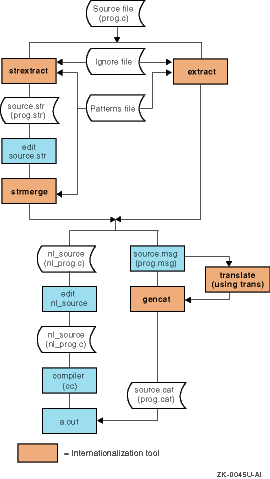
Figure 3-1
illustrates
the files and tools that help you change an existing program to use a message
catalog.
For detailed instructions on using the
extract,
strextract, and
strmerge
commands, see
extract(1)strextract(1)strmerge(1)patterns(4)
Figure 3-1: Converting an Existing Program to Use a Message Catalog
3.3 Editing and Translating Message Source Files
You can use any text editor to edit message text source files, provided that the following is true:
The input device is capable of generating the necessary characters.
If 8-bit or multibyte characters are required, the editor can transparently handle this data.
The requirement on input devices is satisfied for languages other than Western European by terminal drivers, locales, fonts, and other components that are available with localized software subsets.
The requirement for transparent handling of 8-bit and multibyte data
is satisfied by the
ed,
ex, and
vi
editors.
Localized software subsets may also include enhanced
versions of additional editors, such as Emacs, that can handle 8-bit and multibyte
characters.
The
operating system includes the
trans
command to assist
those who translate message text source files for different locales.
The command
provides a multiwindow environment so users can see both the original and
translated versions of the file.
In addition, the command automatically guides
users in the file from one translatable string to the next.
For more information,
see
trans(1)
See Section 3.1.5 for examples of comments to include in message text source files to ensure that messages are correctly translated.
For examples of translated message text source files, search
the
/usr/examples/i18n/xpg4demo/
directory for
*.msg
files, as follows:
% cd /usr/examples/i18n/xpg4demo/
% ls *.msg

.
.
.
A translated message catalog is
associated with a particular locale and encoding format.
Many languages are
supported by multiple locales and encoding formats, and this generates a requirement
that messages in the same language be available in multiple encoding formats.
Although you can use codeset converters to convert message source files, building
and installing multiple versions of the same catalog for a single language
is expensive.
Therefore, the
catopen()
and
catgets()
functions support dynamic codeset conversion of message catalogs.
A set of
.msg_conv-locale_name
files in the
/usr/share
directory controls codeset conversion
of message catalogs.
See
catopen(3)3.4 Generating Message Catalogs
The
gencat
command generates message catalogs from one or more message
text source files.
If the source files contain symbolic rather than numeric
identifiers for message sets, message entries, or both, those source files
must first be preprocessed by the
mkcatdefs
command.
Example 3-2
illustrates interactive processing of message
text source files with symbolic identifiers for a default and nondefault locale.
This example provides context for later sections, which discuss each command.
Example 3-2: Generating a Message Catalog Interactively
% mkcatdefs xpg4demo xpg4demo.msg | gencat xpg4demo.cat   [1]
mkcatdefs: xpg4demo_msg.h created    [2]
% setenv LANG fr_FR.ISO8859-1    [3]
% mkdir fr_FR    [4]
% mkcatdefs xpg4demo xpg4demo_fr_FR.msg -h | gencat \
fr_FR/xpg4demo.cat     [5]
mkcatdefs: no msg.h created    [6]
The
mkcatdefs
command specifies the following:
The root name to use for the header file
The header file maps symbolic identifiers used in the program to their numeric values in the message catalog.
The name of the message text source file being processed
The preprocessed message source is piped to the
gencat
command, which specifies the name of the message catalog.
[Return to example]
The
mkcatdefs
command prints to standard output the name of the header file it creates.
The utility appends
_msg.h
to the root name to create
a name for the header file.
[Return to example]
When generating a message
file for a nondefault locale, you must set the
LANG
environment
variable to the name of the locale that the message catalog will support,
in this case,
fr_FR.ISO8859-1.
[Return to example]
Because the name of the message catalog opened by the program does not vary by locale name, you must create a directory in which to store each message catalog variant. [Return to example]
This line creates the local variant of the message catalog.
The header file created by the
mkcatdefs
utility does not
vary by locale.
The header file has already been created for the default message
catalog, so this
mkcatdefs
command includes the
-h
flag to disable creation of another header file.
The catalog specified
to the
gencat
command is directed to the temporary locale
directory.
On user systems, you can move this version of the catalog to the
/usr/lib/nls/msg/fr_FR.ISO8859-1
default directory or to a directory
that is application specific.
[Return to example]
The
mkcatdefs
command announces that no
header file has been created, as intended.
[Return to example]
See the
/usr/examples/i18n/xpg4demo/Makefile
file for an example of how you can integrate generation of a message
catalog into the makefile that builds an application.
3.4.1 Using the mkcatdefs Command
The
mkcatdefs
command preprocesses
one or more message source files to change symbolic identifiers to numeric
constants.
The utility has the following features:
Sends preprocessed message source to standard output, so you
can either pipe the output to the
gencat
command as described
in
Example 3-2
or use the
>
redirection specifier to print the output to a file
Creates a header file that maps numbers identifying message sets and messages in the new message catalog with the symbolic identifiers referred to in source programs
You must include this header file in all the program modules that open this catalog and refer to message sets and messages that use symbolic identifiers.
The advantage of symbolic identifiers is that you can specify
them in place of numbers when you code calls whose arguments include message
sets and message identifiers.
Symbolic identifiers improve the readability
of your program source code and make the code independent of the order in
which message sets and entries occur in the message catalog.
Each time that
the
mkcatdefs
utility processes a message text source file,
it produces an associated header file to equate set and message symbols with
numbers.
Updating your program after a message file revision can be as simple
as compiling it with the new header file.
Note
The
mkcatdefscommand includes two options that are not discussed in this chapter.The -S option enables symbolic name support in output passed to the
gencatcommand. Thedspmsgcommand (used in shell scripts) has a corresponding -S option to enable use of symbolic names to retrieve messages from message catalogs that were built to include this support. (Thecatgets()function in thelibcLibrary is restricted at run time by the XSH specification of the X/Open UNIX standard to use numeric identifiers, not symbols, to retrieve messages from a catalog.)The -m option enables automatic generation of a default message string and assigns it to a symbolic name. This feature removes the requirement to specify a default message string in
dspmsgcommand lines orcatgets()calls for display when the command or function cannot retrieve a message from a catalog.See
for more information about these options. mkcatdefs(1)
The option of defining symbolic identifiers for message
sets and catalogs is not included in the XSH specification, so do not assume
that the
mkcatdefs
command is available on all operating
systems that conform to this specification.
However, the source text message
file and header files produced by the
mkcatdefs
command
should be portable among systems that conform to the specification.
The
mkcatdefs
command
maps numbers to symbol identifiers based on the ordinal position of those
symbols in the message source input stream currently being processed.
When
you are processing changes to an existing catalog, make sure the symbols you
specify in the source input to the
mkcatdefs
command are
correctly mapped to numeric counterparts for those symbols in the existing
message catalog.
In general, consider the
mkcatdefs
utility a tool for regenerating an entire message catalog, not
just parts of it.
Use the following guidelines:
For message and message set deletions, specify numeric identifiers in place of symbols at strategic points in the message source input. This technique prevents deletions of message sets and individual messages from affecting the ordinal position of subsequent entries.
Define new sets at the end of the input source stream (at the end of the last source file if a catalog is generated from a sequence of source files).
Define new messages for an existing message set at the end of that set.
Specify source entries
for the entire catalog; otherwise,
mkcatdefs
will not produce
a complete message header file.
You need a complete header file for compiling
programs that use both current and new symbols to identify messages.
In addition,
mkcatdefs
generates a
delset
directive before
each
set
directive you specify in the input source.
In
other words,
mkcatdefs
expects your input to completely
replace all messages in the referenced set.
If the catalog was generated from multiple source files, specify source files in the same order as they were specified to generate the existing catalog; otherwise, you invalidate headers used to compile all program modules that open the catalog. You can avoid recompiling programs that do not refer to new messages as long as you do not invalidate the symbol-number mapping in the message header file with which those programs were compiled.
Do not specify
NL_SETD
in a
set
directive of a message text
source file or try to mix default and user-defined message sets in the same
message catalog.
Doing so can result in errors from the
mkcatdefs
or
gencat
utility.
Keep in mind that the
mkcatdefs
utility
condenses multiple spaces between the message indentifier and the message
text to a single space.
This modification ensures compatibility with the UNIX
standard and the requirements of other UNIX and LINUX platforms.
3.4.2 Using the gencat Command
The
gencat
command merges one or more message text source files into
a message catalog.
For example:
# gencat en_US/test_program.cat test_program_en_US.msg
The
gencat
command creates the message catalog if the specified catalog
path does not identify an existing catalog; otherwise, the command uses the
specified message text source file (or files) to modify the catalog.
The
gencat
command accepts message source data from standard input,
so you can omit the source file argument when piping input to
gencat
from another facility, such as the
mkcatdefs
command.
The X/Open UNIX standard does not specify
file name extensions for message source files and catalogs.
On Tru64 UNIX
systems, the convention is to use the
.msg
extension
for source files and the
.cat
extension for catalogs.
Because the message catalogs produced by the
gencat
command
are binary encoded, they may not be portable between different types of systems.
Message text source files preprocessed by the
mkcatdefs
command should be portable between systems that conform to X/Open UNIX CAE
specifications.
See
gencat(1)3.4.3 Design and Maintenance Considerations for Message Catalogs
Message sets and message entries are identified at run time by numbers that represent ordinal positions within one version of a message catalog. When you add or delete message sets and entries in an existing catalog, you must be careful not to change the ordinal position specifiers that identify messages.
Consider a message whose English
language text "Enter street address: " is identified as 3 : 10 (tenth message
of the third message set) in the original generation of a message catalog.
That message will have a different identifier in the next version of the
catalog if the revised source input to the
gencat
command
performs any of the following operations:
Inserts message sets at the beginning of the input source
In the third message set, inserts any messages before the "Enter street address: " entry
In the third message set, deletes messages before the "Enter street address: " entry without specifying a message deletion directive (a message number followed by no other characters on the line)
Consider the value of adding comments to code to explain restrictions on ordinal positioning to potential translators, as demostrated in the following two program segments:
$ Note - Do not reorder message descriptors for columns.

S_COM_LIST_ROW         "%5d        %20s     %20s    %4s     %9s\n"
$ The first descriptor must always be displayed at the beginning of error messages.
$ The second descriptor contains the first name.
$ The third descriptor contains the surname.

S_COM_LIST_ERROR      "%1$s: Error badge number for $2$s   %3$s  incorrect\n"
When program source refers to messages
by numeric identifiers, any changes in ordinal positions of message sets and
message entries require changes to program calls that refer to messages.
When
a program source file refers to messages by symbolic identifiers, the maintenance
cost of ordinal position changes is sharply reduced for each module.
In other
words, you can synchronize any particular program module with the new version
of a message catalog by compiling with the new header file generated by the
mkcatdefs
utility.
The ability to compile program source to synchronize with new message catalog versions does not address issues of complex applications where multiple source files refer to the same message catalog. For such applications, a usual goal is to ensure module-specific maintenance updates. In other words, after an application is installed at end-user sites, you should be able to update a specific module and its associated message catalogs without recompiling and reinstalling all modules in the application. You can achieve this goal in a number of ways. The following design options can help you decide on a message system design strategy that works best for applications developed and maintained at your site:
One message source file and catalog for each program module
Advantages
This is the easiest strategy to implement for the individual programmer as it eliminates problems that arise when programmers share one source. Source control software, such as the Revision Control System (RCS) and the Source Code Control System (SCCS), help to manage files that multiple programmers maintain. Sometimes, however, programmers work on different application versions in parallel. This additional layer of complexity is not easy to manage. A one-to-one correspondence between message source files and associated program sources makes it easier to determine whose changes are needed in the message file to build the application for a particular release cycle at a specific point in time.
When the message catalog is module specific, you can replace the entire message catalog when a new binary module is installed at end-user sites. Module replacement minimizes risk to the run-time behavior of other modules in the same application.
Disadvantages
At run time, the application may need to open and close as many message catalogs as there are modules. Opening a message catalog entails some performance overhead and adds to the number of open file descriptors assigned to the user's process and to the systemwide open file table. There is a systemwide and process-specific maximum for the number of files that can be open simultaneously, and these limits vary from one system to another.
On Tru64 UNIX systems, opened message catalogs are mapped into memory (and the file closed) to improve performance of message retrieval. This operation also means that opening multiple message catalogs has little impact on open file limits. This situation, however, may not exist on other platforms to which you might need to port your application.
One message source file for each program source and a single catalog for each application
Advantages
This technique has the same advantages as one message source file and catalog for each program as described previously. In addition, the single catalog design eliminates any problems associated with numerous open operations if you port your application to systems other than Tru64 UNIX.
Disadvantages
When you generate a message catalog from multiple source files, maintainability problems can occur if you do not carefully control message set directives. The best rule to follow is to define a fixed number of sets for each source file. For example, define one set for errors, one set for informational displays, and one set for miscellaneous strings. If you allow programmers to change the number of message sets for different versions of their message source files, the message set numbers for subsequent program modules are likely to change from one version of the catalog to another. This means that other modules whose source code was not changed may have to be included in an update release simply for synchronization with a new version of the message catalog.
There
are similar maintainability problems if no source files define message sets
or if only some of them do.
The
mkcatdefs
and
gencat
commands concatenate input source files so that the end-of-file
marker exists only at the end of the last input source file.
This means that,
if no sets are defined in any file, all messages are considered part of the
default message set.
(In program calls, the
NL_SETD
constant
refers to the default message set.) In this case, adding messages to any source
file other than the last one changes the numeric identifiers of messages in
all source files that follow on the input stream.
Another disadvantage of the multiple source file to single message catalog design arises when the resulting message catalog is extremely large and memory is limited. As mentioned earlier, message catalogs are mapped into memory when opened so that disk I/O for message retrieval does not impede performance. If the users who run your application typically use software and messages that are associated only with a subset of the available modules, module-specific message catalogs can conserve the total amount of memory used when message catalogs are opened for a particular execution cycle.
Finally, if only some message source files define message sets, message sets can cross source file boundaries. Messages defined in source files that occur later on the input stream are considered part of a message set defined by a source file processed earlier. This arrangement can also result in message entry position changes when new messages are added to different source files.
Depending on your application, it might make sense to have one or more message catalogs that are generated from multiple, module-specific source files and some that are generated from a single source file that is maintained by all programmers.
For example, if many modules in the application generate messages for the same error conditions, message text consistency is a desirable goal. In this case, generate one message catalog with a single message text source file in which error messages are defined. Use this source file to define message sets for errors, warnings, and so forth. Programmers would be instructed to add new messages only to the end of each set and to delete obsolete messages with message deletion directives. Message deletion directives remove messages from the catalog without changing the position numbers for subsequent messages in the same set.
To make the task of maintaining message files easier, consider the following guidelines:
Add new messages at the end of a message set. This helps to maintain backward compatibility with existing message catalogs.
Do not remove obsolete messages. This allows older programs to continue to work with newer message catalogs. You can, however, add comments to the message file identifying the message as obsolete.
Resist the temptation to make cosmetic changes to messages. Because changed messages often require retranslation, you must weigh this cost against the need for change. In general, only change messages that contain incorrect parameters (number or type), incorrect information, and egregious spelling or grammatical errors.
Correct messages without changing the placement of the message in the file. This avoids any mismatch between old and new programs or catalogs. Also, add a comment to the file explaining the correction.
3.5 Displaying Messages and Locale Data
After a message catalog is created, you can display its contents to make sure that the catalog contains the messages you intended and that both messages and message sets are in the proper order. Your application might also include scripts that, like programs, need to determine locale settings, retrieve locale-dependent data, and display messages in a locale-dependent manner at execution time.
The following list describes the
dspcat,
dspmsg, and
printf
commands, which display messages
in a message catalog, and the
locale
command, which displays
information for the current locale:
dspcat
command
The
dspcat
command can display all messages, all messages in a particular
set, or a specific message.
The following example displays the fourth message
in the second set of the
xpg4demo.cat
catalog:
% cd /usr/examples/xpg4demo/en_US
% dspcat xpg4demo.cat 2 4
Are these the changes you want to make?%
The
dspcat
command also includes
a
-g
flag, which reformats the output stream for an entire
catalog or message set so that it can be piped to the
gencat
command.
This option may be useful if you need to add or replace message sets
in one catalog by using message sets in another catalog, perhaps as part of
an application update procedure at end-user sites.
You can also use the
dspcat
-g
command to create a source file from an
existing message catalog.
You can then translate or customize the source file
for end users before building the translated source into a new catalog with
the
gencat
command.
The following example first displays the message source for the message
catalog used by the
du
command for the
en_US.ISO8859-1
locale and then redirects that source to a file that can be edited:
% dspcat -g \
/usr/lib/nls/msg/en_US.ISO8859-1/du.cat

$delset 1
$set 1
$quote "

1       "usage: du [-a|-s] [-klrx] [name ...]\n"
2       "du: Cannot find the current directory.\n"
3       "du: %s\n\
The specified pathname exceeded 255 bytes.\n"
4       "du: %s\n\
The generated pathname exceeded 255 bytes.\n"
5       "du: Cannot change directory to ../%s \n"
6       "Out of memory"
% dspcat -g \
/usr/lib/nls/msg/en_US.ISO8859-1/du.cat > \
du.msg
dspmsg
command
The
dspmsg
command displays a particular message from a catalog and
optionally allows you to substitute text strings for all
%s
or
%n
$s
specifiers in the message.
For example:
% dspmsg xpg4demo.cat -s 1 9 'Cannot open %s for output' xpg4demo.dat
Cannot open xpg4demo.dat for output%
printf
command
The
printf
command writes
a formatted string to standard output.
Like the
printf()
function, the command supports conversion specifiers that let you format messages
in a way that is locale dependent.
You can also use this command in scripts,
along with the
locale
command, to interpret "yes/no"
responses in the user's native language.
For example:
if printf "%s\n" "$response" | grep -Eq "`locale yesexpr`"
then
        <processing for an affirmative response goes here>
else
        <processing for a response other than affirmative goes here>
fi
locale
command
The
locale
command displays information for the current locale setting
or tells you what locales are installed on the system.
In the following example,
the
locale
command displays the current settings of all
locale variables, then the keywords and values for a specific variable (LC_MESSAGES), and finally the value for a particular item of locale
data:
% locale
LANG=en_US.ISO8859-1
LC_COLLATE="en_US.ISO8859-1"
LC_CTYPE="en_US.ISO8859-1"
LC_MONETARY="en_US.ISO8859-1"
LC_NUMERIC="en_US.ISO8859-1"
LC_TIME="en_US.ISO8859-1"
LC_MESSAGES="en_US.ISO8859-1"
LC_ALL=
% locale -ck LC_MESSAGES
LC_MESSAGES
yesexpr="^([yY]|[yY][eE][sS])"
noexpr="^([nN]|[nN][oO])"
yesstr="yes:y:Y"
nostr="no:n:N"
% locale yesexpr
^([yY]|[yY][eE][sS])
See
dspcat(1)dspmsg(1)printf(1)locale(1)3.6 Accessing Message Catalogs in Programs
Programs call the following functions to work with a message catalog:
catopen()
to open message catalogs (Section 3.6.1)
catclose()
to close message catalogs (Section 3.6.2)
catgets()
to read program messages (Section 3.6.3)
Message catalogs are usually located through
the setting of the
NLSPATH
environment variable.
The following
sections discuss this variable and the calls in the preceding list.
3.6.1 Opening Message Catalogs
Programs call
the
catopen()
function to open a message catalog.
For example:
#include <locale.h>
#include <nl_types.h>

.
.
.
nl_catd        MsgCat;

.
.
.
setlocale(LC_ALL, "");

.
.
.
MsgCat = catopen("new_application.cat", NL_CAT_LOCALE);
In this example, the
catopen()
function
returns a message catalog descriptor to the
MsgCat
variable.
The variable that contains the descriptor is declared as type
nl_catd.
The
catopen()
function and the
nl_catd
type are defined in the
/usr/include/nl_types.h
header file, which the program must include.
A call to
catopen()
requires the following arguments:
The name of the catalog
The
catalog name is customarily specified as
filename.cat
(or a program variable whose value is
filename.cat) without the preceding directory path.
At run time, the
catopen()
function determines the full
pathname of the catalog by integrating the name argument into pathname formats
defined by the
NLSPATH
environment variable.
If you specify
any slash (/) characters in the catalog name argument, the
catopen()
function assumes that the specified catalog name represents a
full pathname and does not refer to the value of the
NLSPATH
variable at run time.
An oflag argument
This
argument is either the
NL_CAT_LOCALE
constant (defined
in
/usr/include/nl_types.h) or zero (0).
If you specify the
NL_CAT_LOCALE
constant, the
catopen()
function searches for a message catalog that supports the
locale set for the
LC_MESSAGES
environment variable.
If
you specify
0, the
catopen()
function
searches for a message catalog that supports the locale set for the
LANG
environment variable.
A
0
argument is supported for compatibility with
XPG3.
The
NL_CAT_LOCALE
argument conforms to The Open Group's
current UNIX CAE specifications and is recommended.
Although the
LC_MESSAGES
setting is usually inherited
from the
LANG
setting rather than set explicitly, there
are circumstances when programs or users set
LC_MESSAGES
to a different locale than set for
LANG.
The names and locations of message catalogs are not
standard from one system to another.
The Open Group's UNIX standard therefore
specifies the
NLSPATH
environment variable to define the
search paths and pathname format for message catalogs on the system where
the program runs.
The
catopen()
function refers to the
variable setting at run time to find the catalog being opened by the program.
If you do not install your application's message catalogs in customary locations
on the user's system, your application's startup procedure will need to prepend
an appropriate pathname format to the current search path for
NLSPATH.
The syntax for setting the
NLSPATH
environment variable
is as follows:
NLSPATH=
[ [ [:] ] [ /directory ] [ [ [/] ] [ substitution-field ] [ literal ] ] ... [ [:]alternate_pathname ] ...]
A leading colon (:) or two adjacent colons (::) indicate the current directory; subsequent colons act solely as separators between different pathnames. Each pathname in the search path is assembled from the following components:
/directory to indicate the full directory path to the catalog
You can also specify
./directory
to indicate a relative path.
substitution-field, which can be one of the following directives:
%N
The value of the first argument to
catopen(), for
example,
xpg4demo.cat
in the following call:
catopen("xpg4demo.cat", NL_CAT_LOCALE);
%L
The locale set for one of the following:
LC_MESSAGES, if the second argument to
catopen()
is the
NL_CAT_LOCALE
constant
LANG, if the second argument to
catopen()
is zero (0)
This substitution field represents an entire locale name, such as
fr_FR.ISO8859-1.
%l
The language component of the locale set for either the
LC_MESSAGES
or
LANG
variable (as determined by the same
conditions specified for
%L)
Given the locale name
fr_FR.ISO8859-1, this substitution
field represents the component
fr.
%t
The territory component of the locale set for either the
LC_MESSAGES
or
LANG
variable (as determined by the same
conditions specified for
%L)
Given the locale name
fr_FR.ISO8859-1, this substitution
field represents the component
FR.
%c
The codeset component of the locale set for either the
LC_MESSAGES
or
LANG
variable (as determined by the same
conditions specified for
%L)
Given the locale name
fr_FR.ISO8859-1, this substitution
field represents the component
ISO8859-1.
%%
A single
%
character
literal to indicate the following:
Directory or file names that cannot be specified using substitution fields
Field separators, for example, an underscore (_) or period
(.) between the language, territory, and codeset substitution fields or a
slash (/) between the
%L
and
%N
substitution
fields
To clarify how the
LC_MESSAGES
setting,
NLSPATH
setting, and the
catopen()
function interact, consider the following set of conditions:
The locale set for
LC_MESSAGES
is
fr_FR.ISO8859-1.
(Unless explicitly set by the user or program,
the locale set for
LC_MESSAGES
is derived from the locale
set for
LANG.)
The
NLSPATH
variable is set to the following
value:
:%l_%t/%N:/usr/kits/xpg4demo/msg/%l_%t/%N:\
/usr/lib/nls/msg/%L/%N
The program initializes the locale with the following call:
.
.
.
setlocale(LC_ALL, "");

.
.
.
The program opens a message catalog with the following call:
.
.
.
MsgCat = catopen("xpg4demo.cat", NL_CAT_LOCALE);

.
.
.
Given the preceding conditions,
the
catopen()
function looks for catalogs at run time in
the following pathname order:
xpg4demo.cat
./fr_FR/xpg4demo.cat
/usr/kits/xpg4demo/msg/fr_FR/xpg4demo.cat
/usr/lib/nls/msg/fr_FR.ISO8859-1/xpg4demo.cat
When troubleshooting run-time problems, consider
how
catopen()
behaves when certain variables are not set.
If
LC_MESSAGES
is not set (directly or through the
LANG
variable), the
%L
and
%l
fields contain the value
C
(the default locale for
LC_MESSAGES) and the
%t
and
%c
substitution fields are omitted from the search path.
In this case,
catopen()
searches for the following catalogs:
xpg4demo.cat
./C_/xpg4demo.cat
/usr/kits/xpg4demo/msg/C/xpg4demo.cat
/usr/lib/nls/msg/C/xpg4demo.cat
If
LC_MESSAGES
is set but the
NLSPATH
variable is not set, the
catopen()
function
searches for the catalog by using a default search path that is vendor defined.
On Tru64 UNIX systems, the default search path is
/usr/lib/nls/msg/%L/%N:.
For the sample set of conditions under discussion now, this default
would result in
catopen()
searching for the following:
/usr/lib/nls/msg/fr_FR.ISO8859-1/xpg4demo.cat
xpg4demo.cat
Finally, if neither
LC_MESSAGES
nor
NLSPATH
is set,
catopen()
searches for the following:
/usr/lib/nls/msg/xpg4demo.cat
./xpg4demo.cat
If
catopen()
fails to find a message catalog that matches the locale, the function
next checks for an appropriate
/usr/share/.msg_conv-locale-name
file.
This file, if it exists, specifies another
locale for which a message catalog is available and from which messages can
be converted.
If this file is found, the available message catalog is opened
and the appropriate codeset converter is invoked to convert messages to the
codeset of the
LC_MESSAGES
setting.
For example, the
.msg_conv-fr_FR.UTF-8
file specifies that, if
catalog_name
exists for French in ISO8859-1 format, that catalog can
be opened and its messages converted to UTF-8 format.
The
catopen()
function does not
return an error status when a message catalog cannot be opened.
To improve
program performance, the catalog is not actually opened until execution of
the first
catgets()
call that refers to the catalog.
If
you need to detect the open file failure at the point in your program where
the
catopen()
call executes, you must include a call to
catgets()
immediately following
catopen().
You
can then design your program to exit on an error returned by the
catgets()
call.
Including an early call to
catgets()
may be important to do in programs that perform a good deal of work before
they retrieve any messages from the message catalog.
However, informing the
user of this particular error is a problem because you cannot retrieve an
error message in the user's native language unless the catalog is opened successfully.
For additional information on the
catopen()
function,
see
catopen(3)
Note
When running in a process whose effective user ID is root, the
catopen()function ignores theNLSPATHsetting and searches for message catalogs by using the/usr/lib/nls/msg/%L/%Npath. If a program runs with an effective user ID of root, you must do one of the following:
Install all message catalogs used by the program in locale directories identified as
/usr/lib/nls/msg/%L.Or, install message catalogs used by the program in another directory and create links in the
/usr/lib/nls/msg/%Ldirectories to those catalog files.
This restriction does not apply to a program when it is run by a user who is logged in as superuser. The restriction applies only to a program that executes the
setuid(\|)call to spawn a subprocess whose effective user ID is root.
3.6.2 Closing Message Catalogs
The
catclose()
function closes
a message catalog.
This function has one argument, which is the catalog descriptor
returned by the
catopen()
function.
For example:
(void) catclose(MsgCat);
The
exit()
function also
closes open message catalogs when a process terminates.
3.6.3 Reading Program Messages
The
catgets()
function
reads messages into the program.
This function takes the following arguments:
The message catalog descriptor returned by the
catopen()
call
The symbolic or numeric identifier of the message set
Use the
NL_SETD
constant when retrieving messages
from message catalogs that do not contain user-defined message sets.
The symbolic or numeric identifier of the message
The default message string
The program uses the default message string when the program cannot retrieve the specified message from a catalog, which usually occurs because the catalog was not found or opened. Because programs commonly use default strings, make sure that the default text is meaningful and always available.
You ordinarily use the
catgets()
function in conjunction with another routine, either directly or as part of
a program-defined macro.
The following code from the
xpg4demo
program defines a macro to access a specific message set, then uses the macro
as an argument to the
printf()
routine:
.
.
.
#define GetMsg(id, defmsg)\
                        catgets(MsgCat, MSGInfo, id, defmsg)

.
.
.
printf(GetMsg(I_COM_DISP_LIST_FMT,
               "%6ld  %20S %-30S %3S %10s\n"),
               emp->badge_num,
               emp->first_name,
               emp->surname,
               emp->cost_center,
               buf);

.
.
.
See
catgets(3)
Note
The
gettxt()function also reads messages from message catalogs. This function is included in the System V Interface Definition (SVID) but is not recognized by the X/Open UNIX standard. For information about this function, see. gettxt(3)