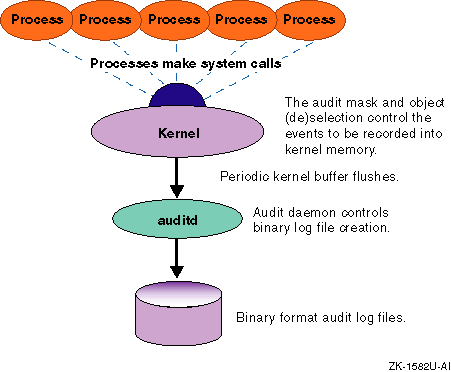
Provided with the Tru64 UNIX operating system software is the audit subsystem. The audit subsystem records events on the system, such as file opens, file creations, logins, and print jobs submitted. Each event is stamped with the audit ID (AUID) of the user who created it, which allows all actions to be traced directly to a user. Users have no direct interaction with the audit subsystem.
This chapter contains the following information:
Auditing provides a means to record the actions that were performed
on the system.
When a user logs in, the system creates an identity record
that associates an audit ID (AUID) with their processes;
the AUID remains stamped on processes
regardless of the program being run.
Even if the user changes their real or
effective user ID (for example, by using the
su
command
to become root or another user), the system still knows which authenticated
user caused a specific action based on the audit id.
Be aware that the reliability
of the user ID is only as good as the authentication mechanism that is used
to verify the user's identity.
The system maintains an extensive authentication profile describing the characteristics and authorized capabilities of each user; for example, the particular login restrictions on the user.
In its simplest form, auditing consists of the following:
An event on the system results in the generation of an audit record. This audit record contains information about the event, such as what the event was, when it occurred, and the ID of the user who caused it.
The audit record is stored along with other audit records in a file called the audit log.
You use a utility to view information in the audit log file and to generate reports from that information.
Figure 3-1 provides an overview of the audit subsystem.
Figure 3-1: The Audit Subsystem
Auditing provides you with a powerful tool for monitoring events on the system. Through auditing, you can accomplish the following:
Discourage users from attempting to violate security. A user who knows that system events are monitored and that security violations can be tracked to the responsible individual might be dissuaded from attempting to violate security.
Detect attempts at violations or activities indicative of probing a system for weak points. If an audit reveals failed attempts to violate system security, you can take counter measures to lessen the likelihood of later attempts succeeding.
Assess damage and restore the system if a break-in should occur. Careful analysis of an audit trail after a break-in can help you determine what occurred during the security violation and what steps are needed to return the system to its original state. It also allows you to take steps to prevent similar break-ins in the future.
Evaluating and debugging application software. The capability of audit to monitor the completion status and arguments of system calls for a designated process provides the ability to assess what is going on inside an application. You can also determine which files the application is attempting to access even if you do not have the source code.
It is important that you inform users of the purpose and, in general
terms, the nature of the auditing performed on the system.
Present auditing
in a positive light, as a tool to help protect the users' files and their
access to system resources.
This helps minimize any resentment; users who
are openly told that their system is regularly audited are less likely to
feel as though they are being spied upon.
For those users who might be tempted
to violate security, knowledge that activities are monitored can be a powerful
deterrent.
3.1.1 Audit Files
The following lists the files used by the audit subsystem.
/sbin/init.d/auditStartup and shutdown script for the audit subsystem.
/var/audit/auditlog.hostname.nnnDefault log file. The Tru64 UNIX audit subsystem can record events in any file at any location that you specify.
hostname is the name of the system that generated the audit log.
nnn is a generation number between 000 and 999.
/var/adm/syslog.dated/current/daemon.logDefault log file for status messages from the audit subsystem.
/etc/rc.config.commonContains the current system defaults for the audit subsystem.
/etc/sec/audit_eventsContains a listing of all the system events that can have security relevance.
This file can be used as input to the
auditmask
command,
which controls which events are audited on the system.
/etc/sec/site_eventsA file defining site-specific audit events. It supports integrating application specific audits into the audit subsystem.
/etc/sec/event_aliasesA file containing a list of aliases that represent sets of events that can be audited.
/etc/sec/auditmask_styleA file defining audit style flags for profiles.
/etc/sec/file_objects/*Directory containing lists of filenames to monitor for profiles.
/etc/sec/rc_audit_eventsA
file containing the list of audit events to monitor.
The list is loaded at
system startup, and the file is pointed to by the runtime configuration variable
AUDITMASK_FLAG in
/etc/rc.config
or
/etc/rc.config.common.
/etc/sec/fs_objectsA list of files that are subject to audit selection or deselection.
/etc/sec/auditd_locA list of alternate paths and hosts where audit logs can be stored if the current location becomes unavailable or full.
/etc/sec/auditd_clientsA list of the remote hosts that can send their audit data to be stored on the local system.
/cluster/members/{memb}/dev/auditA CDSL required for audit on clustered systems. Points to a device associated with the audit subsystem.
/cluster/members/{memb}/dev/.audit/audSA CDSL required for audit on clustered systems. Points to a device associated with the audit subsystem.
You can manage the audit subsystem by using:
A command-line interface
A graphic interface that provides point-and-click operation and on-line help.
3.1.2.1 Command-Line Interface
The following commands are audit subsystem commands. You must be the root user to use these commands. For more information on a command, see its associated reference page.
sysman auditconfigInteractively sets up the audit environment on your system including configuring the location for the audit logs, the action that the audit subsystem takes if file space is exhausted, how long the audit logs are held (forever if specified) on your system before being deleted to free disk space, and if you will be auditing across the network.
auditmaskSelects events for inclusion in the audit log or displays a list of events currently being recorded in the audit log.
Changes made to the audit subsystem with the
auditmask
command are temporary and are reset on a system reboot.
audgenGenerates an audit event record from a privileged program or a script containing a message of your choice.
auditdActivates the auditing daemon (turns on auditing), administers audit log storage, and configures the audit daemon.
Changes made to the audit subsystem with the
auditd
command are temporary and are reset on a system reboot.
audit_toolSelectively extracts information from the audit log and presents it in a readable form.
You access the graphical interface to the audit subsystem by using the CDE Dashboard as follows:
System Applications->Daily Administration->Audit Manager
You can not use the graphical interface to configure the kernel for
auditing and establishing audit log management parameters.
You must use the
sysman auditconfig
command.
3.1.3 Audit Masks
Audit masks determine which events are audited and if those events are audited for successful occurrences, failed occurrences, or successful and failed occurrences. There are two kinds of audit masks as follows:
The system audit mask, which includes the following events:
A system call name defined in the
/etc/sec/audit_events
file
A trusted event name defined in
audit.h
A site-defined name in the
/etc/sec/site_events
file
An alias defined in the
/etc/sec/event_aliases
file
The process audit mask, which applies to a specific process.
A special case of the process mask is the login process mask, which is only available when the Enhanced Security subset is installed and active. The login process mask is set for a user login process. When the user logs in, that audit mask is applied to the login process, and all offspring processes inherit that audit mask. See Appendix A for more information about Enhanced Security.
All security-relevant system calls can generate audit data, but
when there is no security relevance, some system calls do not generate audit
data.
The conditions under which a particular system call does not generate
an audit data are described in
Table 3-1.
Table 3-1: System Calls Not Always Audited
| System Call | Cause for No Audit Record |
close() |
The system call failed because it was passed an invalid file descriptor. |
dup2() |
The system call failed because it was passed an invalid file descriptor. |
execv(),
execve(),
exec_with_loader() |
Failures triggered by failed
namei()
lookups, failures to terminate threads, aborts from handler callouts.
|
fcntl()* |
The system call failed because it was passed an invalid file descriptor. |
ioctl()* |
The system call failed because it was passed an invalid file descriptor. |
msfs_syscall() |
Any system call failure. |
priocntlse() |
An invalid process was specified (ESRCH), or the call did not modify another process. |
proplist_syscall() |
Failures on
copyin()
of system call
arguments.
|
reboot() |
Successful reboots are not audited.
The
reboot()
call does not return from a successful reboot. |
security() |
No audit record for the
getluid
option.
This option has no security relevance, and if it were audited,
many audit records of no use would result. |
swapctl() |
Only
SC_ADD
forms of the
call are audited.
Other forms have no security relevance. |
uadmin() |
Only a failed A_REBOOT or A_SHUTDOWN is audited. In other cases, the system is rebooted and the system call does not return. |
The system calls marked with an asterisk (*) typically generate audit
data only for security-relevant options.
When executing processes from
auditmask
with the
-e
or
-E
flag, however, all options generate audit data.
Note the following aspects of system call auditing:
Some records show
NOTE: uid changed.
This
typically occurs in
SETUID
events, but may be seen anywhere
when one thread changes the UID for all threads in a process (task).
Audit records contain vnode information and the file type
of the object of the operation.
So, for example, if a
chmod
command is specified for a symbolic link, the actual object referenced by
the link is described.
By design, some system calls can fail and not generate an audit record for the failure if the failure is not security-relevant. See Table 3-1 for a list of the calls.
Only
TIOCSTI
operations are audited for
the
ioctl
system call.
Only
F_DUPFD,
F_SETTIMES,
and
F_CNVT
are audited for the
fcntl
system call.
If the process audit control flag is set to USR, all
ioctl
and
fcntl
system calls are audited.
A trusted event is an event that is associated with a security protection mechanism; it does not always correspond directly to a system call. A list of the trusted events follows:
audit_daemon_exitIndicates that the audit daemon exited abnormally. This occurs only when there is insufficient memory available during initialization of the audit daemon. The exit is recorded in the new audit log, and a message is displayed on the designated audit console.
audit_log_change
Indicates that
the audit daemon closed the current audit log and began writing a new log
(for example, in response to the
auditd -x
command).
The change in logs is recorded in the current audit log, and a message is
displayed on the designated audit console.
audit_log_createIndicates that a new audit log was created in response to the removal of the current log file. The new file has the generation number of the lost log file incremented by 1. The creation of the new log is recorded at the beginning of the new audit log, and a message is displayed on the designated audit console.
audit_log_overwrite
Indicates
that the audit daemon began overwriting the current audit log as you specified
with the
-o overwrite
option to
auditd.
The overwrite is recorded at the beginning of the newly overwritten audit
log, and a message is displayed on the designated audit console.
audit_reboot
Indicates that the audit daemon
initiated a system reboot (as a result of an overflow of the log) as you specified
with the
-o halt
option to
auditd.
The reboot is recorded at the end of the current audit log, and a message
is displayed on the designated audit console before the reboot occurs.
auditconfig
Indicates that the
-o changeloc
option to the
auditd
command
was used to change the specified overflow action.
The change in the audit
setup is recorded in the current audit log.
audit_startaudit_stop
Indicates that the audit daemon
was killed normally (typically, with the
-k
option
to
auditd).
The shutdown is recorded at the end of the
current audit log, and a message is displayed on the designated audit console
when the shutdown occurs.
audit_suspend
Indicates that the audit
daemon suspended auditing (as a result of an overflow of the log) as you specified
with the
-o suspend
option to
auditd.
The suspension is recorded in the current audit log, and a message is displayed
on the designated audit console.
audit_xmit_fail
Indicates that
the audit daemon was sending audit records across a network and the transmission
failed.
The failure is recorded in the local log specified as the next path
in
/etc/sec/auditd_loc
(with
auditd -r)
or the default local path
(/var/adm).
audgenauth_event
An event associated with user-authentication
and the management of user accounts occurred.
Trusted
auth_events
include
passwd,
su,
rsh, and
login.
The event is recorded in the
current audit log.
loginlogoutYou can define your own audit events (referred to as site-defined events). This is useful if you want applications to generate records specific to their activities.
Trusted application software can generate data for the site-defined events and subevents. The data can be included in the audit logs with the system's audit data or stored in application-specific logs.
To define site events, you must create an
/etc/sec/site_events
file and add in it the event names and event numbers for the system's
site events.
The
site_events
file has one entry for each
site event that can contain any number of subevents.
The lowest allowed site event number is
MIN_SITE_EVENT,
which is defined in
<sys/audit.h>.
Typically, the number
is 2048.
By default, up to 64 site events can be defined.
However, this upper
limit can be increased up to a maximum 1,048,576.
To change the upper limit for the allowed number of site events, add
an entry in the
/etc/sysconfigtab
file, then reboot the
system.
For example, to allow up to 5000 site-defined events, use the
sysconfigdb
command to add the following lines to
/etc/sysconfigtab
file, then reboot the system:
 sec:
     audit-site-events=5000
After the
/etc/sec/site_events
file is created, applications
can use the
audgenl()
library routine to generate application-specific
audit data.
See
audgenl(3)3.1.3.4 Event Alias
An event alias groups multiple audit events under
a single name that you select for auditing.
An event alias can include a system
call, trusted event, site event, or another alias.
You use the following format
to define your event aliases in the
/etc/sec/event_aliases
file after the default Tru64 UNIX event aliases:
[alias: event[:success:failure] [event[:success:failure]...]]
Continuation lines are allowed.
See the
/etc/sec/event_aliases
file for more information.
3.1.4 Audit Records
The output of audit records include, at a minimum, the following data.
The only exception is that if a login is not completed,
audit_id:
does not appear or if the audit id has not been set for the process
(this is the normal state for some system processes).
audit_id:                  ruid/euid:
pid:                       ppid:                cttydev:
event:
result:
ip address:
timestamp:
audit_id:The Audit ID (AUID).
The AUID is associated with a user at login and should remain unchanged throughout
the login session.
Processes started by the user will have the AUID associated
with them.
The AUID is not affected by use of the
su
command
to change user IDs.
AUID and LUID (login UID) are synonyms.
Note that a malicious process that gains root access can use system
calls to change its audit ID.
To monitor such a privileged process, enable
monitoring of the security system calls.
A change of the audit uid is identified
in the audit record for the
security()
syscall by the first
argument being
0x3.
Both the original and new audit IDs
are available from the audit record.
The original audit ID is saved as the
result code (return value) and the new audit ID is the argument.
ruid/euid:The real user ID (RUID) and the effective user ID (EUID).
pid:The process ID.
ppid:The parent process ID (PPID). Useful for tracing back through a list of processes to the originating event and its associated RUID and AUID.
cttydev:The device on which the event occurred. The record reports the major and minor numbers.
event:The name of the event (typically, either the name of a system call or the name of a trusted event).
result: or error:If the event
succeeds, the result.
Often the result is 0.
But some system calls return
a different value.
For example
write(
In the case of an error, the audit record for a system call returns the error message and number. For example,
error: Not owner (1)
Audit records for trusted events can have additional error messages.
ip address:The IP address of the system on which event occurred.
timestamp:The date and time of the event.
3.1.4.1 Additional Entries in Audit Records
Most entries in an audit record for a system call are arguments to that system call. The following list describes many of the labels for entries that can be associated with an audit record.
Labels are context sensitive.
That is, their meaning can depend on the
type of audit record in which they appear.
For example, in the audit record
for
mmap(flag:
indicates
an attribute of the mapped region.
But in an audit record for
audcntl(flag:
is a number passed with a HABITAT
request.
Commands entered on the command line by users appear as arguments to
char param:
in audit reports.
For example, if a user copies the
file
august_report
to a file named
sept_report, the audit record includes the following:
event:  execve
char param:  /usr/bin/cp
char param:  cp august_report sept_report
In the context of a given audit record, interpreting the entries is a straightforward matter. If questions do arise, the reference page for the system call being audited will help clarify the report.
The following is a list of the audit record fields and the associated explanations of the fields:
address:Memory address, typically
an argument to
mmap(
char param:A character string. The string can be the argument to an event or some other information relevant to the event. For example:
event:       open
char param:  /etc/zoneinfo/localtime
cmd name:The name of the process which generated this event (arg 0 of the exec command that started the process).
cntl flag:A control flag.
For example, one of the flags to an
audcntl(
descriptor:A file descriptor. If state-dependent information is available, the actual file name and the descriptor.
devname:A device name.
directory:The name of the current directory.
flag:A
flag
argument to a system call.
For example, in the context of
mmap(audcntl(
flags:Arguments passed to
system calls as flags.
For example, in
open(oflag
argument.
gid:The group ID.
home dir:The home directory.
hostname:A host name.
inode id:An inode number.
Along with
inode dev, part of the descriptor information
recorded for audit records involving activities with files.
inode dev:The major and minor inode device numbers.
int param:An integer value.
For example, in
setpgid(process_id
argument.
len:An argument to
mmap(
login name:The login user name.
long param:A value of type
long.
mask:A mask argument.
For
example, in
audcntl(
object mode:The protection
mode of an object.
For example, in
open(
operation:A request to
audcntl(
pgrp:A process group ID.
For
example, the
process_group_id
argument to
setpgrp(
procname:The process name associated with a PID.
prot:An argument to
mmap(
req mode:The request mode.
For example, in an
open(O_CREAT,
the protection mode for the new file.
request:The security action
requested in a call to
security(
shell:The user's shell program.
Typically this record element appears in
login
event records.
username;The user name associated with the event.
If the
audit_tool -w
option or the Audit Manager
Translate UID/GIDs to Local Names selection was used to generate the audit
report, then the user name might appear in parentheses.
Parentheses indicate
that the audit reduction tool had to use the
getpw()
routine
to look up the user name in
/etc/passwd.
This happens in
cases where the user name was not associated with the RUID at login time (for
example, logins were not included among the audited events).
See
Section 3.5.3
for a description of dependencies among audit events.
3.2 Configuring the Audit Subsystem
Auditing must be built into your kernel. If the audit subsystem is not configured into your system's kernel, the audit configuration procedure guides you through a kernel rebuild to include the audit subsystem.
In addition to system-wide auditing, you can specify auditing of events
on a user-by-user basis by including the Enhanced Security subset OSFC2SECnnn.
The
dxaudit
graphical interface for
audit requires the software subset OSFXC2SECnnn.
The
nnn
represents the Tru64 UNIX version
number.
See
Release Notes
for the current version number.
Enter the following
command to determine if these subsets have been installed:
# setld -i | grep C2SEC*
OSFC2SECnnn  installed  Enhanced Security (System Administration)
OSFXC2SECnnn installed  Enhanced Security GUI (System Administration)
See
Installation Guide
and
setld(8)
You configure the audit subsystem configuration in the following parts:
Configure the kernel for auditing and establishing audit log management parameters. In this part you select the location for the audit logs, the action that audit takes if file space is exhausted, for how long the audit logs are held (forever if specified) on your system before being deleted to free disk space, and if you will be centralizing audit data storage.
Centralizing audit data storage is an option if you have computers linked in a TCP/IP network and you want to centrally store the audit data from those systems on a remote host (audit hub) that has a higher security level. Centralizing audit data storage is an alternative to storing audit data on a local system. You can configure centralizing audit data storage during the configuration process or later as described in Section 3.2.1.
Select the events to audit.
The following steps show you how to configure the audit subsystem:
In part one of configuring the audit subsystem, enter the
sysman auditconfig
command to start configuring audit.
If the audit
subsystem is not configured into your system's kernel,
sysman auditconfig
guides you through a kernel rebuild.
Click Yes on the Welcome screen to begin configuring audit.
Click OK on the Information screen.
Specify the audit log location. You can specify one of the following locations:
The default location (/var/audit/auditlog.hostname.nnn)
Another location on the system.
If this system will store its audit data on an audit hub, enter the host name followed by a colon ( hostname:) of the audit hub.
Click Next on the Log Pathname screen.
Accept the default for the action if log space is exhausted (Suspend auditing until space becomes available) by clicking Next on the Action On Log File Space Exhaustion screen.
Accept the default for the audit log lifespan in months (forever), and the hour of deletion (3) on the Log File Lifespan screen.
If you want this system to be the audit hub on which other
network system store their audit data, enable the
Remote clients
can log audit information to the system
option, then click on the
Configure remote client
button.
A
Configure remote client
window is displayed in which you enter the fully qualifiied domain
name for each client that will log audit data.
Accept the default for audit console message destination (syslog-/var/adm/syslog.dated/current/daemon.log)
by clicking Finish Part One on the Advanced Audit Options screen.
Proceed to part two by clicking Yes to the question
Do you wish to proceed to part two?
on the Audit Event Information
screen.
In part two of configuring the audit subsystem, you must pick from a list of six profiles described in the following table. An audit profile provides a method to consolidate the parameters that define what is audited by the audit subsystem and to group that information under a profile.
| Profile | Description |
| Desktop | Suggested minimal auditing for a single user system. |
| NIS_server | Suggested auditing for a system used as a NIS server. |
| Networked_system | Suggested auditing for a system on a network. |
| Server | Suggested auditing for a system that is used as a server for network-based applications. |
| Timesharing | Suggested minimal auditing for a system that is used to support multiple interactive users. |
| Timesharing_extended_audit | Extended auditing for a system that is used to support multiple interactive users. |
A profile is made up of the following three parts:
Located in
/etc/sec/auditmask_style
under the
Profile:
label.
See
auditmask(8)-c
option for a
description of the valid audit style characteristics.
Located in
/etc/sec/event_aliases
under the
Profile:
label.
The list of files is in
the
/etc/sec/file_objects/Profile
file.
Monitoring is performed by setting the appropriate object selection
and deselection flags.
Information in
/etc/sec/auditmask_style
determines which flags are set.
This file is optional and does not need to
exist if the audit style defined in
/etc/sec/auditmask_style
does not include
obj_sel
or
obj_desel.
Select the profile closest to the configuration of your system and click Next on the Audit Event Category Selection screen.
Note that use of the CTRL key allows the selection of more than one
category; for example,
Desktop
and
Networked_system
for a desktop system on a network.
While multiple selections are
possible, use the minimum profile that meets your needs.
Accept the default list of events to be audited by clicking Next on the Advanced User Audit Event Modification/Deletion screen.
Some profiles include this step, otherwise skip to the next step. Accept the default list of files to be audited by clicking Next on the UNIX File System Objects screen. This menu item does not appear for all profiles.
Accept the options for audit events that have been set as a result of the profile that were selected by clicking Finish on the Advanced Options screen.
Complete the audit set up by clicking OK on the Audit Configuration Complete screen.
When you have completed the selections, the
auditconfig
does the following:
Modifies AUDITMASK_FLAG in the
/etc/rc.config.common
file.
Writes the
/etc/sec/rc_audit_events
file.
Writes the
/etc/sec/fs_objects
file.
Check the configuration of the audit daemon by entering the
auditd -w
command.
If you accepted the system default, your configuration
looks like the following:
# auditd -w

Audit data and msgs:
-l) audit data destination                 = /var/audit/auditlog.hostname.001  [1]
-c) audit console messages                 = syslog  [2]

Network:
-s) network audit server status (toggle)   = off  [3]
-t) connection timeout value (sec)         = 4

Overflow control:
-f) % free space before overflow condition = 10  [4]
-o) action to take on overflow             = suspend audit  [5]
The name of the audit log. [Return to example]
The location of audit subsystem messages. Changes in the status of the audit subsystem are recorded here. [Return to example]
Auditing across the network is not enabled (remote clients may not log to this system). [Return to example]
Percent of remaining free space in the file system that will trigger an audit overflow condition. In this case, 10 percent.
If the file system containing the audit log becomes 90 percent full, the audit subsystem takes an overflow action. [Return to example]
The overflow action is to suspend auditing until storage space is available.
In place of
alternate file systems, any directory
names specified in
/etc/sec/auditd_loc
are displayed.
[Return to example]
3.2.1 Centralizing Audit Data Storage
If you have computers linked in a TCP/IP network, you can run the audit daemon on multiple systems and have the audit data sent to the audit daemon on remote system (audit hub) to store the information on a single system with a higher security level as an alternative to storing the audit data on the local system.
To prevent corruption of audit data, the audit data from remote systems is stored in its own dedicated audit log file on the audit hub.
When you use the audit tool to retrieve data from these logs of audit
data from remote systems, the first and last audit log entries may be fragments
rather than complete entries.
This can happen if the communications channel
is not cleanly terminated or if the
auditd
daemon remotely
receiving the data is forced to switch log files.
This is because remote audit
information is sent in a continuous stream to the audit hub, rather than as
discrete audit entries.
The audit tool notifies you when it encounters a fragmented entry. This does not affect the retrieval of other records from the audit log.
Centralizing audit data storage requires configuration on the audit
hub and on the remote systems that will direct audit data to the audit hub.
If you did not configure for centralized audit data storage when you configure
the audit subsystem, you can use the commands described in the following sections
to do so.
3.2.1.1 Configuring Centralized Audit Data Storage on the Audit Hub
Follow these steps to configure the audit hub for centralized audit data storage:
On the host that is to be the central collecting point for
audit information (the audit hub), create the file
/etc/sec/auditd_clients.
In this file, enter on a separate line the name of each remote
host that will send audit data to the audit hub.
Enter the following command to enable the audit hub to receive
audit data from audit daemons on remote hosts identified in the
/etc/sec/auditd_clients
file:
# /usr/sbin/auditd -s
Set the options for remote audit daemons as follows:
auditd
[-p ID_of_daemon_serving_remote_host options_for_remote_daemon]
For example, to set the audit log location to
/var/audit/NYC_Sys1
for the remote host served by the audit daemon with ID 6, enter:
# /usr/sbin/auditd -p 6 -l /var/audit/NYC_Sys1
The IDs of audit daemons serving remote hosts are integers. To display the audit daemons IDs, enter:
# /usr/sbin/auditd -w
The previous command displays the current options. No IDs are displayed unless at least one child audit daemon exists. If the -p option is not specified when running with more than one audit daemon, the master daemon (accepting audit data for the local system) handles the request.
When you use the audit tool to retrieve data from these logs of audit data from remote systems, the first and last audit log entries may be fragments rather than complete entries. This can happen if the communications channel is not cleanly terminated or if the auditd remotely receiving the data is forced to switch log files. This is because remote audit information is fed in a continuous stream to the audit hub, rather than as discrete audit entries.
The audit tool notifies you when it encounters a fragmented entry.
This
does not affect the retrieval of other records from the audit log.
3.2.1.2 Configuring Remote System Audit Data Storage on an Audit Hub
On each remote system, enter the following command to direct the audit data to the audit hub:
# /usr/sbin/auditd -l audit_hub_name:
If the remote system cannot communication with the audit hub, the audit
daemon on the remote host stores the audit data locally, as specified with
the
-o
and
-r
flags to
auditd.
3.3 Managing the Audit Subsystem
The following sections describe how to:
3.3.1 Changing the Audit Subsystem Startup Defaults
The system startup defaults for the audit subsystem are stored in the
AUDITMASK_FLAG
variable in the
/etc/rc.config.common
file.
This field is used to pass command-line arguments to
auditmask
at system startup.
The
AUDITMASK_FLAG
variable
sets the audit style flags and sets
auditmask
to read the
events selected for auditing from the
/etc/sec/rc_audit_events
file.
The
/etc/sec/fs_objects
file contains
a list of the files that have property lists that were modified during the
audit subsystem configuration to allow the file to be monitored with object
selection and deselection.
You can modify the
AUDITMASK_FLAG
variable in the
/etc/rc.config.common
file by using the
rcmgr
command, the
sysman auditconfig
command, or the Audit Manager
through the CDE Dashboard.
You can modify the
/etc/sec/rc_audit_events
file
by using a text editor, the
sysman auditconfigcommand,
or the Audit Manager through the CDE Dashboard.
3.3.2 Starting, Stopping, and Suspending the Audit Daemon
To start the audit daemon, enter:
# auditd [-l log_pathname]
To stop the audit daemon, enter:
# auditd -dk
To stop the audit daemon in a TruCluster Server environment, enter the following commands:
# auditmask [-cluster] -n
# auditd [-cluster] -dk
To suspend the audit daemon, enter:
# auditd -o suspend | halt
After the audit log data has been collected, it is important to have a structured archival procedure for the audit log files. Many of the applications that use the audit log data need to locate and analyze data that can be several months old.
The
sysman auditconfig
utility provides a method
for periodically deleting the binary audit logs using a root
cron
job.
This feature is disabled by default.
If enabled, you should
provide for periodic audit log file backup before each
cron
job run.
The
Audit log lifespan in months
dialog box reflects
both the monthly cycle on which the deletion will execute and the criteria
for the deletion.
The deletion always occurs on the first of the month; the
hour is adjustable, but the minute is set to zero.
A binary audit log is deleted
when all the audit events it contains are older than the deletion execution
date minus the
Audit log lifespan in months.
For example, to create a
cron
job that runs on the
second, fourth, and sixth months on the first day of the month at 3:00 a.m.,
enter the following:
"Audit log lifespan in months" = "every second month"
"Hour of deletion(0-23)" = "3"
Binary log files that contain entries
that are all at least two months old are deleted at
cron
execution.
3.3.4 Recovering Audit Data
In the event your system encounters a panic situation, the
crashdc
utility extracts any audit data left in the system at the
time of the panic and places it in the crash directory, in the
audit-data.n
file
The
n
is the crash number.
If no audit data
was present, the file is not created.
You can use the
audit_tool
command to display the contents of the
audit-data.n
file.
It is possible for some audit records to appear in both the
auditlog
file and in the
audit-data.n
file.
It is also possible that the first audit record in the
audit-data.n
file may not be complete.
The
audit_tool
command marks this as a corrupted record.
In this case, the audit record was written to the regular
auditlog
file.
3.4 Managing Audit Events
The following sections describe how to:
3.4.1 Displaying the Audit Mask
To display the current audit mask and whether events are being audited under successful or failed occurrences or both, you can use:
The
dxaudit
program found on the CDE Dashboard,
as follows:
Application Manager->Daily Administration->Audit Manager-> Collection
The
auditmask
command:
# auditmask
If the keyword
succeed
is present, successful occurrences
of that event will be audited; if the keyword
fail
is present,
failed occurrences of that event will be audited; if both are present, successful
and failed occurrences will be audited; if neither keyword is present, that
event will not be audited.
3.4.2 Identifying Events that can be Audited on the System
Follow these steps to create the file
all_auditable_events
that contains a list of all possible auditable events:
Save the current audit mask to the file
original_audit_mask:
#
auditmask >
original_audit_mask
Set the audit mask to all events:
#
auditmask -f
The
auditmask -f
command may slow down your system.
Save the audit mask to the file
all_auditable_events:
#
auditmask >
all_auditable_events
Set the audit mask to no events:
#
auditmask -n
Restore the audit mask to the original events:
#
auditmask < original_audit_mask
The audit subsystem is capable of generating and collecting large amounts of data. Therefore, it is important to place reasonable limits on the data being generated by the audit subsystem and to monitor the growth of the audit log. Monitoring ensures that audit logs do not grow to fill the file system and cause a denial of service situation.
You selected the events to audit when you configured the audit subsystem and chose a profile; however you can change the audit mask at any time by selecting and deselecting events.
To select events to audit, you can use:
The
dxaudit
program found on the CDE Dashboard,
as follows:
Application Manager->Daily Administration->Audit Manager-> Collection
The
auditmask
command as follows:
/usr/sbin/auditmask
[flags]
[event[:succeed:fail]]
[-e,E file[args...] [<event_list]]
The
auditmask
command with event arguments sets the
system audit mask.
This is a cumulative operation, so it is possible to turn
on or off audit for one set of events, then turn on or off audit for a second
set of events without changing the first set of events (except for the intersection
between the two sets).
Command line arguments to the
auditmask
command can
include one or more events, each with an optional field
:succeed:fail, where
succeed
is either 0 to specify no auditing
of successful occurrences of the event or 1 to specify auditing of successful
occurrences of the event; and
fail
is either 0 to specify
no auditing of failed occurrences of the event or 1 to specify auditing of
failed occurrences of the event.
The following are some examples of using the
auditmask
command to select events to audit.
See
auditmask(8)
To select all events, enter:
# auditmask -f
This option causes a significant degradation in system performance.
To select the successes and failures of an event, enter one of the following commands:
# auditmask eventname
# auditmask eventname:1:1
To select only successes of an event, enter:
# auditmask eventname:1:0
To select only failures of an event, enter:
# auditmask eventname:0:1
To select events in a specified file, enter:
# auditmask < filename
To select processes generated by a specific user, enter:
# auditmask -a AUID-of-user
To select file activity only for certain files (Object Selection), enter:
# auditmask -x filename [:1|:0]
To select an event if either the system mask or process mask specifies the event, enter:
# auditmask -c or
To select an event only if both the system mask and process mask designate the event, enter:
# auditmask -c and
To select an event based only on the process audit mask, enter:
# auditmask -c usr
To disable auditing for:
All events, enter:
# auditmask -n
A specific event, enter:
# auditmask eventname:0:0
File activity for certain files (Object Deselection), enter:
# auditmask -y filename
The
auditmask
utility can be used to adjust the audit
characteristics of the system, of a single process, or all processes associated
with a user's audit ID (AUID).
The generatation of an audit record is a
function of the system audit mask, the process audit mask, and the process
audcntl
flag.
Each audit mask is a bitmap for all the events.
The process
audcntl
flag specifies:
orAudit if the event is in
either the system or the process audit mask.
The default
audcntl
flag setting is
or.
andAudit if the event is in both the system and the process audit mask.
offNo auditing done for this process.
usrAudit if the event is in the process audit mask.
Specifying which events are audited can be done by naming a set of system
calls and/or alias names.
Aliases are defined in (and may be added to) the
/etc/sec/event_aliases
file.
You can edit this file to add or delete
system calls.
An optional extension can be used to distinguish between successful
occurrences and/or failed occurrences of any event.
For example:
open:1:0Specifies successful
occurrences of the
open( ) call.
open:0:1Specifies failed occurrences
of the
open( ) call.
The following examples demonstrate the use of the
auditmask
utility for various purposes.
These examples modify the process
audit mask.
Unless specified, the process
audcntl
flag
remains at its default setting of
or.
To execute command arguments and audit everything for the newly created process:
# auditmask -E command args
To execute command arguments, audit failed
open(
) system calls, and successful
ipc
events (defined in
/etc/sec/event_aliases) for the newly created process:
# auditmask open:0:1 ipc:1:0 -e command args
For process ID (PID) 999, audit all (-f)
events except
gettimeofday( ):
# auditmask -p 999 -f gettimeofday:0:0
For PID 999, audit no (-n) events:
# auditmask -p 999 -n
For PID 999, audit
open( ) and
exec( ) events:
# auditmask -p 999 open exec
For PID 999, add
exit( ) to the set of
events being audited:
# auditmask -p 999 exit
For PID 999, get the set of events being audited:
# auditmask -p 999
For PID 999, set the
audcntl
flag to
usr:
# auditmask -p 999 -c usr
When tracing a running process, the
auditmask -c usr
command traces all options for the system calls.
For all processes owned by the user with AUID 1123, audit
all
ipc
events (the AUID is the same as the user's initial
RUID):
# auditmask -a 1123 ipc
To access the
auditmask
help option:
# auditmask -h
3.4.5.1 Displaying Trace Process Data
To display information about the trace process, enter the following command:
# audit_tool `auditd -dq` -B
The
auditd
-d
option flushes data
from the kernel to the audit log.
The
auditd
-q
option provides the name of the current audit log.
Information similar to the following is displayed:
AUID:RUID:EUID PID   RES/(ERR)      EVENT
-------------- ---   ---------      -----
1123:0:0       6691  0x14           audcntl ( 0x7 0x0 0x14 0x0 )
1123:0:0       6691  0x0            execve ( /sbin/date date )
1123:0:0       6691  0x2000         getpagesize ( )
1123:0:0       6691  0x2000         getpagesize ( )
1123:0:0       6691  0x0            getrlimit ( )
1123:0:0       6691  0x3ffc0004000  mmap ( -1 0x7 0x3ffc0004000 0x12 0x2000 )
1123:0:0       6691  0x0            getrlimit ( )
1123:0:0       6691  0x3ffc0006000  mmap ( -1 0x7 0x3ffc0006000 0x12 0x4000 )
1123:0:0       6691  0x0            getuid ( )
1123:0:0       6691  0x1            getgid ( )
1123:0:0       6691  0xa68          read ( 3 )
1123:0:0       6691  0x120000000    mmap ( 3 0x5 0x120000000 0x102 0x4000 )
1123:0:0       6691  0x140000000    mmap ( 3 0x7 0x140000000 0x2 0x2000 )
1123:0:0       6691  0x4            open ( /shlib/libc.so 0x0 )
1123:0:0       6691  0xa68          read ( /shlib/libc.so )
1123:0:0       6691  0x3ff80080000  mmap ( /shlib/libc.so 0x5 0x3ff80080000 0x2 0x10e000 )
1123:0:0       6691  0x3ffc0080000  mmap ( /shlib/libc.so 0x7 0x3ffc0080000 0x2 0x10000 )
1123:0:0       6691  0x3ffc0090000  mmap ( -1 0x7 0x3ffc0090000 0x12 0x9bf0 )
1123:0:0       6691  0x0            close ( 4 )
1123:0:0       6691  0x0            stat ( /shlib/libc.so )
1123:0:0       6691  0x0            set_program_attributes ( )
1123:0:0       6691  0x0            close ( 3 )
1123:0:0       6691  0x2000         getpagesize ( )
1123:0:0       6691  0x0            obreak ( 0x14000ea10 )
1123:0:0       6691  0x0            gettimeofday ( )
1123:0:0       6691  0x3            open ( /etc/zoneinfo/localtime 0x0 )
1123:0:0       6691  0x32e          read ( /etc/zoneinfo/localtime )
1123:0:0       6691  0x0            close ( 3 )
1123:0:0       6691  0x1d           write ( 1 )
1123:0:0       6691  0x0            close ( 0 )
1123:0:0       6691  0x0            close ( 1 )
1123:0:0       6691  0x0            close ( 2 )
1123:0:0       6691  0x0            exit ( )
3.4.5.2 Auditing Active Processes
Example 3-1
shows the commands that you can use to investigate
a process started by a user logged in as
guest.
Example 3-1: Sample Active Auditing Session
# ps -uguest -o user,pid,uid,comm  [1]
USER       PID   UID COMMAND
guest    23561  1123 csh
guest    23563  1123 ed

# auditmask -p 23563 open exec -c or  [2]
# auditmask -p 23563  [3]
!  Audited system calls:
execv                      succeed  fail
exec_with_loader           succeed  fail
open                       succeed  fail
execve                     succeed  fail

!  Audited trusted events:

!  Audcntl flag: or

# auditd -d 5s -w   [4]
Audit data and msgs:
  -l) audit data destination   = /var/audit/auditlog.hostname.001
  -c) audit console messages           = /var/audit/auditd_cons
  -d) audit data dump frequency        = 5s

Network:
  -s) network audit server status (toggle) = off
  -t) connection timeout value (sec)       = 4

Overflow control:
  -f) % free space before overflow condition = 10
  -o) action to take on overflow    = overwrite current auditlog

# audit_tool /var/audit/auditlog.hostname.001 -Bfw  [5]
USERNAME    PID    RES/(ERR)   EVENT
--------    ---    ---------   -----
jdoe        23563  0x4         open ( /etc/motd 0x0 )
jdoe        23563  0x4         open ( /etc/passwd 0x0 )
jdoe        23563  0x4         open ( /etc/ftpusers 0x0 )
jdoe        23563  0x4         open ( /etc/hosts 0x0 )
jdoe        23583  0x0         execve ( /usr/bin/sh sh -c ps )
jdoe        23583  0x5         open ( /usr/shlib/libc.so 0x0 )
jdoe      * 23592  0x0         execve ( /sbin/ps ps gax )  [6]
jdoe        23599  0x0         execve ( /usr/bin/sh sh -c w )
jdoe        23599  0x5         open ( /usr/shlib/libc.so 0x0 )
jdoe      * 24253  0x0         execve ( /usr/ucb/w w )
jdoe        23563  0x4         open ( savethis 0x602 0640 )

[Ctrl/C]  [7]
--interrupt:  exit (y/[n])?  y
Find out what process user
guest
is running
and also get the process ID and audit ID.
[Return to example]
For PID 23563, set the auditmask to
open
and
exec, and perform an
OR
operation
with the system mask.
Note that
exec
is an alias for
execv,
exec_with_loader, and
execve.
[Return to example]
Get the auditmask for the 23563 process. [Return to example]
Dump to the audit log every 5 seconds and also show the
auditd
configuration.
[Return to example]
Display a continuous (-f) abbreviated (-B) audit report.
Resolve AUIDs to corresponding user names (-w).
Note that the name of the audit log was gotten from the results of the
auditd -w
command.
[Return to example]
The asterisk (*) indicates an operation involving
setuid.
[Return to example]
Exit the
audit_tool
program with a Ctrl/C
(auditing continues).
[Return to example]
See
auditmask(8)3.4.5.3 Dynamically Auditing Additional System Call Arguments
If additional system call arguments are required, you can use the
dbx
command to dynamically change which arguments get recorded for
any system call.
System calls are defined in their related
.h
file located in the
/usr/include/sys
directory.
For example,
flock
is system call 131 (defined in the
/usr/sinclude/sys/syscall.h
file), and takes as arguments a file descriptor and an option.
To audit these arguments, enter the following
dbx
commands:
     (dbx) a sysent[131].aud_param[0]='c'
     99
     (dbx) a sysent[131].aud_param[1]='a'
     97
The first entry in the
aud_parm
array corresponds
to the first system call argument, the second entry corresponds to the second
system call argument, and so on.
The
c
encoding indicates
a file descriptor is recorded.
The
a
encoding indicates
an integer argument is recorded.
The set of encodings is described in the
<sys/audit.h>
file.
3.4.6 Auditing File Operations
Object selection and deselection are powerful tools for managing the growth of audit logs.
Events such as mount and reboot affect system state. Data access events, such as open and stat, act on files. Although reboot attempts might always be security relevant, not all file open events are (depending on the site security model).
Object selection and deselection let you chose which files do (selection) or do not (deselection) result in audit records when those files are objects of data access operations.
Data access operations are:
read, open, close, link, lseek, access,
stat, lstat, dup, open, revoke, readlink,
fstat, pre_F64_stat, pre_F64_lstat,
dup2, pre_F64_fstat, readv, pread, getdirentries,
stat, lstat, fstat, _F64_readv
Object selection and deselection work as follows:
Object selection allows you to audit
selected data access operations performed on any one of a set of designated
files.
Files are designated by having the object selection flag set in the
file property list by the commands
auditmask -X
command
or
auditmask -x
command.
The same operations performed
on any unflagged file will not generate audit data.
For example, you can flag the
/etc/passwd
file
and the
/.rhosts
file and audit the open system call.
This will cause an open on the
/etc/passwd
fuke or the
/.rhosts
file to be audited while an open on
/tmp/xxxx
files would not be audited.
Object deselection allows you to audit
selected data access operations which modify any one of a set of designated
files.
The same operations performed on any unflagged file will generate audit
data whether the file is modified or not.
Files are designated by having the
object deselection flag set in the file property list by the
auditmask
-Y
command or the
auditmask -y
command.
File
open's for write or truncate access, are examples
of file modification.
Audit selection and deselection do not reduce auditing of processes
for which the
auditmask -c usr
command was specified (the
value of the audit control flag is
AUDIT_USR).
Use of object selection/deselection requires three steps:
Decide which file or files you want to apply object selection or deselection to. If you want to apply selection or deselection to more than one file, you can create a file that is a list of file names (complete path names), one file name per line.
Set the audit style either to Object Selection or Object Deselection as appropriate:
From Audit Manager: Collection->Audit Style
From the command line:
# auditmask -s obj_sel
or
# auditmask -s obj_desel
Activate object selection and deselection as follows:
#
auditmask -x
filename
#
auditmask -X
filelist
#
auditmask -y
filename
#
auditmask -Y
filelist
The following are examples of how to enable the selection of a file for audit:
# auditmask -s obj_sel
# auditmask -q /etc/passwd
selection: off     deselection: off  --  /etc/passwd
# auditmask -x /etc/passwd
selection: off => on   --  /etc/passwd
# auditmask -q /etc/passwd
selection: on     deselection: off  --  /etc/passwd
The following example shows how to deselect a list of files:
# auditmask -s obj_desel
# cat desel_file
/etc/motd
/etc/fstab
/etc/passwd
# auditmask -Q desel_file
selection: off    deselection: off  --  /etc/motd
selection: off    deselection: off  --  /etc/fstab
selection: off    deselection: off  --  /etc/passwd
# auditmask -Y desel_file
deselection: off => on   --  /etc/motd
deselection: off => on   --  /etc/fstab
deselection: off => on   --  /etc/passwd
The status of the object selection and deselection flags for a file list can be displayed from the CDE dashboard as follows:
Select Application Manager->Daily Administration->Audit Manager->Modify System Mask->Current->Edit ->Object Selection/Deselection.
Under File, select
/etc/sec/fs_objects.
Under File, select List of Files.
Settings are not applicable.
Click on Query.
Although the system object selection and object deselection audit styles
are mutually exclusive, it is possible for any one object to be subject to
both models simultaneously on different systems (across NFS).
The
proplistd
daemon needs to be running to transfer attributes across
NFS.
3.5 Generating and Displaying Audit Reports
By default, audit records are
located in the
/var/audit
directory in an audit log file
called:
auditlog.hostname.nnn
The hostname is the name of the local host. The nnn is an automatically generated numeric suffix that is appended to audit log file names. A numeric suffix is in the sequential range from 000 to 999.
From the audit log, you generate a report that contains the audit records that you want to display. To generate and display an audit report, you can use:
The Audit Manager graphical interface from the CDE Dashboard by selecting the following options:
Sysman Applications->Daily Administration->Audit Manager->Reports->Generate Reports
When displaying logs with the Audit Manager, you create a selection file that specifies such things as the events, times of day, AUIDs and other attributes of the audit records that you want included in the report.
The
audit_tool
command.
The following are
some exmaples of using the
audit_tool
command.
See
audit_tool(8)
Note
Because new events have been added to the audit subsystem, the
audit_toolcommand running earlier version of the Tru64 UNIX operation system will not recognize new events and will display an error message for unrecognizable events.
To generate and display a report for all activities that occurred during a certain time period, enter:
# audit_tool -t start -T end auditlog
The
start
and
end
times are in the format
yymmdd[hh[mm[ss]]].
Hours (hh), minutes (mm), and seconds (ss)
are optional.
To generate and display a report for all failed attempts by a specific user to open files, enter:
# audit_tool -U username -e open:0:1 auditlog
If
login
is not preselected for auditing, then no
user names appear in the audit log.
In this case, you can still select for
UIDs (audit_tool -u UID) or
AUIDs (audit_tool -a AUID).
To generate and display a report for each audit ID (AUID) in the audit log, enter:
# audit_tool -R auditlog
By default, the reports will be named
report.AUID.
To generate and display a report of all audit records containing the text string in a parameter field or associated with a descriptor, enter:
# audit_tool -s string auditlog
To generate and display a report of all audit records associated with a specific process ID, enter:
# audit_tool -p PID
To generate and display a report of all audit records associated with a specific process ID and all the descendants of that process, enter:
# audit_tool -p -PID
You can use the contents of a deselection file to filter out audit records that you do not want to see. A deselection file consists of one or more lines in the following format:
[hostname audit_ID RUID event pathname flag]
An asterisk (*) in a field is a wildcard, which always gives
a match.
A string ending with a plus sign (+) matches any string that starts
with the designated string.
The
flag
specifies
read (r) or write (w) mode for open events.
For example, to filter out all
open
operations for read access on objects whose pathname starts
with
/usr/lib/, specify the following line in the file:
* * * open /usr/lib/+ r
The lines that you specify in the deselection file take precedence over other selection options. You can create multiple deselection files, but you can specify only one deselection file each time you perform audit reduction.
To display an audit report using a deselection file, enter:
# audit_tool -d deselection_file
3.5.2 Displaying Abbreviated Audit Records
The
audit_tool -B
command generates an audit report
with an abbreviated record format.
An example of an abbreviated report:
AUID:RUID:EUID    PID    RES/(ERR)   EVENT
--------------    ---    ---------   -------------------------------------
-1:0:0            2056   0x0         execve (/usr/sbin/rlogind rlogind )
-1:0:0            2057   0x0         execve (/usr/bin/login login -p -h
                                             alpha1.sales.dec.com guest)
1234:0:0          2057   0x0         login  (guest)
1234:1234:1234    2057   0x0         execve (/bin/sh -sh)
1234:1234:1234    2058   0x0         execve (/usr/bin/stty stty dec)
Column headings for abbreviated reports:
AUID:RUID:EUIDThe audit ID, real UID, and effective UID associated with the event.
PIDThe process ID number.
RES/(ERR)RES
is the result number.
Refer to the reference page for the specific system
call for information about the result number.
(ERR)
is the error code, if an error occurred.
For
a list of error codes and their meanings, see
errno(2)
EVENTThe event and arguments appear in the last column.
The following information does not appear in the abbreviated report:
User name (If you want the user name instead of the AUID:RUID:EUID,
use the
audit_tool -wB
command.)
PPID
Device ID
Current directory
Inode information
Symbolic name referenced by descriptors
IP address
Time stamp
See the description of the
-O
option in
audit_tool(8)3.5.3 Dependencies Among Audit Events
Some information in the audit log is based
on previously audited events.
For example, the LOGIN event associates a login
name with a real UID (RUID).
Subsequent occurrences of that RUID (for a given
process) can then be associated with a login name.
Such data is called state-dependent
information.
By default, the
audit_tool
command cross references
audit record state information; you enter the
-F
option to
specify not to.
The following three audit records illustrate state-dependent information.
The first record shows a successful
open()
of
/etc/passwd, returning a value of 3:
audit_id:    1621      ruid/euid: 0/0         (username: root)
pid:         23213     ppid: 23203            cttydev: (6,1)
procname:    state_data_test
event:       open
char param:  /etc/passwd
flags:       2 : rdwr
vnode id:    2323       vnode dev:   (8,1024)   [regular file]
object mode: 0644
result:      3 (0x3)
ip address:  16.153.127.241 (alpha1.sales.dec.com)
timestamp:   Wed Nov 10 17:49:59.93 2000
The following record shows the result of an
ftruncate()
system call for the
/etc/passwd
file with state-dependent
information.
The state-dependent data currently associates the file name
/etc/passwd
with descriptor 3 for this process:
audit_id:    1621      ruid/euid: 0/0         (username: root)
pid:         23213     ppid: 23203            cttydev: (6,1)
procname:    state_data_test
event:       ftruncate
vnode id:    2323      vnode dev:   (8,1024)   [regular file]
object mode: 0644
descriptor:  /etc/passwd (3)
result:      0
ip address:  16.153.127.241 (alpha1.sales.com)
timestamp:   Wed Nov 10 17:49:59.96 2000
If state-dependent data is not being maintained, you would see only
that the
ftruncate()
system call was against descriptor
3 (vnode ID = 2323, dev = 8,1024):
audit_id:    1621      ruid/euid: 0/0         (username: root)
pid:         23213     ppid: 23203            cttydev: (6,1)
event:       ftruncate
vnode id:    2323      vnode dev:   (8,1024)   [regular file]
object mode: 0644
descriptor:  3
result:      0
ip address:  16.153.127.241 (alpha1.sales.com)
timestamp:   Wed Nov 10 17:49:59.96 2000
Table 3-2
lists state-dependent information and
the audit events required to maintain it.
Table 3-2: State-Dependent Information
| To get this state-dependent Information | Audit these events |
| login user name | login,
logout |
| process name | execv, execve, exec_with_loader,
exit |
| file info/socket info | open, old_open, close, dup, dup2,
fcntl, bind, connect, accept, naccept, socket, proplist_syscall |
| current directory | chdir, chroot, fchdir |
| audit status | audit_suspend, audit_log_create, audit_log_overwrite,
audit_shutdown, audit_xmit_fail |
The
exit() system call informs
audit_tool
that it no longer needs the state-dependent information for the
exiting process.
This allows
audit_tool
to run faster.
If you are not interested in state-dependent data, you do not need to
audit
exit(), and use the
-F
option
to the
audit_tool
program for fast mode.
See
audit_tool(8)3.6 Traditional UNIX Logging Tools
For security-relevant auditing, use the audit subsystem. Traditional UNIX operating system logging tools are available and do provide some auditing capabilities for the following categories of events:
Local login and logouts
File Transfer Protocol (FTP) logins
External logins and logouts for TCP/IP (rlogin
and
telnet)
External logins and logouts for DECnet (dlogin
and
set host)
Failed logins
Failed attempts to become superuser (the
su
command)
Reboots and crashes
rsh
and
rcp
file transfer
requests
DECnet file transfer requests
Auditing for each of these categories involves a data file, that stores
the pertinent information, and a method for viewing the stored data.
In some
cases this method is a specific command, such as
last
or
lastcomm.
In other cases the contents of the file are viewed directly,
for example, with the
more
command.
The accounting data is stored in a number of files in the
/var/adm
directory as listed in
Table 3-3.
The presence
of specific log files on your system depends on which logging and accounting
features you have enabled.
Table 3-3: Traditional UNIX Log Files in /var/adm
| File Name | Security-Relevant Information |
wtmp |
Records all logins, logouts, and shutdowns.
Use the
last
command to view this log. |
syslog.dated/date/daemon.log |
Messages generated by system daemons. |
syslog.dated/date/kern.log |
Messages generated by the kernel (for example, for system crashes). |
syslog.dated/date/lpr.log |
Messages generated by the line printer spooling system. |
syslog.dated/date/mail.log |
Messages generated by the mail system. |
syslog.dated/date/user.log |
Messages generated by user processes. |
syslog.dated/date/syslog.log |
Requests for DECnet file transfers. |
acct |
Raw system accounting data, including user commands. |
Protect the contents of these files.
The files and directories should
be owned by the root user, and they should not be writeable by
group
or
other.
See
System Administration
for information on UNIX accounting.
3.7 Auditing in a TruCluster
The Audit Configuration icon on the Custom Setup menu of the
/usr/sbin/sysman auditconfig
utility configures audit options clusterwide.
The kernel build performed by cluster creation automatically includes support
for audit.
Audit configuration occurs in two steps.
In the first, the parameters
for the audit daemon, such as the name and location of the audit log file,
are specified.
In the second, a set of events to audit, called the audit mask,
is selected.
The configuration utility ensures that the same parameters and
events are used on each cluster member.
To maintain a single point of administration,
the
auditconfig
utility stores this audit configuration
information in the
/etc/rc.config.common
file.
No additional kernel rebuild is required to enable auditing because
the DEC_AUDIT kernel option and the
/dev/audit
special
file are automatically included on all cluster members in the initial cluster
kernel build.
When auditing is enabled, an audit daemon (auditd)
runs on each member of the cluster.
Each audit daemon records event-specific
audit log entries in a private audit log file, named by default
/var/audit/auditlog.{membername}.nnn.
Each audit log entry includes the hostname of
the member on which it occurred, facilitating a merged display of the entries
from multiple audit log files.
Figure 3-2
illustrates how
audit data is gathered.
Figure 3-2: Audit Data Flow in a Cluster
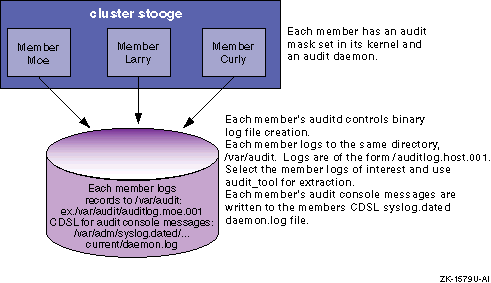
Each audit daemon writes its error or status messages to the local
/var/adm/syslog.dated/DATE/daemon.log
file, or optionally to a common audit console file.
The set of events to be audited, called the audit mask, is initially
generated using the
auditconfig
utility.
This utility specifies
a common audit mask that is created clusterwide.
Initial start up of the audit
daemon uses information from the
/etc/rc.config.common
file.
Thus, the same
auditd
command-line options and the
same audit mask are used for each member.
On a running cluster, the
auditd
commands may be
directed to every active daemon using the
auditd -cluster
option.
For instance,
auditd -cluster -w
displays the status
of each member.
Similarly, the
auditmask -cluster
option
can change or display the audit mask on every active member.
While it is possible to specify different audit daemon parameters or different audit masks for the audit daemons in a cluster, this can be confusing and is not recommended.
The
audit_tool
utility can merge audit log files
to present a clusterwide view of events sorted by forward time progression.
Because host name information is recorded with each event, event origin can
easily be determined.
3.7.1 Cluster Command Examples
This section provides examples of audit commands as they would be executed
on a member system in a two member (haydn
and
handel), Version 5.1A cluster.
To display each member's
auditd
status, enter:
# auditd -cluster -w

Audit data and msgs:
  -l) audit data destination                 = /var/audit/auditlog.handel.003
  -c) audit console messages                 = syslog

Network:
  -s) network audit server status (toggle)   = off
  -t) connection timeout value (sec)         = 4

Overflow control:
  -f) % free space before overflow condition = 10
  -o) action to take on overflow             = ignore

cluster member haydn.necorp.com auditd standard output:

Audit data and msgs:
  -l) audit data destination                 = /var/audit/testauditlog.haydn.003
  -c) audit console messages                 = syslog

Network:
  -s) network audit server status (toggle)   = off
  -t) connection timeout value (sec)         = 4

Overflow control:
  -f) % free space before overflow condition = 10
  -o) action to take on overflow             = ignore
To display each member's audit mask status, enter:
# auditmask -cluster

!  Audited system calls:

!  Audited trusted events:
login                                    fail

!  Audstyle flags: exec_argp exec_envp login_uname obj_sel

**** cluster member haydn.necorp.com standard output: ******
!  Audited system calls:

!  Audited trusted events:
login                                    fail

!  Audstyle flags: exec_argp exec_envp login_uname obj_sel
To display log file names the members are currently logging to, enter
(from member
hayden):
# auditd -cluster -q

/var/audit/auditlog.haydn.001

cluster member handel.necorp.com auditd standard output:
/var/audit/auditlog.handel.001
To explicitly flush all the cluster member's kernel
auditd
buffers to get the latest audit records, enter:
# auditd -cluster -d
To display the login event for both members called
handel
and
haydn
to
stdout, enter:
# audit_tool -e login auditlog.handel.001 auditlog.haydn.001

ruid/euid:   0/0
pid:         525424        ppid: 525423               cttydev: (6,1)
event:       login
login name:  root
devname:     /dev/pts/1
...........
-- remote/secondary identification data --
hostname:    mk.necorp.com
...........
char param:  argv=login -h mk.necorp.com -p
char param:  Failed authentication
error:       13
ip address:  10.0.0.1 (haydn-mc0)
timestamp:   Mon May  3 15:54:18.19 1999 EDT


ruid/euid:   0/0
pid:         525424        ppid: 525423               cttydev: (6,1)
event:       login
login name:  (nil)
devname:     /dev/pts/1
...........
-- remote/secondary identification data --
hostname:    mk.necorp.com
...........
char param:  argv=login -h mk.necorp.com -p
char param:  Failed authentication
error:       13
ip address:  10.0.0.1 (haydn-mc0)
timestamp:   Mon May  3 15:54:26.44 1999 EDT


ruid/euid:   0/0
pid:         1049810       ppid: 1049809              cttydev: (6,2)
event:       login
login name:  root
devname:     /dev/pts/2
...........
-- remote/secondary identification data --
hostname:    mk.necorp.com
...........
char param:  argv=login -h mk.necorp.com -
char param:  Failed authentication
error:       13
ip address:  10.0.0.2 (handel-mc0)
timestamp:   Mon May  3 15:54:37.74 1999 EDT


ruid/euid:   0/0
pid:         1049810       ppid: 1049809              cttydev: (6,2)
event:       login
login name:  (nil)
devname:     /dev/pts/2
...........
-- remote/secondary identification data --
hostname:    mk.necorp.com
...........
char param:  argv=login -h mk.necorp.com -p
char param:  Failed authentication
error:       13
ip address:  10.0.0.2 (handel-mc0)
timestamp:   Mon May  3 15:54:43.14 1999 EDT


4 records output
6 records processed
3.8 Responding to Audit Reports
Whenever you suspect an effort is being made to violate security, you
should consider increasing the frequency of auditing.
Additionally, you might
want to tailor the list of events being audited to gather more specific information
about the attempted violations.
For example, if the attacks are against the
file system, you might want to log all failed and successful file
opens and
closes,
links,
unlinks,
chdirs,
chmods,
chowns, and other file-related activities.
When the audit trail appears to implicate a specific authorized user in attempts to violate security, be aware of your site security rules for handling security violation and make sure your actions comply with those rules. In addition, you can consider taking the following action:
Talk with the user, reminding him or her of the importance of maintaining security and the need for all users to contribute to that effort.
Restrict the user's access to the system by placing the user in a group of one.
In extreme cases, deny the user system access by removing the user's account. This can be on a temporary or permanent basis.
Audit the offending user's activities for indications that the user's behavior has changed. When you extract audit information, pay close attention to activities associated with the user's audit ID, UID, RUID, and user name.
User-specific audits can be done from the screen: Audit Manager ->
Reports -> Generate Reports, or with the
audit_tool
options
-a
AUID
,
-u
UID
, and
-U
username
.
If the audit trail indicates attempts to violate security but points to no specific user, it is possible that you are faced with intrusion by an outsider. Your responses must then be directed to the system and the larger user community. In this case you can take the following steps:
Have users change their passwords and inform them about the selection of safe passwords.
Hold meetings with users to discuss the importance of system security.
Increase physical security to make sure that only authorized users can gain physical access to the system.
Perform backups of the file system more frequently, to minimize the damage if a break-in should occur and data on the system is lost or altered.
If attacks seem to be coming in over a network, increase the auditing of network-related activities.